A Zoom corporate training LMS integration can make a live session part of a structured learning journey, rather than a standalone calendar event. Zoom hosts the virtual instruction; the LMS organizes the course around it, including enrollment, related learning activities, and course records. The exact workflow depends on how the systems are configured.
Meeting details, attendance records, and course progress can easily end up scattered across tools. Avoid assuming that information will sync automatically. First decide what learners and administrators need to see, which system owns each record, and how the workflow supports your training goals.
This guide explains how Zoom and an LMS can work together, what to define before rollout, and how to assess platform fit. It also covers how WestNet LMS supports virtual and instructor-led modules, automated enrollment, self-paced learning, and learning analytics and reporting within a corporate training workflow.
Key Takeaways
- Distinguish between hosting a Zoom meeting and managing course enrollment, learning context, and records through an LMS.
- Map the workflow from course setup to post-session review, and specify how each system handles its part.
- Compare manual coordination, link-based workflows, and verified integrations across learner access, records, reporting, and administrator effort.
- Pilot Zoom corporate training LMS integration with one course, then assess learner access, administrative workload, record accuracy, and support readiness.
- WestNet AI Enhanced LMS brings live and self-paced learning together with ILT and vILT modules, automated enrollment, SSO, analytics, and HRIS integration.
Why connect Zoom corporate training with an LMS?
Zoom corporate training LMS integration means coordinating live virtual sessions with learning activities managed through an LMS. The meeting becomes part of a course or program, so learners can see how it fits into their training and administrators can manage the broader learning workflow. The information shared between systems depends on the connection and configuration.
A video-conferencing tool hosts the conversation. A learning management system organizes the learning journey around it. An LMS can provide a course catalog, manage enrollment and learner administration, and support reporting. For a foundational explanation of these capabilities, see this Learning Management System (LMS) overview.
What Zoom handles and what the LMS handles
Think of Zoom as the environment for the live virtual session. The LMS provides the course context: why the training is happening, who is enrolled, and what other learning belongs alongside the session. Keeping these responsibilities distinct matters because hosting a meeting does not define how an organization administers the course or maintains its learning records.
For example, an administrator can organize the course and enroll learners in the LMS before the session. The trainer delivers live instruction using Zoom. Afterward, administrators review course progress and any attendance information captured in the organization’s workflow. Define how each record is collected and maintained rather than expecting meeting details or attendance to transfer automatically between tools.
When a Zoom-LMS connection adds practical value
Coordination is especially useful when training repeats across cohorts, serves distributed teams, or combines live instruction with self-paced activities. A new-hire program might pair a virtual orientation with preparatory materials and follow-up coursework. A compliance session could be one part of a broader course plan, while product training could combine a trainer-led demonstration with learning content employees complete independently.
Keeping course context in one place can reduce scattered instructions and manual coordination. Learners have a clear place to find the training information managed by the LMS, and administrators can organize enrollment and related learning activities. Organizations planning a wider LMS for corporate training workflow can make live sessions one component of structured workforce learning.
Adding a meeting link to a course is useful, but it is not the same as connecting systems. A link makes a session easier to find; it does not determine whether enrollment, session details, attendance, or other records flow between tools. Define the desired workflow and the responsibility for each data exchange before rollout.
Start with the operational question: what should learners be able to do before and after the session, and what information do administrators need to manage the course? The answers help distinguish a simple access link from a coordinated learning workflow and give you a practical basis for comparing integration options.
How a Zoom corporate training LMS workflow fits together
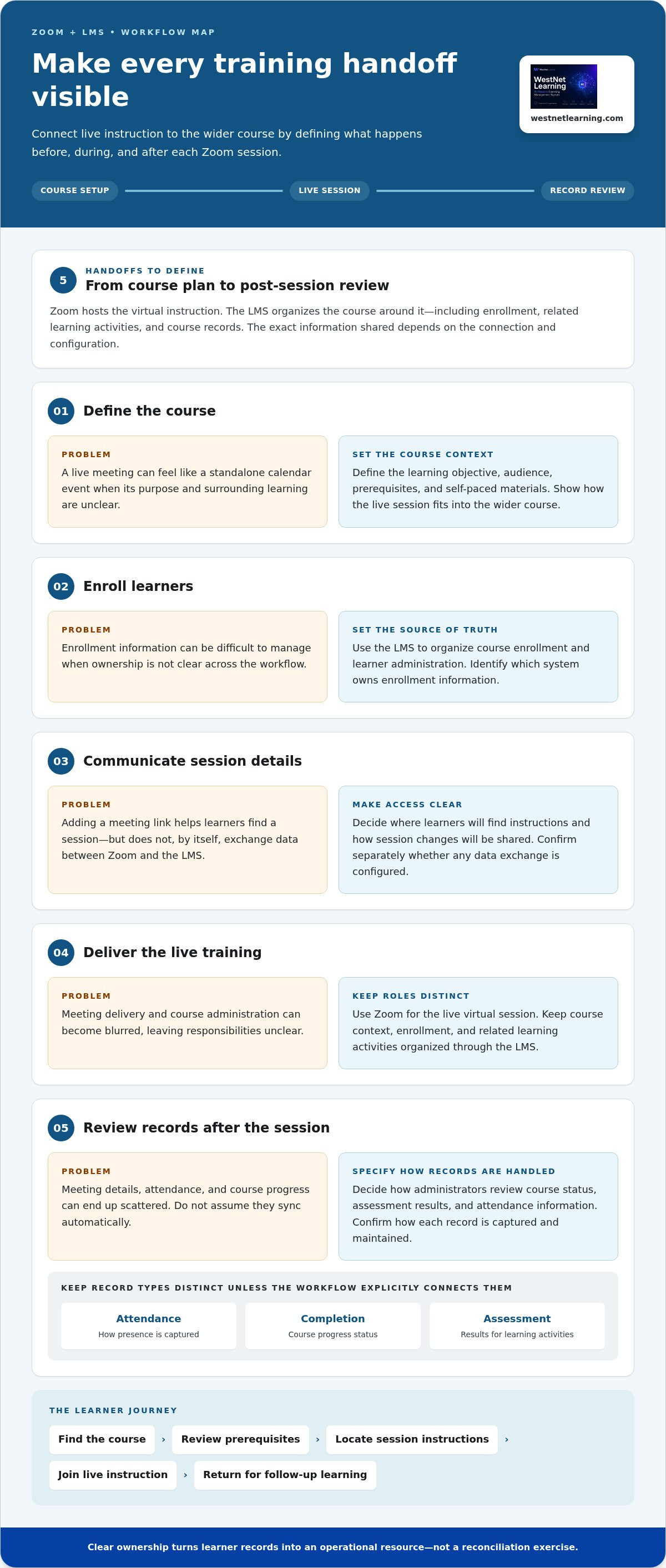
A dependable workflow makes each handoff visible, from course setup to post-session review. Map the process before configuring tools, then confirm how each system handles meeting access, attendance, and course records. This prevents teams from relying on data transfers that have not been established.
- Define the course. Set the learning objective, audience, prerequisites, and self-paced materials. Decide how the live session fits into the wider course.
- Enroll learners. Use the LMS to organize course enrollment and learner administration. Identify the source of truth for enrollment information.
- Communicate session details. Decide where learners will find instructions and how changes will be shared. Adding a link to course information makes it easier to locate, but does not by itself exchange data between systems.
- Deliver training. Use Zoom for the live virtual session and keep session delivery distinct from LMS course administration.
- Review records. Decide how administrators will review course status, assessment results, and attendance information. Confirm how each record is captured before relying on it.
Map the learner journey around a live session
Give learners a clear path: find the course, review prerequisites, locate session instructions, join the live instruction, and return for follow-up learning. Virtual & Instructor-Led modules (ILT, vILT) can sit within a broader course structure that includes self-paced material. Keep attendance, completion, assessment, and recording records distinct unless the workflow explicitly connects them.
Define data, identity, and system responsibilities
Before configuring tools, document the data each team needs and decide who owns it. Map user identity, enrollment, course status, session information, and reporting needs. WestNet AI Enhanced LMS includes multiple authentication options, including SSO, and HRIS integration. These capabilities support identity and workforce-data planning as part of the wider learning workflow.
Clear ownership makes learner records an operational resource rather than a reconciliation exercise. Specify which system creates or maintains each record, who can correct it, and how administrators will review it. Then classify the workflow as manual coordination, a meeting link in course materials, or a verified system integration. Connector, API, and LTI approaches are options to assess against the products and configuration in use.
Use your system map to set acceptance criteria before rollout. For example, learners should be able to locate the correct session instructions, administrators should know which system owns each record, and reporting should have an agreed process. Reviewing LMS integration capabilities can help frame the connected-systems discussion. Define the required data exchange and verify it during implementation.
How to evaluate Zoom LMS integration options before choosing
Compare workflows against your training requirements, not a vague promise of “seamless integration.” For Zoom corporate training LMS integration, identify what learners need to access and which records administrators need to manage. Assess every option against the same criteria. Manual coordination, a link in course materials, and a verified system integration are different operating models, with different levels of automation and effort.
Manual coordination
- Learner access: Staff share instructions and session details through separate processes.
- Enrollment: Administrators coordinate LMS enrollment and session access separately.
- Session information: Staff distribute details and handle changes manually.
- Records and reporting: Teams reconcile information using the records available in each system.
- Administrator effort: More manual handoffs can mean more follow-up and reconciliation.
Link-based workflow
- Learner access: A meeting link is placed in course materials for learners to find.
- Enrollment: The LMS manages course enrollment, while meeting access remains a separate process.
- Session information: Instructions are centralized in the course, but updates may still need separate handling.
- Records and reporting: A link does not establish data exchange for attendance, completion, or reporting.
- Administrator effort: Session details may be easier to locate, but record handling remains a separate task.
Verified system integration
- Learner access: Documented connection behavior can support a more coordinated experience.
- Enrollment: Defined data flows determine whether enrollment information is exchanged.
- Session information: Confirm which details move between systems and in which direction.
- Records and reporting: Validate which records are captured and where administrators review them.
- Administrator effort: Assess setup, maintenance, exception handling, and support responsibilities.
Which records and controls should buyers evaluate?
Separate the evidence your program needs: enrollment, participation, completion, assessment, and certification records. These represent different events. Meeting attendance alone does not demonstrate learning or prove course completion. Define how administrators will review reports, correct exceptions, and resolve mismatched records. Include security, access controls, data ownership, accessibility, and support readiness in the evaluation, alongside the learner experience.
How to assess the connection method and ownership
Compare setup effort, data direction, maintenance ownership, and the steps learners must take. Ask IT, security, HR, and L&D to review requirements together, including SSO and workforce-data considerations. For a Zoom connector, API, or LTI implementation, use technical documentation to establish supported data flows, responsibilities, and limitations. A corporate training LMS demo buyer's guide can help structure an evaluation around your actual workflow.
How to pilot and roll out Zoom corporate training LMS integration
Move from requirements to rollout in controlled steps. A focused pilot reveals where learner access, administrator tasks, and records depend on manual work. It also helps teams assess how a system connection changes the process. Test the full workflow, not just whether learners can join a live session.
Prepare a representative pilot course
Choose a real course with a defined learner group and clear completion expectations. A recurring onboarding or product training course can work well if it reflects the audience, materials, and follow-up you plan to support at scale. Document the current process from invitation and enrollment through session access, follow-up, and reporting. Mark each step as manual or dependent on a validated system behavior.
- Document the requirements. Identify learners, prerequisites, session instructions, required records, and administrator responsibilities. Note which system owns each piece of information.
- Configure the pilot workflow. Set up the course and learner-facing instructions in the LMS. Decide how session details will be shared and how staff will handle information that is not exchanged between systems.
- Test before launch. Have learners and administrators walk through the process using the intended roles and access methods. Verify that instructions are clear and every planned task has an owner.
- Review and decide. Compare test results with the acceptance criteria. Resolve gaps, document the operating process, and expand when the workflow is ready for a wider group.
Test, measure, and prepare administrators
Test exceptions as well as the ideal path. Include a changed user, a cancellation, a missed session, and rescheduled training. For each scenario, decide who updates course information, how learners are notified, and how administrators handle affected records. A rescheduled meeting should not leave conflicting instructions or an unclear course status.
Set measurable criteria before testing and record outcomes and unresolved issues. Track whether learners can find session instructions, how much administrator time coordination takes, whether required records match the intended workflow, and whether support responsibilities are understood. Set acceptable results for your organization rather than using arbitrary targets. Keep attendance, completion, and assessment evidence distinct.
Prepare administrators to manage routine tasks and exceptions. WestNet provides Data Migration & Administrator Support and a Dedicated Client Success Manager to support platform administration and rollout planning. Include these resources in your operating plan, alongside the technical documentation and validation required for your selected Zoom workflow. For system-level connectivity considerations, consult this enterprise LMS with API guide.
Once the pilot meets your criteria, use the documented workflow to plan the next rollout stage. Include LMS integration options in planning for how connected systems fit into your broader learning environment.
How WestNet AI Enhanced LMS supports Zoom-centered corporate training
WestNet AI Enhanced LMS helps organize corporate learning around live virtual instruction and self-paced activities. It supports the wider learning program through course structure, learner administration, and reporting, giving teams a platform to manage the training context around live sessions.
The LMS includes Virtual & Instructor-Led modules (ILT, vILT), automated enrollment, multiple authentication options including SSO, Learning Analytics and Reporting, and HRIS integration. These features support training workflows that combine live instruction and other learning activities. When planning a Zoom-centered course, define how learners access session details and how attendance, course progress, and other records are handled.
Coordinate instructor-led learning with wider LMS workflows
Use ILT and vILT modules as part of a course or catalog rather than treating each live session as a standalone event. Automated enrollment supports learner administration around the course, while Learning Analytics and Reporting help administrators review learning information in the LMS. These functions can help teams structure live instruction alongside self-paced course activities.
Keep responsibilities clear. Zoom delivers the live session, while the LMS manages the learning workflow around it. Specify which platform holds each record and document the process for updating learner course status, whether that process uses a validated connection or a manual step.
Evaluate WestNet through a focused demo or trial
Use an evaluation to walk through a representative course with the people who will administer and support it. Include an L&D lead and LMS administrator, and involve relevant IT or HR stakeholders when identity, SSO, or workforce data are part of the workflow. Trace enrollment, access to course information, the live-session process, follow-up learning, and reporting. Identify which steps use LMS features and document the requirements for the Zoom workflow.
A demo or free 30-day trial gives your team a practical way to assess the platform against its requirements. Test the learner and administrator experience, review reporting, and note process gaps before planning a broader rollout. Include Zoom-related requirements in the evaluation criteria and document the data flows your training program needs.
Ready to evaluate how WestNet AI LMS could support your corporate training workflow? Explore WestNet AI LMS.
Build a learning workflow ready to grow
Turn your integration requirements into a decision your teams can act on. Align L&D, IT, HR, and training administrators around the learner experience you want, the records your organization needs, and the responsibilities each system will own. That shared direction gives your Zoom corporate training LMS integration a practical foundation as programs expand or change.
Plan beyond the first course. A clear operating model helps your organization adapt as audiences, training formats, and learning priorities change, while keeping learner access and administrator tasks manageable. Start with your requirements, then evaluate how the platform fits your actual workflows.
Request a WestNet AI LMS demo to explore how the platform can support your corporate learning plans.
Frequently Asked Questions
Can Zoom integrate with a corporate training LMS?
Zoom can be coordinated with a corporate LMS through workflows ranging from manually managed session details to a verified system integration. The right option depends on what your organization needs to connect, such as course access, enrollment, or learning records. Define the intended data flow and validate the selected connection before relying on it operationally.
Is Zoom alone enough to manage corporate training?
Zoom can host live instruction, but a training program may also need a structured way to organize courses, prerequisites, learner assignments, and follow-up materials. An LMS can manage those broader learning activities while Zoom is used for the live session. Assign clear responsibilities so learners know where to go at each step.
Does attending a Zoom training session automatically count as course completion?
No. Attendance and course completion are separate unless your organization has defined and implemented a process that connects them. A learner might join a session but still need to complete an assessment or review required material. Set completion rules for each course, then specify how administrators record and verify each requirement. Do not use meeting attendance alone as evidence that a learner has demonstrated the intended knowledge.
Can learners access Zoom training from inside an LMS course?
Session instructions or a meeting link can be placed in course materials, depending on how the organization configures its workflow. A link makes details easier to find, but does not necessarily connect enrollment, meeting access, or attendance data across platforms. Test the learner journey, including what happens when session details change, so instructions remain accurate and easy to locate.
What happens to training records when an employee changes roles?
That depends on the organization’s learner-identity and record-management rules. A role change may affect which courses an employee needs next, while historical learning records should be managed according to the organization’s retention and reporting practices. Define how HR updates reach the LMS, who reviews changes, and how prior course history remains associated with the employee. WestNet AI Enhanced LMS includes HRIS integration to support workforce-data workflows.
Can Zoom training be combined with self-paced LMS courses?
Yes. A course can combine live instruction with independent activities, such as preparatory reading, a knowledge check, or follow-up material. Learners might review course content before joining a trainer-led product walkthrough, then complete an assessment afterward. Plan the sequence and completion requirements in the LMS, and define separately how learners receive access to the Zoom session.
How should a company test a Zoom-LMS workflow before rollout?
Test a representative course with learners and administrators. Check the experience in different situations, such as a new enrollee, a rescheduled session, and someone who missed the meeting. Record whether instructions are clear, required records can be reviewed, and staff know how to resolve exceptions. Before expanding, compare results with criteria agreed by L&D, IT, HR, and training administrators.
Does WestNet AI Enhanced LMS support virtual instructor-led training?
Yes. WestNet AI Enhanced LMS supports Virtual & Instructor-Led modules (ILT, vILT), which can be organized as part of broader corporate learning. These modules can sit alongside self-paced course activities, while automated enrollment and Learning Analytics and Reporting support other LMS-managed training tasks. Plan the Zoom session and the handling of attendance or recording records as part of the course workflow.