What if the next training step mattered more than the size of the course catalog? Personalized learning paths software helps employees find development that fits their roles, existing skills, and goals, rather than sending everyone through the same sequence. That doesn’t mean building a separate plan for every learner. A well-designed path can give a group a shared foundation while making relevant next steps easier to find. Learn more about learning and software.
Training teams know that relevant courses are more useful than generic assignments. The challenge is helping each employee identify what to learn next while keeping programs manageable for administrators. Start by distinguishing a structured learning path from a course recommendation, and both from adaptive learning that changes content in response to performance.
This article explains how personalized paths work, what learner context and progress can contribute, and how to assess their quality before putting them into practice. You’ll also find practical principles for designing, governing, and measuring employee learning paths. WestNet LMS combines AI-generated course recommendations with learning analytics, helping learners discover relevant courses and giving administrators activity and progress data to review.
Key Takeaways
- Start with a defined business learning need and outcomes, then map content and path logic to the employees who need it.
- Evaluate personalized learning paths software by how clearly it connects learner context to useful development choices, not by how much automation it promises.
- Separate assigned paths, course recommendations, rule-based sequencing, and adaptive learning when assessing what a platform actually does.
- Begin with a focused employee group or use case, then review evidence before expanding the approach across roles.
- Use learning activity and progress data to assess whether paths remain relevant and where they may need refinement.
What Is Personalized Learning Paths Software for Employee Training?
Employees need development that fits the work they do and the skills they want to build. Organizations, meanwhile, must support varied roles, career goals, and business priorities without turning training administration into a maze of separate plans. Personalized learning paths software helps bridge that gap by organizing learning experiences around relevant learner context and goals.
Personalization can take several forms. A path might group relevant courses, arrange them in a suggested order, offer flexible pacing, surface recommendations, or connect learners with support. The right design depends on the learning need and how the platform works. Administrators may create paths using defined criteria, while recommendations can help learners discover content. Personalization doesn’t automatically mean the system changes every learner’s experience in real time.
A course catalog shows what’s available; an individual learning path organizes what may be relevant next for a particular learner. That distinction shifts the focus from the size of the content library to the connection between learning activities and employee needs.
What Does a Personalized Learning Path Include?
A path is a connected sequence or set of learning activities, not necessarily a fixed, linear course. It could combine required training with optional development, letting learners choose among relevant activities. Role, identified skill needs, learning goals, and progress can inform which content appears and how it is organized. The design may be simple and structured, or include recommendations that point learners toward additional resources.
For example, a new customer support employee might complete role-based onboarding, then explore development related to product knowledge or communication skills. The initial training establishes a foundation; later activities can align with the employee’s responsibilities or stated goals. The path makes those connections easier to see without requiring every employee to follow an identical sequence.
How Does It Differ from a Standard LMS Course Assignment?
A standard LMS assignment directs an employee to complete a specific course, often to meet a shared requirement. That can work well for compliance or consistent onboarding, but the assignment alone may not help the learner identify a useful next step. A broader employee training software approach can organize required learning alongside role-relevant development, depending on how the organization configures its learning experience.
An LMS can deliver courses and track assigned learning without providing individualized recommendations. A personalized experience may add relevant choices based on information such as role or learning goals, while leaving the learner or administrator in control. Some approaches use automated logic, but personalization doesn’t require complex AI or fully automated decisions. For background on a more technology-driven model, see Adaptive Learning, which describes how learning experiences can respond to learner needs.
- Assignment: directs learners to a specified course or requirement.
- Path: connects learning activities around a role, goal, or development need.
- Recommendation: suggests relevant content without necessarily changing a learner’s sequence.
The distinction matters when evaluating a platform. Look for a clear link between learner context and the choices presented. Then consider how much structure employees need to act on those choices. A well-designed path gives people direction while keeping the overall program manageable.
How Personalized Learning Paths Software Connects Learner Needs to Training
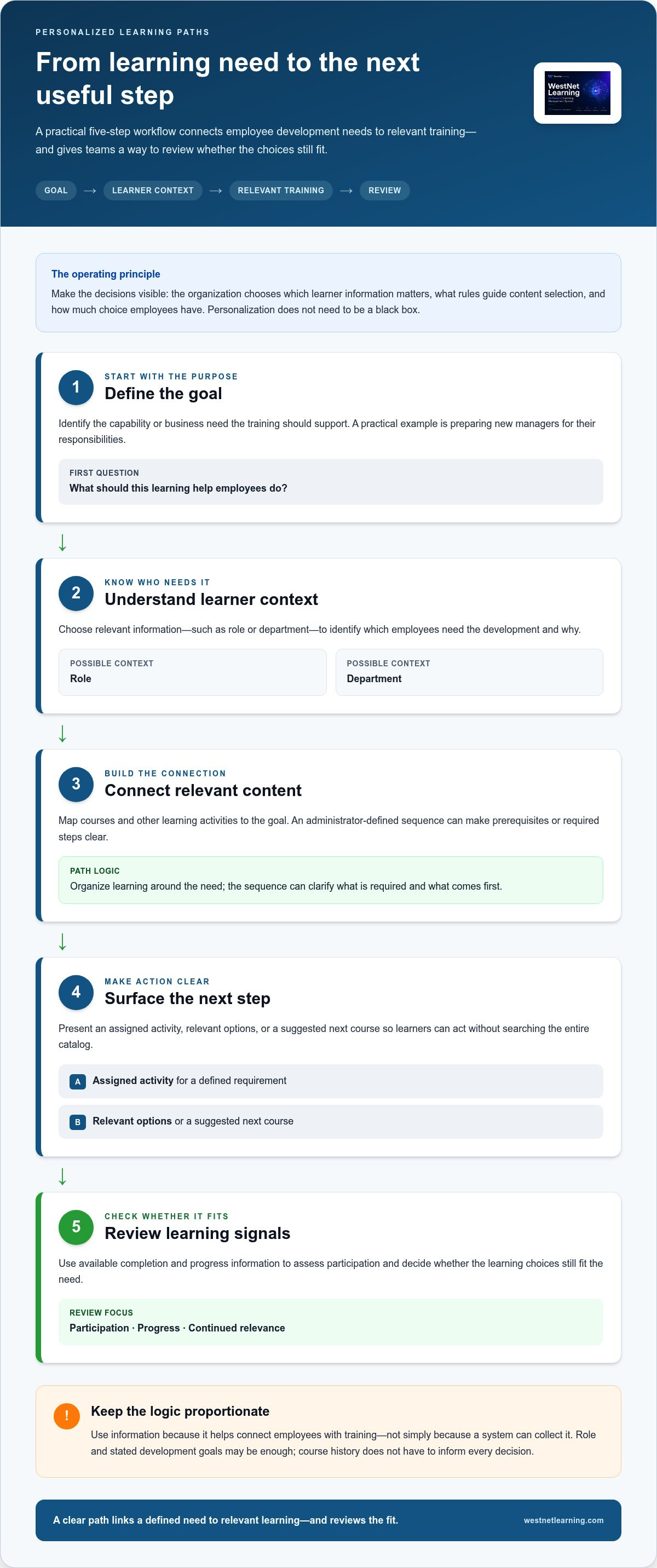
A useful learning path connects a development need to training that can address it. Personalized learning paths software can support that connection, but the organization determines which learner information matters, what rules guide content selection, and how much choice employees have. A practical workflow makes those decisions visible instead of treating personalization as a black box.
- Define the goal. Identify the capability or business need the training should support, such as preparing new managers for their responsibilities.
- Understand learner context. Choose relevant information, such as role or department, to identify which employees need the development and why.
- Connect relevant content. Map courses and other learning activities to the goal. An administrator-defined sequence can clarify prerequisites or required steps.
- Surface next steps. Present the assigned activity, relevant options, or a suggested next course so learners can act without searching the entire catalog.
- Review signals. Use available completion and progress information to assess participation and decide whether the learning choices still fit the need.
This flow doesn’t require every possible data point. An organization might use role and stated development goals without factoring in course history. Keep the logic proportionate to the decision. Collect and use information because it helps connect employees with training, not simply because a system can process it.
What Information Can Inform a Learning Path?
Possible inputs include an employee’s role, department, stated development goals, course history, and progress through assigned learning. These details can help administrators distinguish a shared requirement from content that may be more relevant to a particular group or learner. They are options, not a checklist every program must complete.
Separate confirmed context from interpretation. A learner’s department may be recorded accurately, while a conclusion about their motivation or skill level may be an assumption. Use evidence that is relevant to training decisions, and avoid treating a recommendation as proof of ability or intent.
How Do Recommendations and Progress Signals Work Together?
A recommendation presents a relevant learning option; it doesn’t necessarily enroll the learner or alter a prescribed sequence. Automated enrollment, where configured, places learners into designated training based on organizational rules. An administrator-defined sequence sets the intended order of activities. Each has a distinct purpose, and a learning program can use one or combine several.
Recommendations suggest relevant learning; adaptive sequencing changes what follows based on a learner’s performance. A course suggestion may help someone discover a useful next activity, while progress reporting gives administrators information to review before adjusting a path. Completion signals can show that assigned training is finished, but they don’t alone establish mastery or explain why a learner struggled.
WestNet Learning’s AI-Generated Course Recommendations help learners discover relevant courses, while Learning Analytics and Reporting gives administrators information to review learning activity and progress. For a deeper look at measurement, explore enterprise learning analytics tools. A WestNet LMS demo can also show how recommendations fit into an employee learning experience.
Recommendations vs. Adaptive Learning: What Should Software Actually Do?
Personalized learning doesn’t automatically mean software continuously changes every employee’s training sequence. A platform may organize assigned courses or suggest relevant options without adjusting the path in response to learner performance. To evaluate personalized learning paths software accurately, look at what determines the next step, not just the feature label.
A recommendation feature alone doesn’t prove that a platform adapts learning pathways. The distinction matters: a suggested course gives someone an option to consider, while adaptive sequencing changes the learning experience according to defined learner signals.
| Approach | Who controls the next step? | Information it may use | Automation implied |
|---|---|---|---|
| Assigned path | Administrators define the required activities; learners complete them. | Role, department, or a shared training requirement. | Low. The system delivers the assigned sequence, which may be fixed. |
| Course recommendations | The learner or administrator chooses whether to act on a suggestion. | Depending on the platform, learner context or activity relevant to suggested content. | Content discovery is automated; the path itself may not change. |
| Rule-based sequencing | Administrators set the rules; the system applies them. | Defined conditions, such as completing a prerequisite. | Moderate. The next step follows a configured rule. |
| Adaptive learning | The system adjusts learning based on configured learner signals, with oversight shaped by the program. | Signals such as assessment performance or responses to learning activities. | Higher. The sequence or content can change in response to those signals. |
How Are Recommendations Different from Adaptive Learning?
Recommendations surface learning options for a learner or administrator to consider. Adaptive learning uses defined signals to adjust what content, activity, or level comes next. These approaches can complement each other, but they aren’t interchangeable. Product terminology varies, so assess the actual behavior: does the system suggest an option, apply a preset rule, or change the learning experience based on performance?
For instance, a recommended course on a relevant topic may appear in a learner’s view while leaving their assigned sequence unchanged. In an adaptive experience, a learner’s response to an assessment might influence whether they receive additional practice or move on. Identify the trigger and resulting change rather than inferring adaptive behavior from the presence of AI or recommendations.
When Is a Structured Path More Useful Than Automation?
Use a structured path when employees share a requirement, need consistent role-based onboarding, or must follow a clear order of learning objectives. Recommendations can complement that structure when learners need help discovering relevant options in a broader catalog. Automation can streamline delivery, but human oversight helps keep suggested content aligned with current priorities and appropriate for the audience.
Choose the level of automation that fits the learning need. WestNet LMS provides AI-Generated Course Recommendations to help learners discover courses. This capability is distinct from adaptive sequencing. A WestNet LMS demo can show how recommendations fit into a broader employee learning experience.
How to Design and Improve Personalized Learning Paths at Work
Build a learning path around a workplace need, not around the features of a platform. A focused pilot lets learning teams test whether the content, structure, and learner choices fit the job before extending the approach across roles. Keep the design clear, reviewable, and connected to how training is delivered and administered through employee training software.
- Select a business learning need. Choose a defined use case, such as onboarding a particular employee group, supporting development in a role, or addressing a known capability gap. A narrow starting point makes it easier to identify who the path is for and what problem it should solve.
- Define observable outcomes. State what employees should know or be able to do after the learning. Make outcomes specific enough to guide content selection and later review, rather than relying on a broad goal such as “improve performance.”
- Map existing content. Review available courses and activities against each outcome. Identify what supports the goal, where learners need a clear prerequisite, and where a content gap remains. Build or source additional material only when the existing library doesn’t address the need.
- Set the path logic. Decide which activities are required, which are optional, and where learners can choose among relevant alternatives. Make the basis for those decisions understandable to administrators and learners.
- Review evidence and refine. Examine available completion and progress information alongside learner and manager feedback. Adjust content or rules when evidence points to a mismatch, then review the revised path again.
Build Paths Around Clear Roles and Learning Outcomes
Role context can make a path relevant without requiring a unique plan for every employee. If employees in the same role share onboarding or development needs, build a common foundation first. Add optional learning for distinct goals or responsibilities where it makes sense. This keeps administration manageable while allowing relevant choice. For example, a role-based onboarding path can establish consistent essentials, then present further development options connected to the work.
Balance choice with requirements deliberately. Managers can clarify which capabilities matter in day-to-day work, while administrators maintain required training and oversee path structure. Make required activities visible, explain why they’re included, and separate them from optional recommendations. Learner choice should add flexibility without obscuring essential steps or creating uncertainty about expectations.
Review Relevance, Completion, and Learner Experience
Completion and progress reports can help teams see where learners move through a path or stop engaging, but those signals need context. Ask learners whether the content applies to their work and is easy to navigate; ask managers whether it aligns with role demands. A pause could reflect scheduling pressures, unclear instructions, or a content mismatch. Don’t assume the data alone reveals the reason.
Revise with intent. If feedback shows a course is out of date, replace it; if learners need clearer direction, adjust the path’s organization or guidance. Completion indicates that an activity was finished, not necessarily that an employee applied the learning or achieved the intended outcome. Use the evidence available, and keep the path aligned with its original business need.
A WestNet LMS demo can illustrate how learning recommendations and reporting support employee development.
How WestNet Learning Supports Personalized Employee Development
Personalized employee development combines relevant learning choices with clear organizational direction. WestNet LMS’s AI Enhanced LMS supports this experience through AI-Generated Course Recommendations for learners and Learning Analytics and Reporting for administrators. These capabilities help learners discover courses and give teams activity and progress data to review. The organization remains responsible for setting learning objectives and deciding what content fits each role.
That distinction matters when evaluating personalized learning paths software. Recommendations can contribute to a path by making relevant courses easier to find, but they don’t automatically change a learner’s assigned sequence in response to performance. Treat recommendations as one component of a coordinated learning environment, alongside structured training and administrative oversight.
Where Learner Recommendations Fit in a Broader Path
Course recommendations give learners additional options to consider within their learning experience. Administrators still determine which courses support an objective, which training is required, and how learners should understand the suggestions. This keeps discovery useful without implying that an algorithm sets organizational development priorities or independently establishes a complete learning path.
Content also needs to match the intended outcome. An organization might use existing courses or add relevant material to its library; AI course creation software can support the broader work of developing course content. Once appropriate content is available, recommendations can help learners surface relevant options. Human review remains important for keeping those options aligned with role needs and current priorities.
Connect Learning Activity with Administration
Learning Analytics and Reporting helps administrators review learning activity and progress. These signals can inform routine oversight, such as checking whether learners are engaging with assigned courses or reviewing completion across a training program. Reports support informed review; they don’t, by themselves, establish that training improved job performance or that a recommendation was the right next step.
Automated enrollment can support assigned learning workflows by helping administer designated training. It is an operational capability, not proof that each learner receives an automatically adjusted path. HRIS Integration is another supporting capability within the LMS environment, while administrator support helps teams manage the platform. Together, these functions support delivery and oversight without replacing decisions about learning goals, course relevance, or path design.
For teams putting recommendations into practice, a straightforward governance approach helps keep the experience coherent:
- Set the purpose: define the development need the learning should serve.
- Review relevance: confirm that recommended and assigned courses fit the intended audience.
- Check activity: use reporting to review participation and progress, then interpret the signals in context.
- Maintain oversight: revisit content and learning rules as roles and organizational priorities change.
WestNet LMS brings learner recommendations together with administrative visibility, rather than positioning recommendations as automatic adaptive sequencing. A WestNet LMS demo can show how these capabilities fit into an employee learning environment.
Make Your Next Learning Path a Practical Pilot
Move from concept to application with one focused employee group and a learning need your organization can clearly define. Use the pilot to test whether the learning choices feel relevant, whether learners can identify a useful next step, and whether administrators can maintain the experience without adding unnecessary complexity. Let what you learn guide the next iteration.
The right personalized learning paths software should support thoughtful development while keeping people in control of decisions that require organizational context. WestNet Learning’s AI Enhanced LMS brings learner recommendations and Learning Analytics and Reporting into the same environment, with a Dedicated Client Success Manager supporting the client relationship. These capabilities help teams connect course discovery with administrative review, while leaving learning objectives and path governance in the organization’s hands.
Start with a manageable use case, learn from the experience, and expand when the approach fits your people and priorities. Explore WestNet Learning’s AI Enhanced LMS to take the next step toward a more connected employee learning experience.
Frequently Asked Questions
What is the difference between personalized learning and adaptive learning?
Personalized learning can mean tailoring training to an employee’s role or goals, whether through administrator-designed plans, learner choice, or recommendations. Adaptive learning is narrower: it changes content or sequence in response to defined learner signals, such as assessment responses. For example, an employee may receive a suggested refresher course as personalization; an adaptive system might provide extra practice after incorrect answers before advancing.
Can personalized learning paths software work without AI?
Yes. Teams can create role-based paths manually, arrange courses in a set order, or use rules such as assigning onboarding to employees in a particular department. Personalized learning paths software can help organize and deliver these choices without AI. AI may assist with recommendations or other tasks, but it’s an optional approach, not a requirement for making learning relevant to different employee needs.
How do you measure whether personalized learning paths are working?
Measure more than course completion. Check whether learners can demonstrate the intended knowledge or skill through an appropriate assessment, and ask managers whether the learning appears in relevant work situations. Learner feedback can reveal confusing instructions or missing content. Compare these signals with the path’s original objective, then decide whether to adjust content, structure, or support. Avoid treating participation alone as proof of impact.
Do personalized learning paths replace mandatory employee training?
No. Organizations can keep required training as a clearly identified part of an employee’s program while using optional activities to support additional development. For instance, a shared safety course may remain assigned to everyone in a designated group, while role-specific resources provide further learning choices. Clear labels and due dates help employees distinguish obligations from recommendations and allow administrators to retain oversight of required completion.
How often should an organization update its learning paths?
Review paths on a planned schedule and whenever a meaningful change affects their purpose. Triggers might include a revised role, a new process, updated course material, or repeated feedback that a learning activity no longer fits. Assign an owner to check content relevance and prerequisites, then document revisions so managers and learners understand what changed. The right cadence depends on how quickly the underlying work and content evolve.
How can organizations keep personalized recommendations relevant and fair?
Set clear criteria for recommendations and use learner information only when it relates to training choices. Review whether employees in different roles or departments can access suitable options, and invite learners to flag irrelevant suggestions. Treat recommendations as prompts, not definitive judgments about a person’s ability or motivation. Periodic human review can catch outdated content, uneven coverage, or assumptions that automated suggestions may otherwise reinforce.