What if the best mobile learning platform for employees isn’t the one with the most features, but the one that fits how your workforce actually works? Employees with limited time or inconsistent desktop access need training they can reach across devices and schedules. Meanwhile, disconnected content and completion records make it harder for administrators to maintain a clear view of learning.
The right approach starts with workforce needs, not screen size alone. This guide compares mobile learning approaches, explains which capabilities support access, engagement, and administration, and shows how to plan a rollout that’s usable and measurable.
You’ll learn how to assess device access and learner workflows, distinguish essential capabilities from optional features, and connect training records across systems. We’ll also look at how a corporate learning system such as WestNet’s AI Enhanced LMS can support connected learning through course recommendations, automated enrollment, integrations, and analytics. Use these considerations to build a practical plan that fits your employees’ schedules and gives decision-makers a clearer way to track progress.
Key Takeaways
- Choose a mobile learning platform for employees based on workforce context and training goals, not screen size alone.
- Compare five approaches, from responsive web learning to role-based portals, to identify a fit for different learner needs.
- Separate essential capabilities from optional features by assessing access, content, administration, reporting, and integrations.
- Use a five-step rollout plan: identify learners, define outcomes, map content, pilot with representative roles and devices, then improve.
- Consider a broader LMS strategy when mobile learning needs connected records and administration; the AI Enhanced LMS includes recommendations, automated enrollment, integrations, and analytics.
What Is a Mobile Learning Platform for Employees, and What Problem Does It Solve?
A mobile learning platform for employees is a digital system that gives employees access to training through experiences designed to work across mobile devices. Its purpose is not simply to make a desktop course page smaller. It helps organizations consider where, when, and how employees can realistically learn, while keeping training part of a broader learning program.
In brief: Mobile learning is employee training designed for access and participation in mobile contexts, while general online training may assume learners have a desktop, longer sessions, and a stable place to study.
How mobile learning differs from desktop-first online training
Mobile and desktop learning can share the same goals, but the learning experience may need to account for different conditions. An employee using a phone between tasks may need clear navigation, readable content, and short activities that can be resumed. A desktop session may better suit detailed reference materials, longer assessments, or tasks that need a larger screen. The learning objective should guide the format, not the device alone.
Mobile-friendly access also doesn’t guarantee that training works without an internet connection. Offline availability is a separate capability, so don’t assume a course can be accessed without connectivity just because it opens on a mobile device. For background on the broader concept, see What is M-learning?
Access needs depend on the work
Start with employees’ routines rather than assuming everyone will learn on a phone. Shift patterns, field assignments, travel, and shared work locations can all affect when employees have time and a suitable device. A short, focused lesson may fit a brief break; a complex procedure may require a planned session and a larger screen. Match the format to the task.
Which employees may benefit from mobile-accessible training?
- Deskless employees: Staff working on a production floor, in a service role, or across multiple locations may need an accessible way to review training without relying on a personal desk.
- Traveling employees: People who move between sites may value flexible access, but connectivity and device policies can shape what’s practical.
- Shift-based teams: Staggered schedules can make shared training times difficult. Flexible access can help employees complete learning around their work, subject to operational needs.
- Remote employees: Distributed teams may use different devices and work environments, making consistent access and clear learning records important.
- Office-based employees: A mobile option can be useful for quick refreshers, while detailed or extended training may still work better at a computer.
These groups aren’t mutually exclusive, and a phone won’t be the right tool for every learner or course. Consider the wider delivery model, including employee training software, when planning how content, access, and completion records fit together. For organizations supporting geographically distributed staff, connected learning for global teams is another relevant planning consideration.
Five Mobile Learning Platform Approaches for Different Employee Needs
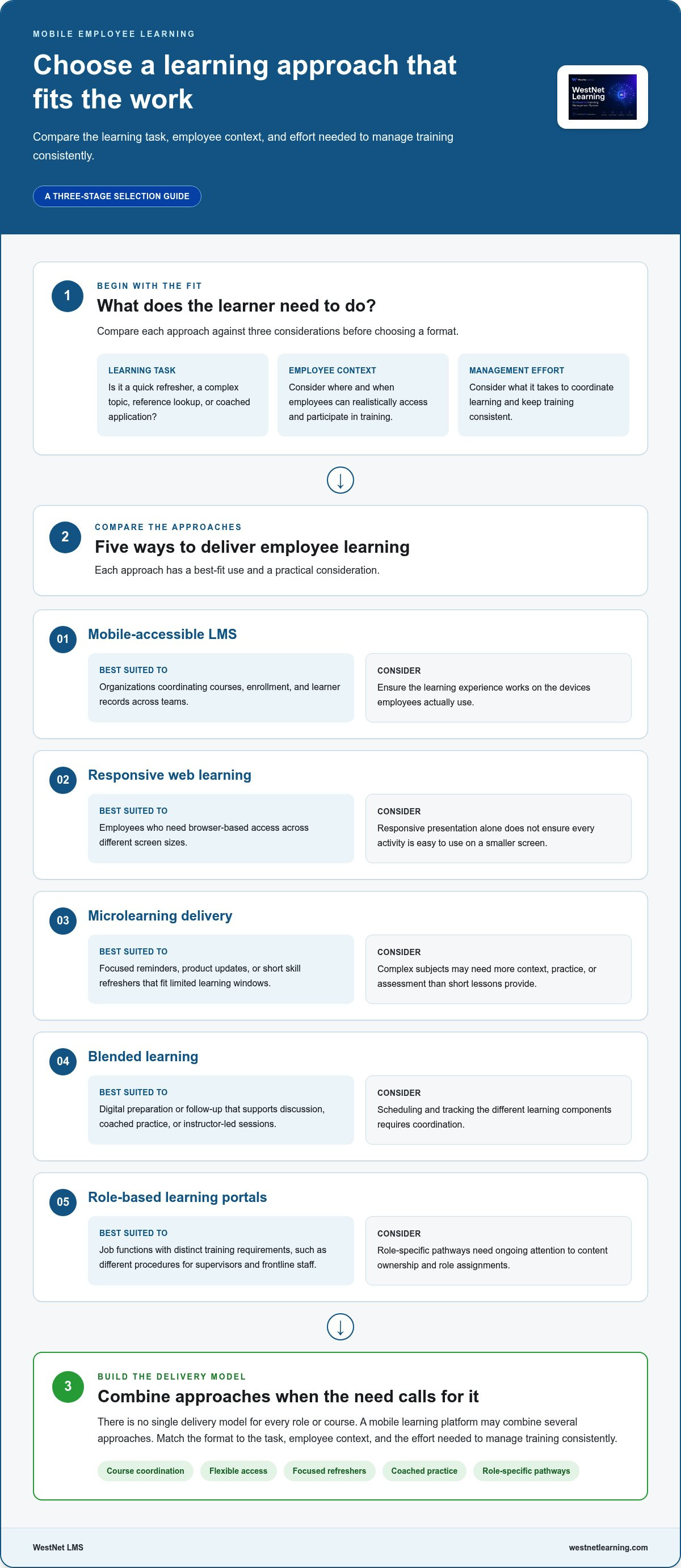
There’s no single delivery model that fits every role or course. A mobile learning platform for employees may combine several approaches, so compare each one against the learning task, employee context, and the effort required to manage training consistently.
- Mobile-accessible LMS: Best suited to organizations coordinating courses, enrollment, and learner records across teams. Its strength is centralized administration; the operational consideration is ensuring the learning experience works for the devices employees actually use.
- Responsive web learning: Best when employees need browser-based access across different screen sizes. It can reduce the need for separate layouts, but responsive presentation alone doesn’t ensure that every activity is easy to use on a smaller screen.
- Microlearning delivery: Best for focused reminders, product updates, or short skill refreshers. Brief units can fit into limited learning windows, but complex subjects may need more context, practice, or assessment than short lessons can provide.
- Blended learning: Best when digital preparation or follow-up supports discussion, coached practice, or instructor-led sessions. It connects different learning modes, but scheduling and tracking the components requires coordination.
- Role-based learning portals: Best when job functions have distinct training requirements, such as different procedures for supervisors and frontline staff. Role-specific pathways can make relevant learning easier to find, but content ownership and role assignments need ongoing attention.
Match the learning format to the task
Choose the format by asking what employees need to do after training. A short refresher can reinforce a familiar process; a complex topic may call for a longer module with examples, practice, and an assessment. Reference materials support quick lookup, while facilitated sessions can help with discussion or coached application. These choices belong in a structured plan for employee training programs, not in a device-first checklist. Coursera also outlines Benefits of mobile learning in the workplace alongside considerations for its use.
Choose standalone access or an LMS-connected experience
Standalone content can offer a direct route to a specific lesson, but records may sit apart from other training activity. An LMS-connected approach can bring enrollment, completion records, and reporting into a central system. That consistency matters when an employee starts on one device and completes learning another way, or moves between digital and facilitated formats. Define which records administrators need before deciding how much central coordination the program requires.
For organizations weighing a connected corporate learning system, the WestNet AI LMS includes capabilities such as automated enrollment, course recommendations, integrations, and learning analytics. These support broader learning administration; assess the mobile experience separately against your employees’ actual devices and workflows.
How to Compare Mobile Learning Platforms Beyond the User Interface
A polished interface is only one part of a useful learning system. Compare whether employees can access relevant content, whether administrators can manage learning consistently, and whether reporting supports your organization’s goals. Mobile usability and LMS administration are separate evaluation dimensions: assess the learner experience and the operational workflow independently.
Start by separating must-haves from optional features. A frontline refresher program may prioritize clear navigation and quick access to assigned content; a regulated training program may place greater weight on completion records and reporting. Evaluate each capability against actual roles, course objectives, and internal requirements.
| Evaluation area | Core requirement to assess | Optional capability to consider |
|---|---|---|
| Learner access | Can the intended learners reach training on the devices and networks they use? | Additional access methods that fit the workforce’s routines. |
| Content formats | Do existing courses and materials support the intended learning tasks? | More formats or interaction types for different objectives. |
| Administration | Can administrators assign, update, and manage learning efficiently? | Automated enrollment or recommendations that reduce manual steps. |
| Reporting | Can teams see the completion and learning information they need? | Expanded analytics for examining learning activity and progress. |
| Integrations | Can learning workflows connect with relevant organizational systems? | Additional connections beyond essential identity or HR data flows. |
| Support | Is help available to learners and administrators in the workflows they use? | Additional support structures aligned with rollout complexity. |
Assess usability, content compatibility, and accessibility
Test representative courses on the screen sizes and devices employees are expected to use. Check text readability, navigation, form fields, interaction controls, and whether learners can return to a course without losing their place. Review existing SCORM or xAPI content against the platform’s supported workflows. Treat accessibility conformance and device behavior as items to validate, not assumptions based on a demonstration.
Also review privacy and security requirements in the context of your organization’s policies and the data involved in learning records. Device compatibility, connectivity, and accessibility needs can vary across teams, so document the scenarios your evaluation must cover before comparing options.
Check reporting, integrations, and learner support
Define which records matter: course assignments, completions, assessment results, or other learning data. Then map where that information needs to go and who acts on it. Consider authentication options such as SSO, HRIS synchronization, administrator workflows, and routes for learner questions. Course recommendations may also support relevant discovery; explore how learning recommendations can fit a connected LMS without treating them as a substitute for clear assignments or reporting.
For example, WestNet’s AI Enhanced LMS includes learning analytics and reporting, automated enrollment, SSO, HRIS integration, learner and administrator help, and course recommendations. Its AI-powered course creation supports SCORM or xAPI. Use these capabilities as comparison points, then validate mobile access and device behavior separately for the employees and content in scope.
Plan a Mobile Learning Rollout Employees Can Actually Use
A rollout works best when it begins with employee needs and a defined learning outcome, not a feature checklist. Treat the launch as a cycle: understand the audience, prepare relevant content, test access in realistic conditions, and use feedback to improve before expanding.
Start with employee context and measurable learning goals
Map who needs training, where they work, which devices and networks they can access, what languages they use, and how much time they can set aside. Then define what learners should know or be able to do. That outcome helps determine the content, assessment, and platform requirements. Record a baseline, such as current completion patterns or learner feedback, so future reviews have a useful point of comparison.
Use a five-step rollout sequence
- Identify learners. Group employees by role, schedule, work location, language needs, and access conditions. Avoid assuming that every employee has a personal phone or can study during a shift.
- Define outcomes. State the intended learning result in observable terms, such as correctly completing a process or demonstrating knowledge in an assessment. Choose measures that indicate progress without promising a particular outcome.
- Map content. Match each objective to an appropriate format. Identify content that needs updating, assessment, translation, or a larger-screen experience, and clarify which records administrators need to retain.
- Pilot with representative users. Select a small group that reflects different roles and access patterns. Test the login process, course navigation, readability, interactions, and completion tracking on the devices they actually use.
- Review and improve. Gather learner comments and review completion or engagement data alongside the original goals. Look for practical friction, such as unclear instructions or difficult navigation, then adjust the experience before broadening access.
Pilot, support, and improve the learning experience
Make the pilot easy to participate in. Share concise login instructions, explain where to find assigned learning, and provide an internal route for technical or course-related questions. Invite feedback with focused prompts: Could learners locate the course? Were instructions clear? Did the activity fit the time available? Review results by relevant role or course, and use only the information needed to assess the learning experience.
Engagement tools should support the objective, not distract from it. Points, badges, or progress indicators may suit some learning activities, while other topics call for straightforward practice and assessment. Consider employee engagement gamification tools as one input when deciding whether game mechanics fit the audience and content.
Use the pilot findings to set clear adjustments and review points for the next phase. If you’re evaluating a connected learning system for this rollout, explore the WestNet AI LMS as part of your planning.
Connect Mobile Employee Learning to a Broader LMS Strategy
Mobile delivery may be a focused project when employees need access to a specific set of lessons. A broader LMS strategy becomes more useful when training spans multiple roles, recurring programs, different formats, or systems that need coordinated records. The goal is to make mobile access one part of a consistent learning operation, rather than create another disconnected destination for courses and completion data.
What an LMS can add to mobile-accessible employee training
A corporate LMS can coordinate activities that sit behind the learner experience. Automated enrollment can help assign relevant courses, while learning analytics and reporting give administrators a way to review progress and completion. HRIS integration can connect employee data with learning workflows, reducing the need to manage the same information separately across systems.
AI-powered course recommendations can help surface relevant learning, and AI-powered e-learning creation can support course development. These are broader LMS capabilities. They don’t, on their own, demonstrate that a platform has a native mobile app, offline access, push notifications, or any particular mobile-device behavior. Evaluate the actual learner experience separately, using the devices, browsers, network conditions, and content employees will use.
Evaluate the AI Enhanced LMS against your organization’s needs
Assess fit against your operational requirements. For example, consider whether SSO aligns with your authentication workflows and whether HRIS integration supports the employee information used for enrollment. The AI Enhanced LMS supports up to 60 site languages, with users able to select a language at login. Determine which languages your learners need and how that experience fits your training content and administration processes.
Also consider the support structure for administrators and learners. The AI Enhanced LMS includes learner and administrator help, administrator support, a dedicated Client Success Manager, and a Service Level Agreement. These features can form part of the evaluation alongside reporting, enrollment, and integration needs. Keep mobile-specific questions distinct: test navigation, course access, readability, and completion workflows on representative devices rather than inferring them from general LMS functions.
Before selecting a solution, write down your essential requirements, the workflows you need to connect, and the mobile experience your pilot must demonstrate. A mobile learning platform for employees should support how your workforce learns while fitting into the organization’s wider approach to course administration and measurement.
If you’re weighing those requirements, explore the AI Enhanced LMS through a demo or free 30-day trial and consider how its corporate learning capabilities align with your needs.
Turn Your Mobile Learning Plan Into a Connected Experience
Make the next step a practical one: choose a priority learning need, then assess how well the proposed experience fits employees’ real workflows. A mobile learning platform for employees should be judged not only by how learners access a course, but by how the organization creates, delivers, and manages learning over time.
Use your evaluation to connect learner needs with the systems and content your teams already rely on. WestNet’s AI Enhanced LMS brings corporate learning capabilities together, including AI-powered course creation for SCORM or xAPI content, HRIS integration, reporting, automated enrollment, and site language selection. Consider these in relation to your goals, then evaluate the mobile experience with the devices and learners in scope.
Ready to explore how the AI Enhanced LMS could support your organization’s learning strategy? Explore the AI Enhanced LMS through a demo or free 30-day trial. A clear evaluation plan can turn flexible access into a stronger, more connected learning experience for your workforce.
Frequently Asked Questions
Is a mobile learning platform the same as a mobile learning app?
No. A mobile learning platform can deliver training through a mobile-accessible website, an app, or another configured interface; an app is only one possible access route. The platform is the wider system for organizing content, users, learning records, and administration, while the interface is what learners interact with. Since app availability and functions vary, assess a real task from sign-in through completion instead of relying on the label “mobile.”
Can employees complete every type of training on a mobile device?
Not always. A mobile learning platform for employees can make suitable training accessible on a phone, but the right format depends on the skill, content, interactions, and work setting. A searchable job aid or brief knowledge check may translate well; a detailed equipment simulation or long data-entry exercise may be awkward. Test representative courses with intended learners, and retain another format where screen size, precision, or sustained attention affects the task.
Do employees need a company-owned phone for mobile learning?
No. A company-owned phone isn’t an automatic requirement; device arrangements depend on organizational policy and employee circumstances. Before allowing personal-device access, decide how work and personal data are separated, what acceptable-use rules apply, and how employees without a suitable or reliable device can participate. A shared workstation or scheduled desktop access may remain necessary for some roles. Align the learning channel with privacy expectations and the support your organization can provide.
Can mobile learning work without an internet connection?
Only if the specific product and configuration support it. Mobile access describes how a learner reaches training, not whether lessons can be downloaded for disconnected use. Even where downloads are available, verify what happens to quiz results, course updates, and completion records when the device reconnects. Test the full sequence in realistic low-connectivity conditions. If employees must learn offline, make downloading and later synchronization explicit acceptance criteria in your platform evaluation.
How can an organization measure whether mobile employee training is effective?
Use more than activity totals. Completion data can show whether learners finished assigned material, while assessment results can indicate whether they understood the target knowledge. Add learner feedback and a role-specific indicator, such as whether staff can correctly follow a newly taught process. Compare these measures with the original objective and examine whether access barriers affect participation. No single metric proves business impact; interpret the evidence together and refine training where gaps appear.
How long does it take to introduce a mobile learning platform for employees?
There’s no universal implementation timeline. Preparation depends on existing courses, required integrations, account setup, governance decisions, pilot scope, and task ownership. A focused launch with one learner group and defined objectives can expose dependencies before expansion. Map responsibilities for content, technical setup, learner communication, and reporting, then set milestones against those tasks. This creates a realistic schedule without assuming every organization has the same starting point.