Shorter training doesn’t automatically lead to better learning. A microlearning platform for employees can make lessons easier to fit into busy workdays, but isolated snippets won’t build capability unless they connect to real tasks and a clear progression.
That’s the challenge for L&D teams: employees need focused, useful learning, while leaders need evidence of whether it’s being understood and applied. Treat microlearning as a measurable journey, not a collection of bite-sized content.
This guide explains how to design short lessons around workplace goals, organize them into a practical sequence, and use learner feedback and analytics to improve them over time. You’ll also learn how an LMS can support the approach through AI-powered e-learning creation, course recommendations, and reporting. Build learning that fits the workday and moves employees toward outcomes that matter.
Key Takeaways
- Anchor each short lesson to a specific employee task and an observable learning objective.
- Build a clear progression from identifying a workplace need to creating, reinforcing, and reviewing a lesson.
- Choose a microlearning platform for employees by matching content creation, recommendations, analytics, administration, accessibility, and integrations to your organization’s needs.
- Pilot one role-specific learning need, set baseline measures, and use evidence to guide improvements before expanding.
- Use an LMS to support focused e-learning content, learner recommendations, and reporting as your approach scales.
What a microlearning platform for employees should solve
Employees often need an answer while doing the work, not another long course to complete later. A process may change, a product may be updated, or a software task may be unfamiliar. Focused learning can make essential guidance easier to find and revisit, instead of requiring employees to search through lengthy material for one useful instruction.
Microlearning is a focused learning unit built around a specific objective or task, so employees can apply what they learn to a defined workplace situation. The Microlearning overview provides broader context, but workplace learning also needs a clear connection between each lesson and the employee’s next action.
A microlearning platform for employees should do more than host short videos. Employees need to find relevant material, see how lessons relate, and revisit guidance when a task comes around again. An LMS can support this approach with course creation, recommendations, and learning analytics, rather than treating short content as a standalone solution.
When short employee lessons are useful
Use a brief lesson when one specific piece of information or practice can help an employee complete a task. A product update, for example, might explain what changed and what to tell customers. A process refresher could highlight a revised approval step, while software guidance could show how to complete one frequent action.
Short lessons can also support onboarding by making role-specific instructions available as new hires encounter tasks. They complement, rather than replace, a complete onboarding program that introduces responsibilities, systems, people, and organizational context. For a broader look at onboarding at scale, WestNet LMS discusses how an LMS handles onboarding for 1,000 employees in its employee onboarding example.
Set lesson length according to the objective. A simple refresher may need little explanation, while a lesson involving multiple decisions may need more context, examples, or practice. The goal is focus, not an arbitrary time limit.
Microlearning is a method, not a shortcut
Some topics can’t be responsibly reduced to one quick explanation. Complex procedures may require a sequence of lessons, opportunities to discuss or practise, and an assessment to check understanding. Keep each unit focused, but preserve the context employees need to make sound decisions, including relevant safety information and exceptions.
Concise content isn’t automatically complete content. Before dividing a larger topic, identify what learners must know first, what they should be able to do afterward, and where they can find help when a situation falls outside the lesson. Short modules alone don’t demonstrate knowledge retention or job performance. Those require appropriate review and evidence beyond completion.
How to build a connected microlearning journey for employees
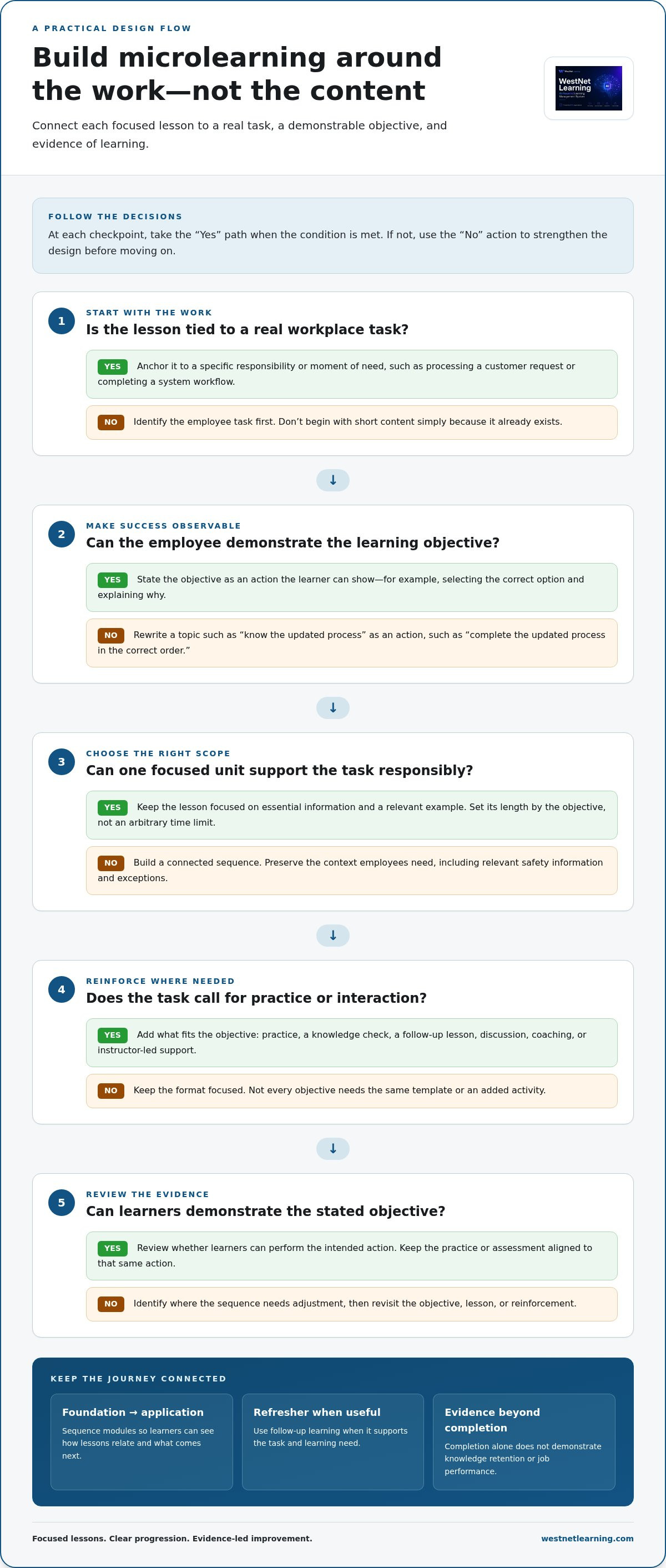
Build from the work, not from the content you already have. A connected journey starts with a specific task employees need to perform, then links focused lessons to the decisions and actions required to do it well. This gives each module a purpose and helps learners see what comes next.
Use this sequence to shape the journey:
- Identify the task. Pinpoint a real responsibility, such as processing a customer request or completing a system workflow.
- Define the objective. Describe an observable action, such as selecting the correct option and explaining why.
- Create the lesson. Present the essential information and a relevant example in a format suited to the objective.
- Reinforce learning. Add practice, a knowledge check, a follow-up lesson, or a discussion when the task calls for it.
- Review the evidence. Check whether learners can demonstrate the objective and identify where the sequence needs adjustment.
Make every module specific to its audience, role, and moment of need. A frontline employee may need guidance before handling a transaction; a manager may need a decision framework for reviewing an exception. Tailored sequences help employees find relevant learning without assigning everyone the same path. A focused e-learning course can provide a structured way to develop lesson content around a defined objective.
Start with a measurable learning objective
Write the objective as an action an employee can demonstrate, not a topic they will “understand.” For example, replace “know the updated process” with “complete the updated process in the correct order.” Keep essential knowledge in this lesson; move background detail that doesn’t support the objective into another module or reference. Then choose practice or an assessment that tests the same action, rather than asking learners to recall unrelated details.
Sequence lessons and reinforce learning
Organize modules from foundation to application, then add a refresher where it supports future performance. For a revised workflow, the sequence might introduce the change, demonstrate the steps, let employees practise a decision, and later revisit common errors. Spaced follow-up is one design option, but its timing should reflect the task and learning need, not promise a particular retention result.
Choose the format to match the learning. E-learning can explain a process and demonstrate a task; knowledge checks can surface misunderstandings; a live virtual session or instructor-led follow-up can support discussion, coaching, or practice when interaction matters. These formats can complement short digital lessons without forcing every objective into the same template. A microlearning platform for employees can organize these activities as a coherent journey instead of leaving learners with isolated pieces of content.
How to choose platform capabilities without mistaking features for outcomes
Choose capabilities by starting with the learning process you need to support, then asking how each feature will help. A microlearning platform for employees should make focused content easier to create, find, manage, and evaluate. But a feature is an enabler, not an outcome: recommendations don’t guarantee a lesson is relevant, and completion data alone doesn’t prove employees can apply what they learned.
Use this comparison framework to connect organizational needs with practical evaluation questions:
Need: Create focused lessons. Capability: Content authoring for relevant formats, including e-learning and knowledge checks. Ask: Can the authoring workflow support the objectives and content formats we use?
Need: Help learners find relevant content. Capability: Course recommendations and learner support. Ask: How do learners locate useful material, and what support is available when they need it?
Need: Understand learning activity. Capability: Analytics and reporting. Ask: Can managers review participation, completion, assessment results, and trends?
Need: Manage learning consistently. Capability: User administration and automated enrollment. Ask: How can roles, groups, and enrollment processes be maintained?
Need: Provide accessible learning. Capability: Language and accessibility options. Ask: Can employees access content in the languages and formats the organization needs?
Need: Fit existing operations. Capability: Integrations, including HRIS connections, and data migration processes. Ask: How will learner records and relevant information move between systems?
Assess content, access, and administration
Evaluate the authoring workflow using real lesson examples, not just a feature list. Consider whether it supports the content formats, learning objectives, and course standards your organization uses. Then map operational requirements: authentication, language selection, user management, enrollment, HRIS integration, and data migration. Clear requirements help distinguish essential capabilities from features that add complexity without supporting the learning journey.
Evaluate analytics and learner support
Decide in advance which reports managers need. Participation and completion show activity; assessment results offer evidence of demonstrated knowledge; workplace observation or task measures may help assess application. No single metric tells the whole story. Recommendations can surface relevant courses, and learner or administrator help can reduce friction, but neither replaces sound lesson design or meaningful assessment.
Gamification is another way to reinforce learning. Badges or leaderboards may recognize participation, but they should support a defined learning purpose rather than stand in for it. WestNet Learning explores these options in its guide to employee engagement gamification tools.
Assess capabilities as part of the broader learning system, not as a promise of automatic engagement or improved performance. WestNet AI LMS includes AI-powered e-learning creation, course recommendations, analytics and reporting, automated enrollment, and HRIS integration. These capabilities can help teams create, organize, and review employee learning in one platform.
How to launch employee microlearning and improve it with evidence
Start small, but define success before launch. Choose one role-specific learning need with a clear task and a practical way to check whether employees can perform it. A focused pilot helps uncover problems with access, instructions, sequencing, or assessment before extending the approach to more teams. It also gives you a baseline for deciding what to refine.
Prepare the first learning sequence
Map the audience, task, prerequisite knowledge, module order, and reinforcement activity. Assign a content owner to verify that guidance is accurate, and establish a review process for changes in policy, tools, or workflow. Plan communication alongside platform access: tell learners why the material matters, where to find it, and when managers should provide support or time to complete it.
Before publishing, record the current picture. Depending on the task, that might include assessment results, common errors, support requests, or an existing completion measure. Set a target that reflects the learning objective, not a generic engagement goal. For example, if the lesson prepares employees to identify the correct escalation route, decide how you’ll assess that decision and what evidence would demonstrate improvement.
Review results and refine the experience
After launch, compare participation and assessment patterns with the baseline and objectives. Look beyond overall completion: check where learners stop, which questions they frequently miss, and whether feedback points to unclear wording or an irrelevant example. A weak result is a signal to investigate, not proof that the lesson needs to be shorter. The cause may be access friction, missing prerequisite knowledge, confusing instructions, or an assessment that doesn’t match the objective.
Use learner feedback to make precise revisions. Clarify an instruction, improve accessibility, adjust module order, or add a job-relevant example where employees need more context. Then review the revised experience against the same measures to distinguish a useful change from an assumption. Learning analytics and reporting in an LMS can help organize participation and assessment evidence; managers can add context by observing how the task is performed at work.
Keep the measurement boundary clear. Platform activity can show that someone opened a lesson or completed a check, but it doesn’t establish long-term retention or prove that learning caused a change in job performance. Combine learning data with appropriate workplace evidence, and interpret results in context. WestNet Learning’s guide to employee performance tracking in an LMS explores measurement beyond course activity.
Once the pilot produces useful evidence, use what you learned to refine the sequence before extending it to other roles. WestNet AI LMS includes Learning Analytics and Reporting to support review of learning activity and course results.
How an LMS can support employee microlearning at scale
A microlearning strategy needs more than compact lessons. As learning expands across roles and teams, the organization also needs a way to create content, surface relevant courses, manage access, and review learner activity. An LMS can bring these processes together, while learning objectives and lesson sequencing remain the foundation.
WestNet AI LMS supports employee learning through capabilities that can contribute to a microlearning approach within a broader learning environment. These capabilities help coordinate focused e-learning and its administration; they don’t make short lessons effective by themselves or guarantee a particular outcome.
Coordinate content, recommendations, and reporting
AI-Powered e-learning Creation supports the development of focused e-courses around defined objectives, including SCORM or xAPI course creation. Each course still needs a clear purpose, accurate content, and an appropriate way to check learning. For deeper guidance on developing course content, explore AI course creation software.
Then connect content to delivery and review:
- AI-Generated Course Recommendations for learners can help surface relevant learning and support discovery across available courses.
- Learning Analytics and Reporting can help administrators review learner activity and course results, informing decisions about what to investigate or revise.
- AI-Powered Help for learners and admins can support users as they access learning and manage the platform.
Use these functions to make a planned learning journey easier to organize, not to replace thoughtful sequencing. Recommendations are most useful when course content is relevant and well organized. Reporting is most useful when teams have decided what evidence matters and how to interpret it.
Support consistent administration across teams
As more groups participate, administration becomes part of the learning design. Automated enrollment can support course assignment, while HRIS integration can connect learning operations with employee systems. Users can select from up to 60 site languages at login, helping organizations with multilingual workforces organize access across teams.
Plan how roles, enrollment, and course updates will be managed as the learning catalog grows. Assign ownership for reviewing content so lessons stay aligned with current workplace processes. A consistent administrative approach makes it easier to maintain learning journeys without treating each new module as a separate rollout.
For organizations building a microlearning platform for employees, the practical goal is a connected system: focused e-learning content, relevant discovery, coordinated administration, and reporting that informs the next improvement. WestNet AI LMS brings these capabilities together to support employee learning.
Turn the first learning need into your next step
A strong microlearning platform for employees is part of a broader learning system, not the strategy on its own. Choose one real workforce need, give it a clear learning objective, and use what employees and managers learn from the first rollout to shape what comes next. Build a focused learning experience, observe how it works in practice, then expand with evidence.
WestNet AI LMS brings course development and learning management capabilities together to support this work. Its AI-powered e-learning creation, recommendations, analytics, and administration tools can help you plan a connected approach to employee learning.
Explore WestNet AI LMS and start a free 30-day trial or request a demo to see how the platform can support your employee learning goals.
Frequently Asked Questions
What is a microlearning platform for employees?
A microlearning platform for employees is a digital learning environment used to organize and deliver brief, task-focused learning resources. The platform is the system employees use to access learning, while microlearning describes how content is structured. For example, a team might use an LMS to make a short decision guide available alongside a related course, giving employees a consistent place to find learning materials.
How long should an employee microlearning lesson be?
Make a lesson long enough to explain and practise its intended skill, but no longer than the content requires. A quick reference on submitting a routine expense may take only a few minutes, while a lesson with a worked example and decision points may need more time. Test the lesson with representative learners, then remove repetition without cutting context or practice they need.
Can microlearning replace traditional employee training?
Microlearning can support traditional training, but it shouldn’t replace every learning format. Short resources work well for targeted updates and reminders, while longer courses, facilitated sessions, or coaching may be better for complex judgment, collaboration, or sustained practice. For example, employees could review concise guidance before a facilitated discussion of customer scenarios. Choose the format according to the capability employees need to develop.
How do you create effective microlearning for employees?
Start with a common work challenge, then build a focused learning interaction around it. For example, a cybersecurity lesson might show a sample suspicious email, ask learners to identify warning signs, and explain what to do next. Keep instructions clear, use realistic language, and provide feedback that explains the reasoning behind the correct response. Review the content with people familiar with the task before release.
How can organizations measure employee microlearning?
Use several signals rather than treating course completion as proof of learning. A scenario-based question can show whether employees recognize the right response, while item-level results can reveal which concepts cause confusion. Learner comments may highlight unclear wording or missing context. To understand whether learning transfers to work, pair these signals with an appropriate observation or task measure and interpret the results carefully.
Does an LMS support microlearning content?
Yes. An LMS can provide a central place to host short e-learning resources, group related materials, assign learning, and record learner activity. That structure helps employees return to guidance without searching across disconnected files or channels. Before publishing, organize the course catalog so titles and descriptions make each item’s purpose clear. The LMS supports access and administration; lesson quality still depends on relevance and sound learning design.