What if the biggest risk of automated enrollment isn’t a missed assignment, but a rule nobody can explain? An LMS with automated course enrollment can reduce manual work and help employees receive training that fits their role or status. Reliable assignments, however, depend on well-governed learner data and clear rules, not automation alone.
Manually assigning courses takes administrator time. Inconsistent processes can also leave employees without training they need or assign them courses that no longer apply. As departments, organizational structures, and employee records change, enrollment rules need to remain understandable and manageable.
This guide explains which enrollment workflows can be automated and what to compare when evaluating an LMS. You’ll learn how to assess rule flexibility, learner data connections, reporting, and administrator oversight, then turn those capabilities into a process with clear exception handling. We’ll also look at how WestNet’s AI Enhanced LMS brings together course auto-enroll, prerequisites, HRIS integration, and user and organization management. The goal is practical: streamline assignments while keeping people in control of why learners are enrolled and what happens when a rule needs review.
Key Takeaways
- An LMS with automated course enrollment assigns training through configured rules, but enrollment is distinct from registration, notifications, completion, and certification tracking.
- Reliable rules depend on accurate learner and course data. Map how information determines eligibility, course selection, enrollment, and review.
- Compare platforms on rule flexibility, data connectivity, administration, reporting, and support, including how they handle changes to employee information.
- Start with one learner group and a defined training need. Document exceptions and assign clear ownership for rule changes.
- WestNet’s AI Enhanced LMS combines course auto-enroll with user and organization management, prerequisites, and HRIS integration.
What an LMS with automated course enrollment actually does
An LMS with automated course enrollment assigns learners to courses through configured rules or workflows. Instead of selecting employees one by one, an administrator defines criteria for an intended group and the system applies those rules to course assignments. The Learning Management System (LMS) then provides a structured place to access training and track learning activity.
Enrollment is one step in a wider learning process, not a catch-all for every course function. It determines who is assigned access to a course. Registration usually describes a learner selecting or signing up for an offering, while a notification tells someone about a course or deadline. Completion tracking records whether required learning has been finished; certification tracking concerns credentials or their status. These activities can be connected, but they answer different operational questions.
How is automated enrollment different from course registration?
Consider an employee who moves into a supervisor role. A configured rule can assign that employee supervisor training, with enrollment granting access to the course. By contrast, a registration flow might let an employee browse optional courses and sign up based on interest. Registration captures a learner’s choice; organization-led assignment directs a learner to training identified as relevant to their work.
This distinction matters because corporate training often follows organizational requirements, not individual discovery. Role-based learning can assign content relevant to a job function. Department or organization-based rules can align course assignments with how teams are structured. Required training can also be assigned to a defined group. Administrators remain responsible for deciding which requirements the rules should reflect.
Which corporate workflows benefit most from automatic assignment?
Automation is most useful when the same assignment logic applies repeatedly. For example, a new employee cohort may need a consistent set of introductory courses. A rule tied to an agreed learner group can reduce the work of rebuilding that assignment for each incoming cohort. Strong employee onboarding training workflows make these learning steps easier to organize as new employees join.
Automation reduces repetitive assignment work, but it doesn’t remove oversight. Administrators still need to set the conditions, keep learner and course information organized, and review whether a rule remains appropriate as roles or training needs change. A practical starting point is to define the intended group, identify the course, and document who owns the rule and handles exceptions. That keeps the workflow efficient without turning assignments into a black box.
WestNet’s AI Enhanced LMS includes automated enrollment and course auto-enroll within its course management capabilities. For organizations refining course content as well as assignment workflows, a well-structured training course gives learners a clear destination once they’re enrolled. Connect purposeful course assignments with clear administrative ownership to make the workflow easier to manage.
How automated course enrollment rules use learner and course data
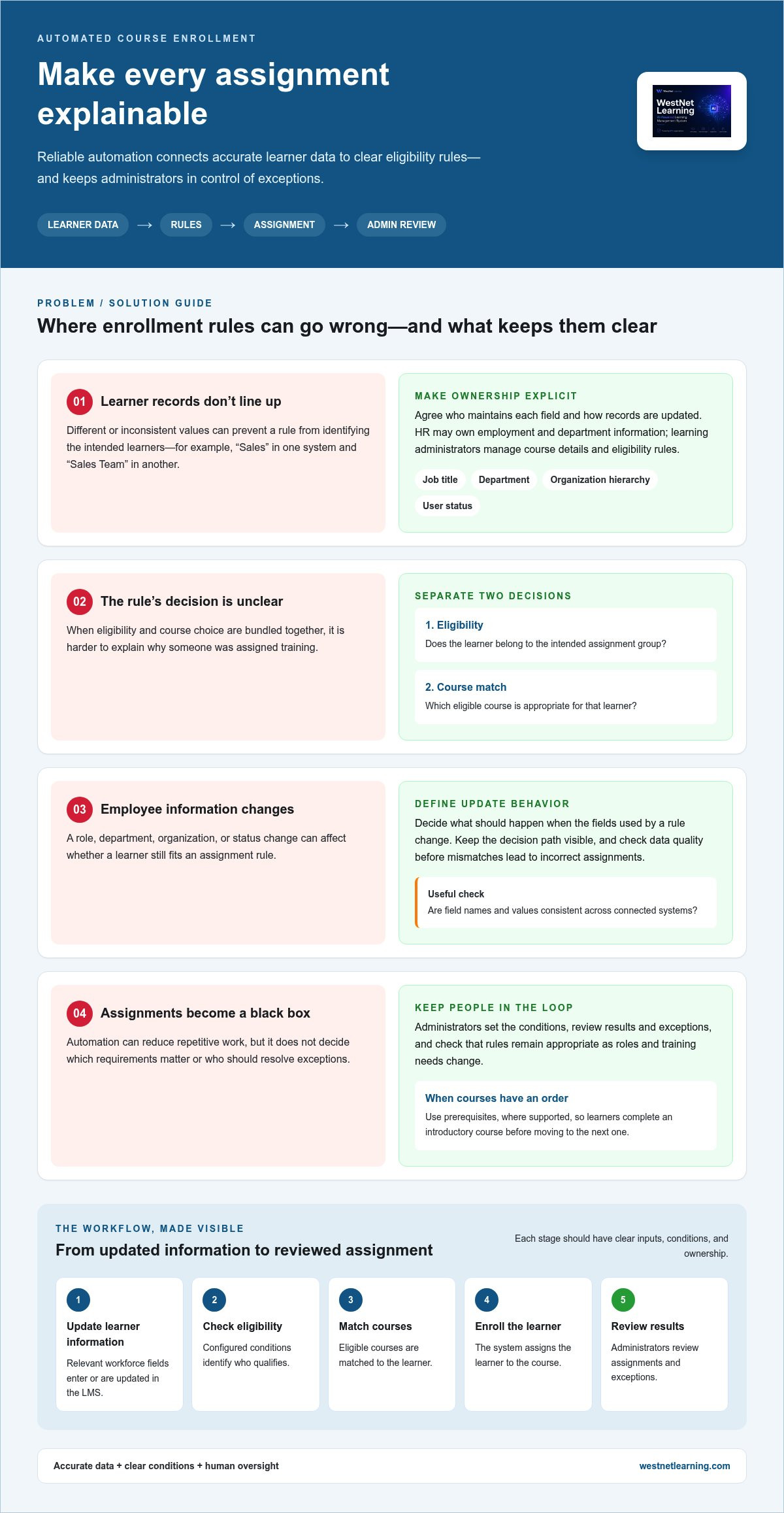
Enrollment rules connect workforce information to learning decisions. A rule is only as dependable as the data and conditions behind it, so map the process before automating it. The workflow takes learner and course data, applies eligibility conditions, and produces a course assignment for review.
In practice, the sequence is straightforward: learner information enters or is updated in the LMS; rule conditions determine eligibility; eligible courses are matched to the learner; the system enrolls the learner; administrators review results and exceptions. Mapping these steps makes the decision path visible instead of treating automation as a hidden action. An LMS with automated course enrollment can support this workflow, with triggers and update behavior determined by the platform and its configuration.
What data can an LMS use to guide enrollment?
Potential data categories include job title, department, organizational hierarchy, and user status. For example, a rule could target a defined department or employee group. When planning a workflow, list the fields that identify the intended learners and decide what should happen when those fields change. This helps expose mismatches before they result in incorrect assignments.
Assign clear data ownership. HR may maintain employment and department information, while learning administrators manage course details and eligibility rules. Agree on how records are updated and how inconsistent values are handled. If one system records “Sales” and another uses “Sales Team,” a rule may not identify the intended learners consistently. HRIS integration can connect HR information with learning workflows, while administrators remain responsible for checking the structure and quality of the data.
How do course rules, prerequisites, and exceptions fit together?
Separate the eligibility decision from the course sequence. Eligibility determines whether a learner belongs in an assignment group; course conditions determine which training is appropriate. Where supported, prerequisites establish the order of learning, so a learner completes an introductory course before moving to the next one. WestNet’s AI Enhanced LMS includes course auto-enroll and a prerequisite module within Catalog & Course Management.
Notifications are related, but distinct. A rule may assign a course, while a separate notification informs the learner about that assignment. Treating these as separate functions helps administrators diagnose whether a problem comes from eligibility, enrollment, or communication.
Define an exception path before launch. A transfer between departments may make an earlier rule irrelevant; a duplicate assignment may need review; a leave or other unusual status may call for a pause or manual decision. Document who reviews these cases and what action they can take. After learner records change, sample the resulting assignments and refine rule conditions where outcomes don’t match the intended policy. This keeps automation auditable and leaves administrators in control of edge cases.
WestNet’s AI Enhanced LMS combines automated enrollment with HRIS integration, user and organization management, prerequisites, and administrator support. For organizations planning connected learning workflows, the WestNet AI LMS brings these capabilities together in one learning platform.
How to compare LMS platforms with automated enrollment
Compare platforms against real employee workflows, not a feature label. A basic registration trigger may enroll someone after they sign up. A broader workflow may use changing employee information, such as a department or user status, to determine whether an assignment should apply. These solve different problems. Define the changes your organization needs to respond to, then assess how each platform supports them and gives administrators visibility and control.
Use a consistent scorecard. For each capability, describe the scenario you need to support and record how the platform handles it. The aim isn’t to rank vendors in the abstract. It’s to identify a fit for your organization’s data, administration, and oversight requirements.
Area
What to compare
Rule flexibility
Can rules use the learner information and course conditions your workflows require, or are they limited to a registration event?
Data connectivity
How does learner information enter the LMS? Consider HRIS integration, data migration, and how updates are managed.
Administration
Can administrators manage users, organizational structures, courses, prerequisites, and assignment exceptions?
Reporting
Can learning analytics and reports provide visibility into assigned training and learner participation?
Support
What administrator support is available for setting up and managing workflows?
Which enrollment automation capabilities matter for corporate training?
Start with the structure of your workforce. Consider how course auto-enroll works alongside user management, departments, and organizational structures, and whether prerequisites can sequence learning when needed. Then map the data path: identify the source of employee information, the fields enrollment rules rely on, and how existing records will move into the platform. For more on connecting systems, explore HRIS and learning workflow integration.
How can buyers assess oversight and learning visibility?
Walk through the full administrative cycle: establish a rule, review the resulting assignments, correct a mistaken match, and manage a change to a user or course. Identify who can make those changes and how administrators can see their effect. Learning analytics and reporting should help teams understand assignments and participation. Notifications are a separate communication function, not proof that enrollment occurred.
Use a representative scenario during evaluation, such as an employee whose department changes. Compare the expected outcome with what administrators can see in the platform. An LMS with automated course enrollment should support the workflow you need while preserving a clear path to review and correction. WestNet’s AI Enhanced LMS includes automated enrollment, HRIS integration, user and organization management, prerequisites, learning analytics and reporting, and administrator support. Consider the WestNet AI LMS against your requirements.
How to plan automated enrollment without losing control
Start with a specific training need, not a platform setting. Choose one learner group, such as employees in a defined role, and identify who is accountable for the training requirement. A focused first workflow makes it easier to spot unclear eligibility rules, incorrect course matches, and gaps in ownership before automation reaches more learners.
Document the decision path before configuring it. A practical workflow record should cover:
- Audience: Which learner group is in scope, and which employee information identifies its members?
- Assignment: Which course applies, and should learners complete courses in a particular sequence?
- Exceptions: How will the team handle transfers, inaccurate records, duplicate assignments, or unusual cases?
- Ownership: Who approves course or rule changes, corrects learner data, and reviews exceptions?
- Review: How often will the workflow be checked against training needs and data-update practices?
What should an enrollment workflow document before launch?
Make the record specific enough that another administrator can understand the assignment without guessing. Name the qualifying fields, the course or courses, and the intended sequence. Then identify who approves changes and who handles exceptions. Choose a review cadence that reflects how often learner information and training requirements change. For required learning, compliance training workflow practices can help frame assignments around clear responsibilities and review.
How can teams roll out automation in manageable stages?
Test the workflow with a limited group before expanding it. Use representative learner records, including examples that should qualify and cases that should not, then compare the system’s assignments with the intended outcome. Review the results with administrators and learners. Their feedback can reveal confusing course choices, missing exceptions, or assignments that add little value. Adjust the rules and document the changes before widening the rollout.
For example, a team piloting a role-based course can check whether people in the target role are included and similar employees outside that group are excluded. Review the results after learner data changes, too. A transfer may affect eligibility, while outdated records can continue to drive an incorrect assignment. When an outcome is wrong, determine whether the cause is the source information, the rule, or the course mapping. Correct the source of the error, then test again.
Once the pilot performs as intended, expand in deliberate stages and keep a clear route for administrators to pause, correct, or revise assignments. An LMS with automated course enrollment should support a governed process, not replace one. WestNet’s AI Enhanced LMS includes automated enrollment and administrator support to help organizations manage learning workflows. Explore WestNet’s AI Enhanced LMS as you plan an approach that keeps assignments efficient and accountable.
How WestNet LMS supports automated course enrollment
WestNet’s AI Enhanced LMS is a corporate learning platform with automated enrollment and course auto-enroll. These capabilities sit within broader learning administration, allowing organizations to manage course assignments alongside learner records, organization structures, and course sequencing. The platform also includes prerequisites to support an intended order of learning. Organizations can plan how these features fit their data, training requirements, and administrator responsibilities.
Where does WestNet automated enrollment fit into LMS administration?
Course auto-enroll supports the assignment workflow, while user and organization management provide context for administering employee learning. Prerequisites help structure the path through courses. The platform includes HRIS Integration, Data Migration & Administrator Support, which supports connecting learner information, transitioning records, and managing LMS administration.
Consider the whole process, not just the enrollment trigger. For a defined employee group, decide which learner information should guide assignment, which course applies, and whether a prerequisite should shape the sequence. Then establish who manages the underlying user and organization information and who reviews assignments when a learner’s circumstances change. This connects product capabilities to the governance model your team has planned.
What should a decision-maker evaluate in a WestNet LMS demo?
Bring a representative scenario, such as assigning a course to a particular employee group and reviewing the resulting workflow as an administrator. Discuss how HRIS integration fits your information sources, what data migration involves for your records, and how learning analytics and reporting can provide visibility into assigned training and participation. Include the administrator support needs of the people who will manage the platform.
Use the evaluation to connect product capabilities to your operating requirements. Outline what learner information is available, how your organization defines groups, and which course or prerequisite sequence supports the training goal. Consider how administrators will oversee the process and use reporting to understand assignments. This helps decision-makers assess fit while recognizing that automation works best with accurate data and clear ownership.
- Assignment: Describe the employee group, relevant course, and intended prerequisite sequence.
- Data: Discuss HRIS integration and the records involved in data migration.
- Administration: Identify who manages users, organizational structures, and assignment review.
- Visibility and support: Explore learning analytics, reporting, and administrator support in your context.
An LMS with automated course enrollment should fit the organization’s workflows while keeping administrators able to oversee assignments. WestNet’s AI Enhanced LMS brings automated enrollment together with course auto-enroll, prerequisites, user and organization management, HRIS integration, and reporting capabilities. To explore how the platform aligns with your training workflows, request a WestNet LMS demo.
Put your enrollment plan into motion
Make your next step focused: choose a training workflow, identify who owns its rules, and define what a successful assignment should look like for learners and administrators. That gives your team a practical way to assess whether an LMS with automated course enrollment can support the process while keeping decisions understandable and reviewable.
Use a product evaluation to connect your requirements to real workflows. WestNet’s AI Enhanced LMS includes automated enrollment, course auto-enroll, HRIS Integration, Data Migration & Administrator Support, and a Dedicated Client Success Manager. Consider how these capabilities fit your organization’s data, administrative responsibilities, and approach to oversight, then map out a sensible starting point.
Ready to explore the fit for your learning operations? Request a WestNet LMS demo and take the next step toward a more deliberate, well-governed enrollment process. With clear ownership and the right workflow in view, your organization can move forward with confidence.
Frequently Asked Questions
Is automated course enrollment the same as course registration?
No. Registration generally records a learner’s choice or interest, while automated enrollment assigns course access through a configured workflow. For example, an employee might register for an optional presentation skills course, while the organization assigns required training to a defined group. Since platforms may use these terms differently, identify what action a feature performs: does it record a signup, grant access, or do both? That distinction clarifies how the workflow will appear to learners and administrators.
Can an LMS automatically enroll employees based on their job roles?
Yes. Some LMS workflows can use job or organizational information to guide course assignments, depending on the platform and its configuration. For example, a role change could make an employee eligible for a different learning path. Before relying on that workflow, identify which system maintains role information and how updates reach the LMS. A controlled test with an employee record that has changed roles can show whether the assignment reflects current information or a stale record.
Can automated enrollment assign more than one course to a learner?
Some platforms support multiple course assignments, though the setup varies. A practical test is an employee who needs both a general course and a role-specific course. Decide whether those should appear together or in sequence, and consider what should happen if the learner already has access to one. Reviewing the learner’s course record helps administrators identify overlapping requirements instead of treating every assignment as a separate, unrelated task.
How do prerequisites affect automated course enrollment?
Prerequisites can define which learning should come before another course when the LMS supports that sequence. They don’t necessarily determine which employee is eligible for the initial assignment. For example, an employee may qualify for an advanced course but need an introductory course first. Review how the platform represents prior learning and how administrators can handle cases where a learner completed the prerequisite elsewhere or the record doesn’t show that activity.
Does automated enrollment automatically complete a course for the learner?
No. Enrollment provides an assignment or course access; it doesn’t show that a learner has participated or completed the course. Those statuses depend on course requirements and activity recorded by the LMS. For instance, an employee may have a course on their learning list but not have opened it. Define these stages clearly in internal communications and reports so managers don’t mistake an assignment for evidence of completion.
What happens when an employee changes roles after being enrolled?
That depends on the organization’s workflow. A role change can affect future eligibility, but it doesn’t by itself determine what should happen to an existing course assignment. Decide whether the course remains relevant, whether an administrator should review it, or whether the employee needs a different assignment. Test the policy with a representative role-change record and document the decision so similar cases receive consistent treatment.
Can an LMS automatically enroll existing employees, or only new users?
Workflows aren’t necessarily limited to newly registered users. Depending on the platform, configuration, and learner information available, an organization may plan assignments for employees already in the system. During evaluation, use an existing learner record and trace what happens when its relevant information changes. Check how administrators distinguish a new assignment from an earlier one and review the learner’s course history before expanding the workflow.