A call center training plan can look complete on paper and still miss the realities of the floor. Agents work rotating shifts, workloads change quickly, and leaders need a clear view of who has learned what. Choosing an LMS for call center agent training means finding a platform that can organize the full learning lifecycle, not just deliver courses.
Training needs to fit around service demands while keeping onboarding, skills development, and progress tracking organized. A clear evaluation framework helps you build a shortlist, compare platforms against realistic agent-training scenarios, and plan a rollout your team can manage.
This guide covers the capabilities to assess, from enrollment and learner recommendations to reporting and content creation. It also explains how to weigh adoption, data needs, and rollout readiness. As you compare options, consider how WestNet’s AI Enhanced LMS supports your requirements with automated enrollment, AI-powered course creation and recommendations, and learning analytics.
Key Takeaways
- Evaluate an LMS for call center agent training across the full learning lifecycle, from onboarding and ongoing development to progress tracking.
- Prioritize features against real workflows, then classify each requirement as essential, useful, or optional.
- Compare platforms using consistent scenarios, user roles, and acceptance criteria so demonstrations produce comparable evidence.
- Keep learning measures, such as enrollment and completion, separate from operational KPIs like call handling.
- Assess how WestNet’s AI Enhanced LMS capabilities, including course creation, learner recommendations, and analytics, fit your training requirements.
What call center agent training needs from an LMS
Contact center training serves people at different stages. A new agent may need a structured introduction to systems, products, policies, and customer interactions. An experienced agent may need a focused update after a process changes, followed by development that builds role-specific knowledge. If a platform treats every learner and training event the same, it can be harder to keep learning relevant and organized.
A call center training LMS organizes, delivers, and tracks learning for agents and the people who support their development. For a general overview, see this Learning Management System (LMS) definition and overview. In a contact center, the system should help leaders structure learning throughout an agent’s tenure and show what has been assigned and completed.
An LMS gives call center leaders a central way to assign learning, deliver training, and track learner activity across onboarding and ongoing development.
Which learning moments should the platform support?
Map your training cycle before comparing platforms. Initial onboarding might combine foundational courses with guided practice. Later learning is often more targeted: a product update, a revised process, a policy change, or recurring development for a particular role. Each may require different assignment rules, content formats, and ways to monitor completion. List the learning events your team runs, then identify who needs each one and when.
Shift patterns matter, too. Assess how agents access assigned material around their schedules, how enrollment is managed, and whether deadlines or learning windows suit your operation. If your model includes instructor-led or virtual sessions, include those workflows in your requirements. If learning is self-paced, focus on organizing and tracking that activity. The platform should fit your operating model, not an assumed one.
Where generic LMS comparisons miss the contact center context
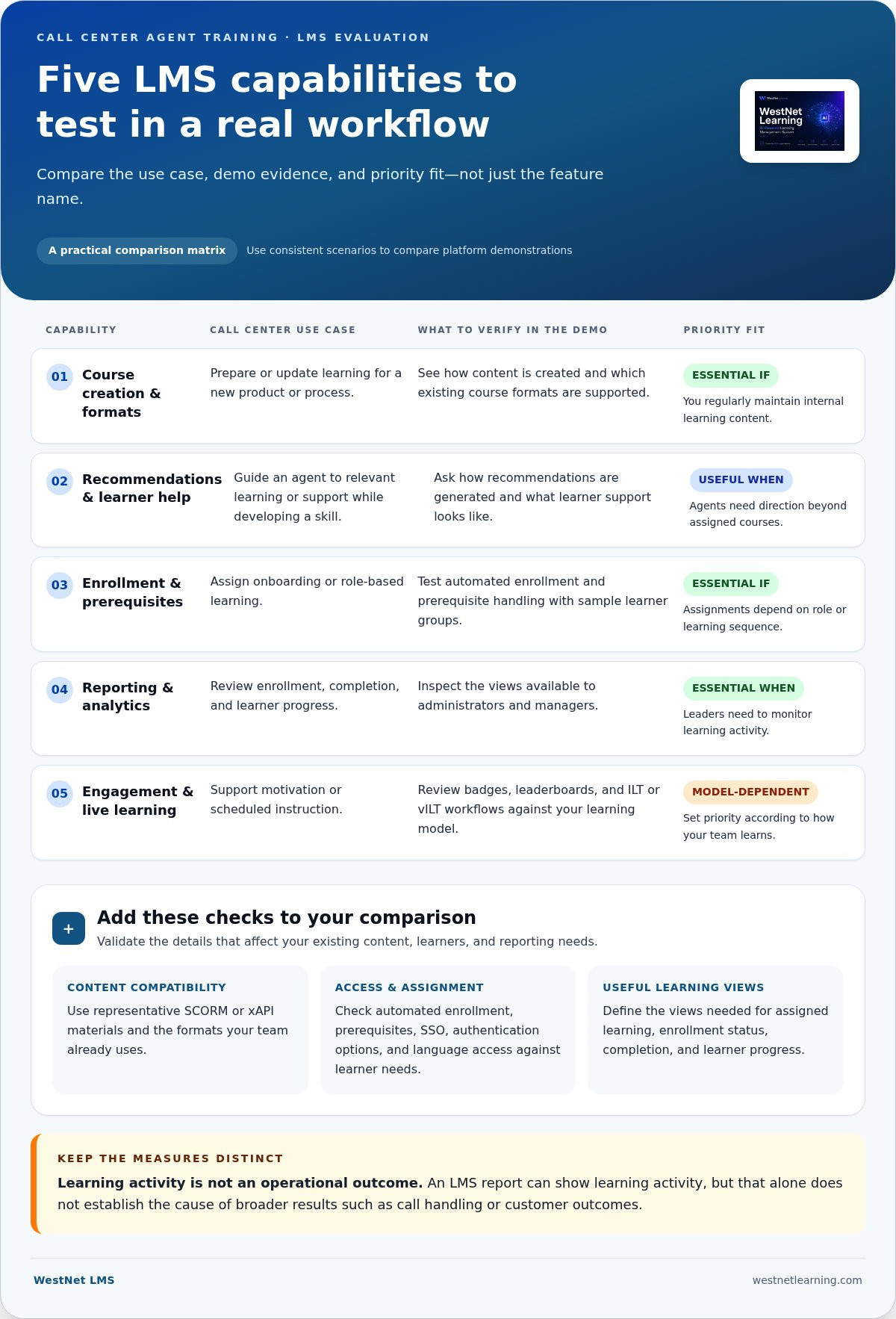
Generic feature lists rarely capture the differences between agent roles. Build requirements around actual workflows: who needs onboarding, which teams receive a policy update, and how managers review learning activity. Keep course enrollment and completion records separate from operational measures such as call handling or customer outcomes. An LMS report can show learning activity, but that alone does not establish the cause of a broader performance result.
Be specific about connected systems. A call center may use telephony, quality-monitoring, or workforce-management tools, so document the systems and data flows your organization needs. Assess each connection as a separate requirement. This keeps the shortlist grounded in evidence and clarifies where LMS capabilities end and other operational systems begin.
Use this foundation to set buying criteria for an LMS for call center agent training. Define learner groups, recurring learning moments, scheduling constraints, and reporting needs first. Then compare platforms against those requirements instead of choosing features just because they appear on a standard checklist.
Which LMS features matter most for call center agent training?
Start with the work each feature needs to support. A feature name alone does not show whether it fits your enrollment process, helps agents find relevant learning, or gives administrators a useful view of progress. Build a comparison matrix around practical scenarios and ask vendors to demonstrate the workflow, not just describe the capability.
- Course creation and formats: Use case: prepare or update learning for a new product or process. Evidence: demonstrate how content is created and which existing course formats are supported. Priority: essential if you regularly maintain internal learning content.
- Recommendations and learner help: Use case: guide an agent to relevant learning or help while developing a skill. Evidence: show how recommendations are generated and what learner support looks like. Priority: useful when agents need direction beyond assigned courses.
- Enrollment and prerequisites: Use case: assign onboarding or role-based learning. Evidence: demonstrate automated enrollment and prerequisite handling with sample learner groups. Priority: essential if assignments depend on role or learning sequence.
- Reporting and analytics: Use case: review enrollment, completion, and learner progress. Evidence: show the views available to administrators and managers. Priority: essential when leaders need to monitor learning activity.
- Engagement and live learning: Use case: support motivation or scheduled instruction. Evidence: demonstrate badges, leaderboards, and ILT or vILT workflows that fit your model. Priority: set according to how your team learns.
Feature fit depends on demonstrated workflow evidence, not the length of a platform’s feature list.
Content, access, and enrollment capabilities
Check compatibility with your existing content rather than assuming all course packages behave alike. Ask for a demonstration using representative SCORM or xAPI materials and the formats your team uses. Then test whether automated enrollment and prerequisites can reflect your role-based assignments. Evaluate SSO, authentication options, and language access against the needs of your learner population.
Reporting, engagement, and administrator requirements
Define the views decision-makers need before reviewing dashboards, such as assigned learning, enrollment status, completion, and learner progress. Treat gamification as a culture fit, not a default requirement: badges or leaderboards may suit one team and distract another. Assess HRIS integration, data migration, administrator support, and client-success coverage as distinct implementation and operating needs.
For an LMS for call center agent training, test each capability against a realistic sequence: an agent joins a role group, receives assigned learning, accesses relevant content, and appears in the progress reports leaders use. Include administrators in the evaluation so setup and ongoing oversight receive the same scrutiny as the learner experience.
A structured demonstration turns this matrix into a practical comparison. Use the corporate training LMS demo guide to plan what your team wants to see.
How to compare LMS options against real call center scenarios
A vendor demonstration is most useful when every platform is tested against the same operating conditions. Before booking demos, define the users, learning content, and administrator tasks you want to evaluate. Classify each requirement as essential, useful, or optional. An essential item needs a clear acceptance criterion; a useful item adds value but is not a purchase blocker; an optional item can wait.
Use a shared scorecard to compare evidence rather than presentation style. For each criterion, record whether it was demonstrated, what steps were required, and any gaps or follow-up questions. Keep the test consistent across platforms, including the user roles and sample content. This helps reveal whether a workflow is straightforward for agents and manageable for administrators.
Scenario one: onboard a new agent
Ask the vendor to trace a new learner’s journey from account setup through course assignment and progress review. Use a sample agent role and include any department, supervisor, or team structure your organization relies on. Observe what the agent sees, what administrators can manage, and which progress details appear in reports. Record each step against your acceptance criteria.
Scenario two: deliver a policy or product update
Use a sample update to test how an administrator adds or creates learning content, targets the intended audience, and reviews assignment or completion activity. Where relevant, test enrollment automation, course restrictions, and prerequisites with representative learner groups. Assess content authoring through an actual workflow, not a list of capabilities. An LMS guide for frontline workers can also help frame access needs across distributed teams.
Make scenarios specific enough to expose operational details without letting the demo become an improvised sales presentation. Prepare the same test inputs for each platform:
- Roles: an agent, a team lead or supervisor, and an LMS administrator.
- Learning materials: representative onboarding content and a short policy or product update.
- Tasks: add or assign learning, locate relevant content, review learner progress, and adjust an assignment if needed.
- Acceptance criteria: the required steps, information displayed, and outcome your team expects at each stage.
Distinguish an unsuccessful result from a feature that simply was not demonstrated. Note whether a requirement was met, partially met, or not shown, and capture the steps involved. If a workflow depends on a particular integration or data source, record that dependency instead of assuming it comes with the LMS. This makes the final comparison clearer and ties technical questions to the requirements they affect.
A consistent evaluation gives your team a grounded view of an LMS for call center agent training. Use the LMS demonstration planning guide to structure a platform walkthrough around your own scenarios.
How to evaluate adoption, measurement, and rollout readiness
A platform is ready for a call center rollout only when the people, data, and ownership model are ready too. Evaluate the path from requirements through a measured pilot, and agree on baseline measures before launch. This gives you a way to interpret LMS reports without assuming that training alone will change broader contact center results.
- Define needs. Confirm the learning workflows, access requirements, reporting questions, and administrative tasks the platform must support. Record which requirements are essential and how you will judge them.
- Map users. Identify learner groups, supervisors, administrators, and the teams responsible for identity and employee data. Note role differences that affect learning assignments or reporting access.
- Test scenarios. Have a representative administrator and learner complete realistic journeys, including accessing assigned learning and reviewing progress. Capture friction points and unmet acceptance criteria.
- Review data. Decide which learning measures matter and who owns each report. Establish a baseline for the measures you plan to compare after rollout.
- Plan rollout. Set the pilot group, sequence the rollout, assign operational responsibilities, and document how feedback will inform configuration and next steps.
Keep learning measures separate from operational KPIs. Enrollment, access, course progress, and completion describe learner activity in the LMS. Call handling and other contact center indicators describe operational performance and may be affected by factors beyond training. If you plan to examine both, define the reporting sources and interpretation separately. The LMS training dashboard buyer’s guide can help clarify which reporting views to include in your evaluation.
Test access, administration, and data readiness
Use representative administrator and learner accounts to walk through sign-in, assigned learning, and progress review. Review authentication requirements, HRIS data flow, user migration, and how licenses are reassigned when an agent’s status or role changes. Before launch, document who owns enrollment, course updates, and reporting. Clear ownership prevents routine tasks from becoming unresolved handoffs.
Define a measured pilot before wider adoption
Choose a representative learner group and a limited set of scenarios, such as a new-hire learning path and a policy update. Set criteria tied to access, completion, and administrator workload, then capture a baseline so you can assess the pilot against the starting point. Use the findings to refine configuration and rollout priorities. Treat results as evidence for decisions, not as a guaranteed forecast for the wider organization.
For an LMS for call center agent training, readiness is shared across learning, operations, and the teams managing user data. Put owners and measures in writing before expanding the rollout. To assess platform fit directly, explore the WestNet AI LMS demo.
How WestNet’s AI Enhanced LMS fits a call center training evaluation
WestNet’s AI Enhanced LMS can be evaluated against the same operational requirements as any platform: how learning is created, assigned, accessed, and tracked. Its capabilities support call center training workflows. Focus the evaluation on how they fit your organization’s processes and requirements.
Start with the scorecard. Automated enrollment and user management support administrators who assign learning by role or manage learner groups. Learning Analytics and Reporting provide views to assess against the enrollment, progress, and completion measures your team defined. Gamification, including badges and leaderboards, is available for teams whose learning culture suits those approaches. Test each capability against a clear use case.
Match confirmed capabilities to your evaluation scorecard
WestNet’s AI-Powered e-learning Creation and AI-Generated Course Recommendations can be evaluated using a representative course update and learner journey. AI-Powered Help supports learners and administrators. SSO, HRIS Integration, Data Migration & Administrator Support address access and operational requirements. The platform includes ILT and vILT modules for organizations whose learning model includes instructor-led or virtual sessions. Support for up to 60 site languages can help serve a multilingual learner population.
Use your criteria to make the review specific. Assess whether enrollment automation fits the way you organize learners, then compare reporting with the measures your decision-makers need. The relevance of an integration depends on your systems and data flows, so assess SSO and HRIS integration against your requirements rather than assuming a connection to a particular contact center tool.
What to examine in a WestNet LMS demo or trial
Bring a real training scenario to the evaluation, such as onboarding content or a product update. Have an administrator review how learning is created and assigned, then follow the learner’s route to the course and examine the resulting progress information. Test AI-Powered e-learning Creation and AI-Generated Course Recommendations in context, noting how each fits your workflow. Use the corporate LMS demo buyer’s guide to structure questions and keep the walkthrough focused.
Include other requirements in the same review: how gamification fits your team, which reporting views support your decisions, and whether ILT or vILT modules match your delivery model. For data readiness, discuss how HRIS integration and data migration fit your planned setup. Record observations alongside your acceptance criteria so the decision reflects demonstrated fit, not assumptions.
Evaluate the WestNet AI LMS through its free 30-day trial or a product demo. Use your call center scenarios, learner roles, and scorecard to assess how the platform’s capabilities align with your training requirements. Explore the WestNet AI LMS demo and trial.
Put your shortlist into action
Test your leading LMS against the learning workflows your agents and administrators will use. Bring a practical scenario, agree on what a good fit looks like, and use the results to guide your rollout decision. A structured evaluation makes choosing an LMS for call center agent training a practical step toward a learning system that fits your operation.
WestNet’s AI Enhanced LMS includes a Dedicated Client Success Manager to support your organization as it evaluates its learning environment. Try the platform through a 30-day free trial or request a WestNet LMS demo, and assess its capabilities against your team’s priorities.
Choose with clarity and move forward at a pace your organization can support. A well-planned evaluation gives your team a solid foundation for the next stage of agent learning.
Frequently Asked Questions
What is an LMS for call center agent training?
An LMS for call center agent training is a centralized platform for assigning and managing employee learning. For example, an administrator might organize separate learning paths for new agents and experienced agents moving to a different product queue, then review their course records in one system. Map roles and learning paths before assessing a platform so you can judge how well it fits your organization’s training structure.
Which LMS features are most important for call center agents?
The most important features are those that support learners’ actual tasks and administrators’ routine work. A team updating product guidance, for example, may prioritize course creation and assignment tools, while an organization with multiple user groups may value enrollment automation and role-based access. Assess SSO, HRIS integration, recommendations, and ILT or vILT options against specific requirements. A capability matters most when it addresses a defined workflow.
Can an LMS integrate with call center software?
LMS integrations vary by platform and by the systems involved. Make a simple data map before evaluation: identify where employee records originate, which system manages sign-in, and whether learning information needs to move elsewhere. HRIS integration or SSO addresses particular needs, but does not by itself establish a connection to telephony, quality-monitoring, or workforce-management software. Treat each desired connection as a separate requirement.
How do you measure call center agent training in an LMS?
Use the learning records available in the LMS, such as course status or learner activity, and decide who will review them. For a product update, leaders might check whether the intended group accessed and completed its assigned course. Keep that view separate from operational data, such as call handling. If you want to relate the two, define the analysis method and data owners before drawing conclusions.
Can an LMS support agents who work different shifts?
An LMS can organize learning access for agents on different shifts. During an evaluation, use learner accounts representing different teams and confirm each can locate the right assigned material within your planned training window. Also consider whether deadlines and course availability fit your operation. An LMS should not be assumed to manage staffing schedules.
How should a company choose an LMS for call center training?
Choose by matching documented requirements to demonstrated platform workflows. Include the people who will administer learning, manage employee data, and use reports, then record how each system handles their tasks. Review migration responsibilities and ongoing support alongside learner features. WestNet’s AI Enhanced LMS has transferable user licenses, so deactivated licenses can be reused for new users. Consider how that capability fits your user-management needs.
Does an LMS replace call center coaching?
An LMS does not automatically replace coaching, which may rely on direct manager feedback, observed practice, or team discussion. Decide which parts of development belong in formal learning and which require interaction with a coach or supervisor. If your training model includes scheduled instruction, assess whether ILT or vILT modules fit that activity. A clear division of responsibilities helps the LMS complement, rather than displace, existing coaching practices.