What if compliance training could do more than record who finished a course? An interactive compliance training platform connects learner participation with the workflows that help teams manage assignments and records. That matters when employees click through without engaging with key information, while administrators spend time enrolling learners and following up on incomplete assignments.
You need more than polished course content. You need learning that feels relevant to employees and clear oversight for managers. The right platform can bring interaction, automation, and reporting into one workflow, helping teams manage training while keeping track of learner progress.
This buyer’s guide will help you compare platforms using practical, role-relevant criteria. We’ll look at interactive features such as gamification and course recommendations, alongside automated enrollment, integrations, and reporting. You’ll learn how to assess these capabilities in a realistic workflow and how WestNet LMS features, including AI-powered e-learning creation and learning analytics, can support coordinated compliance training.
Key Takeaways
- Evaluate an interactive compliance training platform on more than course completion. Consider learner participation, administrative workflows, and the activity records it provides.
- Compare gamification, recommendations, automation, reporting, integrations, accessibility, and support against your organization’s practical requirements.
- Use the same representative course and administrator task to assess each platform, then test both experiences in a realistic workflow.
- Look for reporting that helps managers understand learner progress and training activity. Completion data alone does not prove understanding.
- WestNet’s AI Enhanced LMS brings together capabilities such as automated enrollment, gamification, course recommendations, and learning analytics.
Why an interactive compliance training platform must do more than deliver courses
A course library can provide content, but it does not necessarily create an active learning experience or simplify assignment work. An interactive compliance training platform combines course delivery with ways for learners to participate and tools for administrators to enroll people, monitor progress, and maintain training records. These functions need to work together: learning should fit employees’ responsibilities, while oversight should help teams see what has been assigned and completed.
Completion is useful evidence that a learner reached the end of a course. By itself, it does not show whether the learner understood a concept or can apply it at work. A platform can organize training and document activity, but it cannot guarantee compliance or prove that every learner will make the right decision. For background on the purpose and development of this training, see What is Compliance Training?
Keep two questions in view as you evaluate platforms: Does the learning invite meaningful participation? And can the organization manage assignments and records clearly? WestNet’s LMS for compliance training brings learning and administration into the same workflow. The sections ahead examine both needs, rather than treating course access as the whole solution.
What makes compliance training interactive?
Look for moments when learners must think and respond, not simply move through screens. Knowledge checks can ask learners to recall a principle; scenario-based choices can present a workplace situation and ask what action they would take. Feedback after a response can explain why an option fits or why a decision deserves reconsideration.
That differs from passive video playback or page navigation, where a learner may advance without making a meaningful choice. Interaction is most useful when it relates to the learner’s role and provides timely feedback. These features can support involvement, but they do not guarantee retention or correct behavior. Evaluate the activity itself: Is the question relevant? Does the feedback clarify the decision?
Who needs the platform to work well?
Start with the learner’s experience. Employees need clear access, courses they can use without unnecessary friction, and content that makes sense for their responsibilities. Recommendations can direct learners toward relevant courses, while straightforward navigation helps them understand what is assigned and what remains. A platform should support participation without obscuring the training’s purpose.
Administrators need a different set of controls. They may manage enrollment, track progress across assigned groups, and retrieve records when they need to review training activity. Supervisors also need appropriate visibility into their teams’ progress without the same administrative access as the people who manage the system. Consider what information each role needs and which permissions should come with it.
Bring these needs together when comparing options. Strong learner interaction without workable enrollment and reporting leaves teams with avoidable manual tasks. Efficient administration without relevant learning can make training feel like a checkbox. Evaluate both sides of the workflow and how they support one another.
Which interactive compliance training features support learning and oversight?
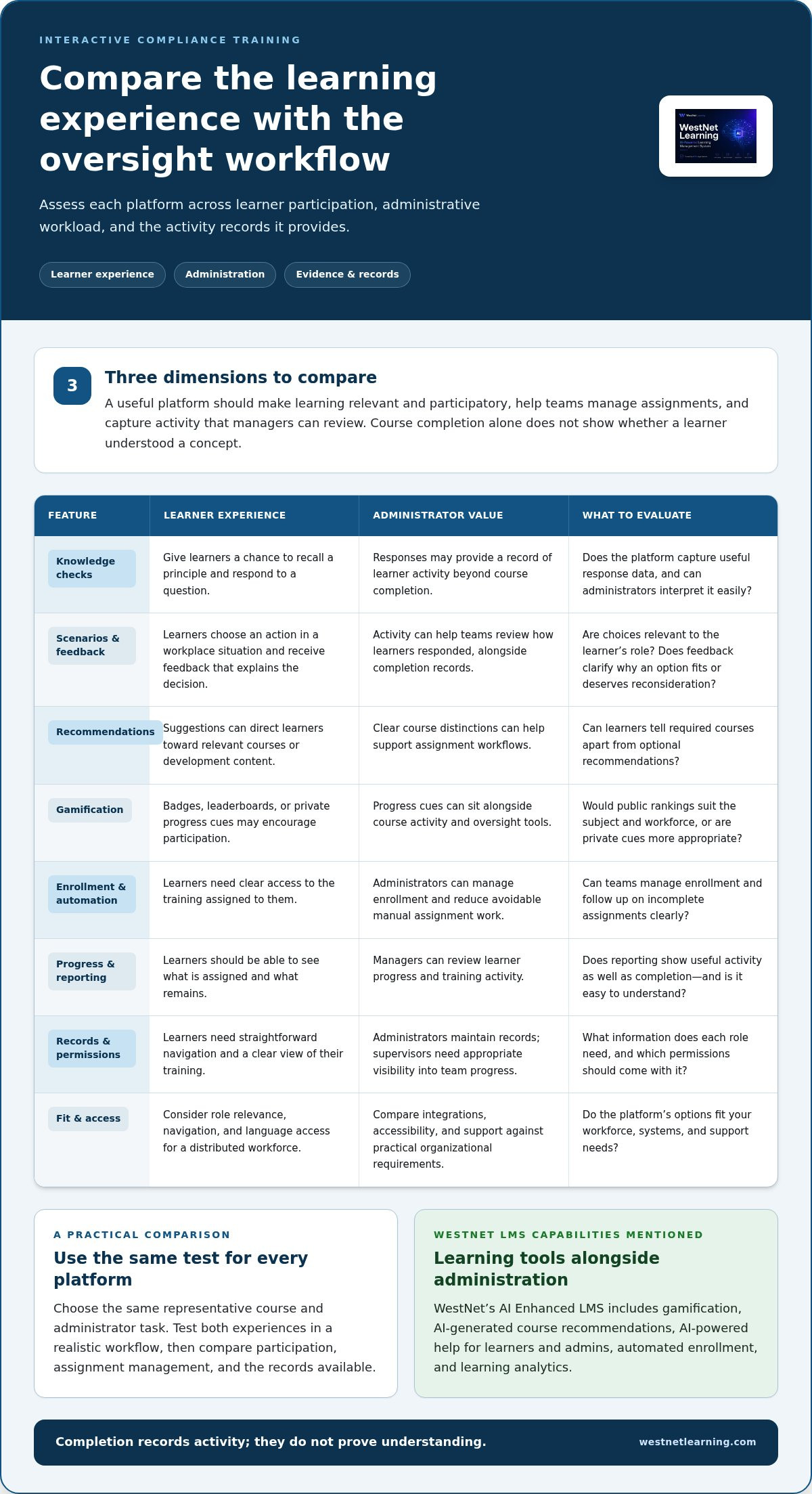
Assess features by the job they do, not by how impressive they look in a product tour. A useful interactive compliance training platform should help learners engage with relevant material and give administrators practical tools to assign courses and review activity. Compare three dimensions: learner experience, administrative workload, and the evidence the platform captures.
Build a comparison table with four columns: feature, learner benefit, administrator value, and evaluation question. For example, a knowledge check may help a learner apply a concept and provide administrators with a record of the response. Ask whether the platform captures only completion or also useful activity data, and whether administrators can interpret that information easily.
Learner-facing features that create active participation
Inspect the course experience directly. Can learners answer questions, make choices in a scenario, receive clear feedback, and see their progress? Each interaction should serve the lesson, not add clicks for their own sake. Recommendations can help learners find assigned or relevant development content. Assess how suggestions appear and whether learners can distinguish required courses from optional ones.
Review gamification just as carefully. Badges or leaderboards may encourage participation in some learning cultures, but they should not replace relevant content or meaningful feedback. Consider whether public rankings suit the subject and workforce, or whether private progress cues would be more appropriate. WestNet’s AI Enhanced LMS includes gamification and AI-Generated Course Recommendations for learners, alongside AI-Powered Help for learners and admins. Evaluate how these tools fit the experience you want to create.
Language access also matters for a distributed workforce. Evaluate whether learners can use the platform in a language they understand and whether course content is available in the languages their roles require. WestNet supports up to 60 site languages, which users select at login. Assess site language and course language separately; they serve related but distinct needs.
Administrator features that keep training manageable
Test the administrative workflow, not just the feature list. Review automated enrollment, user management, role permissions, progress views, and reporting. Ask an administrator to assign a course to a defined learner group, identify incomplete training, and locate the relevant records. If supervisors need visibility, consider whether they can access team information without unnecessary system controls.
Then trace employee data from its source. HRIS integration and data migration affect how user records enter the platform and how administrators maintain them. Map the fields and processes your team relies on, then evaluate the handoffs. For existing learning materials, test how SCORM or xAPI courses work in the platform and what administrators can monitor after assignment.
Compare the usefulness of the evidence, not just its volume. Learning analytics and reporting should help teams understand learner activity in context; a completion figure alone will not explain what learners encountered or where they may need follow-up. Review WestNet’s AI LMS capabilities against your learner and administrator requirements.
How to compare interactive compliance training platforms before buying
Compare platforms against the same requirements, not whichever features stand out in a product tour. A structured matrix helps you weigh the learner experience alongside the work administrators must complete. Use consistent criteria across interaction, administration, reporting, integrations, accessibility, and support. Record evidence from a demonstration or trial instead of relying on broad feature labels.
For each criterion, note what your organization needs, what you observed, and any follow-up questions. For example:
- Interaction: Can learners respond to questions or scenarios and receive useful feedback?
- Administration: Can staff assign courses and manage learner groups through a workable process?
- Reporting: Which activity and completion records can administrators review or export?
- Integrations: How does the platform connect with your HRIS and authentication processes?
- Accessibility: Can your learner groups access and use the course experience effectively?
- Support: What administrator guidance and help resources are available?
Apply the same test to every option. Select a representative course and ask each platform to show the learner path, an administrator assignment, and the resulting report. This makes differences easier to identify than comparing feature lists alone. Include compliance training platform capabilities in your evaluation criteria.
Compare learner experience and course compatibility
Test with the courses and learner groups you expect to support. Follow the navigation, try the feedback, and check whether progress is clear. If employees need different language options, evaluate both the platform interface and the course content. A translated interface does not automatically mean the learning material is translated.
Bring existing SCORM or xAPI content into the evaluation where possible. Check whether it launches as expected, whether interactions work, and what activity appears in reporting. Separate course availability from course management: a platform may include ready-made courses, manage content your organization already has, or support both. Identify which model meets your needs.
Compare administration, integrations, and reporting
Walk through a real administrative sequence: create or select a learner group, assign a course, review follow-up tasks, and locate completion records. Include certificates if your workflow uses them. Ask how records are stored and retrieved, but do not treat a platform report as a guarantee of audit results or proof of understanding. For questions about certification workflows, automated certification tracking guidance can help you frame your review.
Finally, map HRIS integration, authentication options, data migration, and user-license processes to your current systems and responsibilities. Confirm where information originates, how changes are reflected, and who can access each report. A fair comparison shows not just what a platform can do, but how its capabilities fit your day-to-day workflow.
How to evaluate a platform with a practical compliance training workflow
A product demonstration is more useful when it mirrors work your team actually does. Evaluate each interactive compliance training platform using the same course, learner group, assignment, and reporting task. This reveals how features connect across a workflow, rather than leaving you to infer how a list of capabilities will work in practice. Set objectives for both learning and administration, using compliance training best practices to frame what your process needs to support.
Use this sequence to structure the evaluation:
- Map requirements. Identify learner groups, required course content, access needs, records, reporting, and the teams responsible for each task.
- Choose a representative course. Select material employees use, with the interactions and completion requirements your program needs.
- Run the learner test. Enroll a test learner and follow the course from sign-in through questions, feedback, progress cues, and completion.
- Run the administrator test. Assign the same course to a defined group, review learner status, and generate or locate the report your team relies on.
- Review operational fit. Discuss migration, authentication, integrations, support, and rollout ownership before comparing results against your requirements.
Run a realistic learner and administrator test
Give the learner and administrator separate tasks. The learner should access the course, respond to an interaction, interpret feedback, and find their completion status. The administrator should manage enrollment and roles, review progress, and locate relevant records or certificates. Note where either person needs help, repeats steps, or cannot find information. These observations make usability concrete and show which gaps matter most to your organization.
Compare friction against the requirements you documented before the demonstration. A minor navigation issue may be manageable; a missing report or unclear role permission may affect a core workflow. Record what you observed, what the platform demonstrated, and what remains unresolved. Completion records and certificates can support administration, but they do not establish understanding or guarantee an audit outcome.
Plan rollout without disrupting existing workflows
Before migration, inventory existing courses, learner records, authentication methods, and HRIS dependencies. Identify who will prepare data, validate accounts, configure assignments, support learners, and review ongoing reports. Clarify how user changes will be handled, including employees who leave or change roles. Assign an owner to each step so the transition does not depend on an undefined handoff between teams.
Also assess administrator support and the responsibilities your internal team will retain after launch. Broader workforce needs may shape these decisions; the corporate training LMS overview provides context for considering training beyond a single compliance workflow.
Explore WestNet’s AI LMS to see how its learning and administration capabilities can fit into your evaluation.
How WestNet’s interactive compliance training platform connects learning and administration
Once you’ve defined the learner experience, administrative workflows, integrations, and reporting your organization needs, assess a platform against those criteria. WestNet Learning’s AI Enhanced LMS brings learning and administration capabilities together in one system. Its features can support a connected training workflow, but they do not guarantee regulatory compliance or particular learning outcomes. The value depends on how the platform fits your courses, people, and processes.
Match WestNet capabilities to the evaluation criteria
For course development, AI-Powered e-learning Creation can support the process of turning learning material into courses. AI-Generated Course Recommendations for learners can direct people to relevant content, while AI-Powered Help for learners and admins provides help for different user roles. Evaluate these capabilities using actual tasks: see how a learner finds a recommended course and how an administrator gets help with an assignment workflow.
For engagement and oversight, WestNet includes Gamification, Automated enrollment and other task automation, and Learning Analytics and Reporting. Consider how gamification fits your learning culture, how enrollment maps to your assignment process, and what the reporting makes visible to administrators. Use a representative course and learner group to see how learner activity relates to the records your team needs to review.
Operational fit matters just as much. WestNet supports HRIS Integration, Data Migration & Administrator Support and includes a Dedicated Client Success Manager. Map your employee records, user roles, and reporting responsibilities before evaluating the handoffs. The LMS also supports up to 60 site languages, which users select at login. This is a site-language capability, so assess course content separately for your workforce’s language needs.
For user management, deactivated user licenses can be reused for new users. Consider how that process fits your organization’s account lifecycle and responsibilities. Reviewing each capability against a real workflow gives you a clearer basis for assessing fit than a feature checklist alone.
Move from platform evaluation to a confident next step
Use a demonstration to examine the tasks you’ve already defined. Review the learner experience for a representative course, then follow the administrator path for enrollment, progress review, and reporting. Bring questions about your HRIS connection, authentication options, migration needs, and administrator support. A focused demonstration can help your team assess how the pieces connect before planning adoption.
WestNet also offers a free 30-day trial, giving your organization a way to assess platform fit with real workflows. Use the trial to work through course access, learner recommendations, enrollment, and reporting with the roles and processes you’ve identified. Capture friction, assess whether the records meet your operational needs, and document remaining questions for the people who will administer the platform.
Request a WestNet LMS demo to evaluate how its learning and administration capabilities fit your compliance training workflow.
Make your next training decision a practical one
Choosing an interactive compliance training platform is also a chance to define how learning will evolve inside your organization. Before rollout, identify who will review course content, how employee feedback will reach the right team, and when training activity should prompt a closer look. Clear ownership helps turn a technology decision into an operating process that can adapt as roles and organizational needs change.
Use your evaluation to bring learning, compliance, and administrative stakeholders together around shared priorities. Their perspectives can reveal where a workflow needs refinement and help keep the platform aligned with how employees work. The goal is not simply to launch software. It is to build a manageable foundation for relevant learning and responsible oversight.
Use your evaluation criteria to start a focused conversation about your organization’s training workflow. Request a WestNet LMS demo to discuss the tasks and requirements that matter to your team.
Frequently Asked Questions
What makes a compliance training platform interactive?
An interactive compliance training platform asks learners to make choices or respond to course material, rather than only watch or read. For example, a course might present a workplace scenario and ask the learner to select a response, then explain the consequences of that choice. The interaction should connect to the lesson’s objective. A useful test is whether learners must demonstrate a decision, not just advance to the next screen.
Can an LMS guarantee compliance with regulations?
No. An LMS can help organize assigned learning and provide records of training activity, but it cannot guarantee that an organization meets every applicable requirement or that employees will follow a policy. Compliance also depends on factors beyond course delivery, including current policies, management practices, and how employees apply guidance in their roles. Treat platform records as one input for oversight, not as a substitute for legal or compliance review.
How do interactive compliance courses differ from standard online courses?
Interactive courses invite learners to respond during the lesson, while a standard online course may mainly present information for viewing or reading. A practical difference is how learners work through a challenging decision: an interactive lesson can ask them to choose an action and explain the reasoning, while a passive course may simply describe the correct procedure. Compare course formats by checking whether interaction reinforces the specific topic being taught.
What should I look for in compliance training reporting?
Look for reports that help answer operational questions, such as which assigned learners have completed a course, which assignments need follow-up, and whether records can be located by course or learner. Check how clearly the report distinguishes course status from other activity, and whether administrators can access information relevant to their roles. Before selecting a platform, identify the decisions your team needs its reports to support and test those views directly.
Can an interactive compliance training platform support existing courses?
Yes. WestNet supports AI-Powered eCourse creation in SCORM or xAPI formats. During evaluation, test a representative course from launch through completion, then review the activity the platform records. Also confirm that the course behaves as intended for learners and that administrators can find the information they need afterward.
How can gamification support compliance training?
Gamification can add participation cues, such as badges or leaderboards, to a learning experience. Its value depends on whether those elements suit the subject and workplace culture. A badge for completing a learning activity may help signal progress, but it does not show by itself that someone understands the material. Keep the focus on relevant course content, and assess whether game elements encourage attention without distracting from the learning objective.
What is a practical way to evaluate an LMS before choosing one?
Run a focused test using a real course and a realistic learner task, then have an administrator assign it, review the resulting status, and locate the record. Include an exception, such as a learner changing departments or needing a course reassigned, to see how the process works beyond the simplest case. Document friction and compare what you observe with the requirements your organization set before the evaluation.