A HIPAA compliance LMS for healthcare staff can help organize training assignments and completion records across roles and locations, but a platform alone cannot guarantee HIPAA compliance. The challenge is finding a system that improves visibility while keeping access to sensitive information appropriately limited.
If you’re comparing options, look beyond feature lists. Assess whether an LMS supports your workforce training workflows, provides useful evidence of learning activity, and fits your organization’s access and reporting needs.
This 2026 buyer’s guide gives you a practical way to evaluate those needs. It covers assignment management, completion tracking, role administration, reporting, integrations, and operational fit, including questions to raise during access and security reviews. It also explains where an LMS can support administrators and where organizational policies, qualified content review, and broader compliance work remain essential.
Key Takeaways
- A HIPAA compliance LMS for healthcare staff can organize training assignments and records, but it cannot replace an organization’s broader compliance responsibilities.
- Assess access administration, course workflows, learner support, and reporting against the needs of your workforce.
- Use a comparison framework to separate LMS capabilities from policy, content approval, workforce, and security requirements.
- Plan implementation in stages, with qualified review of HIPAA learning content kept distinct from LMS configuration.
- WestNet LMS includes automated enrollment, role administration, and learning analytics to support training workflows.
HIPAA compliance LMS for healthcare staff: what the platform can, and cannot, do
A HIPAA compliance LMS for healthcare staff is a learning management system used to assign, deliver, and document training related to the Health Insurance Portability and Accountability Act. It can bring training tasks into one system: administrators can assign learning to relevant groups, track progress, and identify records that need follow-up. This creates a clearer view of training activity, but it does not make an organization compliant on its own.
HIPAA includes the Privacy Rule and Security Rule, which address different aspects of protecting health information. The HIPAA (Health Insurance Portability and Accountability Act) overview offers background on the law and its components. For authoritative information about requirements and how they apply, consult current HHS Office for Civil Rights (OCR) guidance. Training expectations depend on the organization’s role, workforce, policies, and circumstances.
Which healthcare workforce training responsibilities should the LMS support?
Start by identifying who needs to learn what. Clinical, administrative, and IT roles may encounter different information and workflows, so assignments should reflect job responsibilities and applicable organizational policies. Avoid assuming that one course fits every learner. The LMS should help administrators manage assignments, monitor completion, and identify who needs a reminder or other follow-up. Set timing according to organizational requirements rather than assuming a universal schedule applies to every workforce.
Useful records connect the main steps: who was assigned training, whether it was completed, and what follow-up occurred when it was not. These details help administrators spot gaps and coordinate next actions. They do not establish that the course content was accurate or relevant. Organizations remain responsible for approving materials and keeping them aligned with current policies and workforce needs. AI-assisted course conversion can support content workflows, as described in AI course conversion tools and LMS compliance, but qualified review of HIPAA-related content remains essential.
Why an LMS is not a HIPAA compliance guarantee
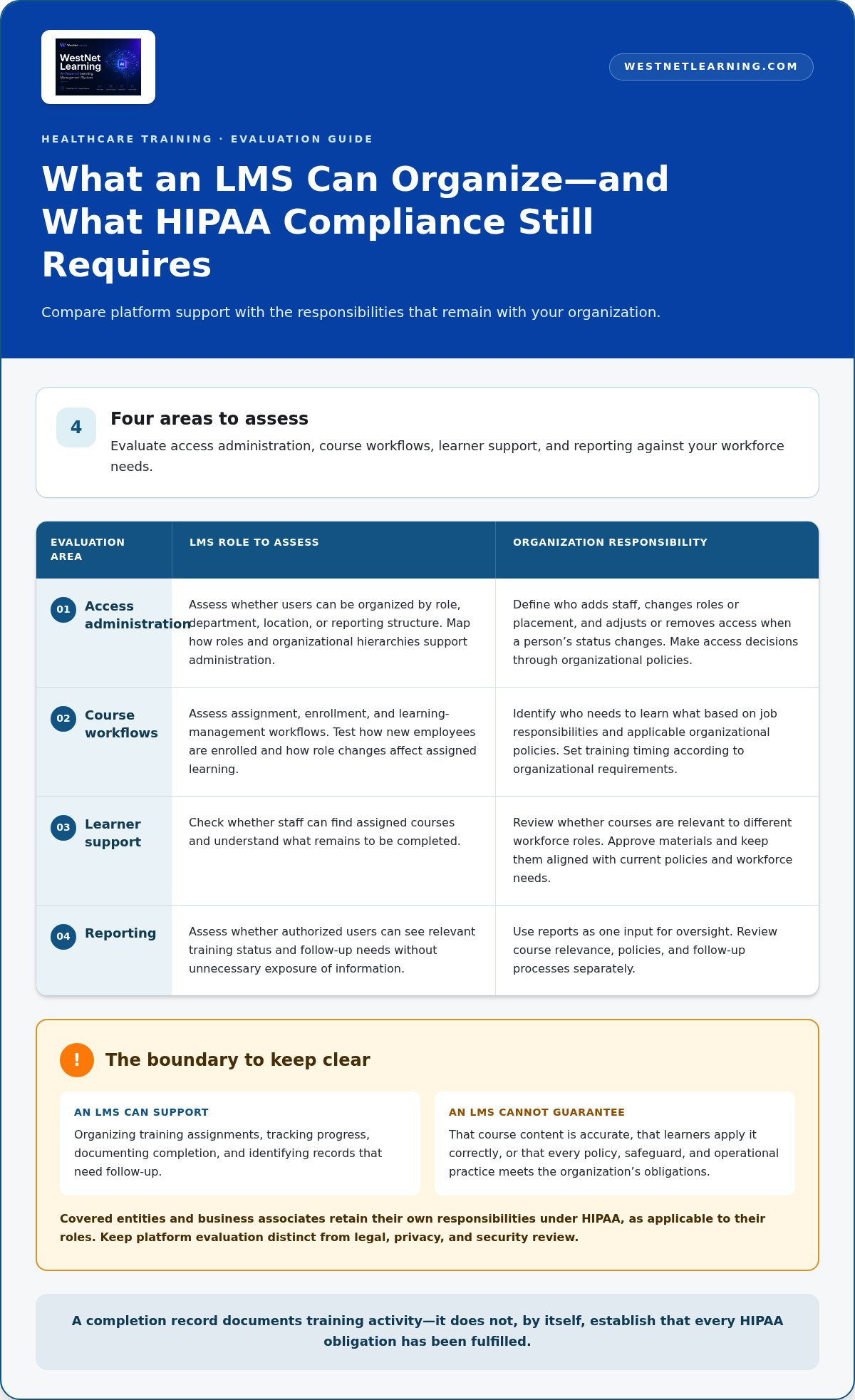
An LMS manages learning workflows. Covered entities and business associates retain their own responsibilities under HIPAA, as applicable to their roles. Features such as enrollment, role administration, and reporting can help organize evidence of training activity. They do not determine whether every policy, safeguard, or operational practice meets an organization’s obligations. Keep platform evaluation distinct from legal, privacy, and security review.
An LMS can support compliance work by organizing training and its records, but it cannot guarantee that an organization complies with HIPAA. A completion record shows that a learner completed an assigned course. It does not show that every obligation has been fulfilled or that the learner applies the material correctly. Treat reports as one input for oversight. Review course relevance, policies, and follow-up processes separately, and consult current HHS OCR guidance. This distinction helps decision-makers value the LMS for what it does without relying on it to solve responsibilities that belong to the organization.
HIPAA LMS features: evaluate access, course workflows, and training evidence
Evaluate an LMS by tracing the work administrators need to do, from adding staff to reviewing completion status. A useful comparison goes beyond security terminology. Test whether the platform fits existing identity systems, supports your course assignment process, and gives appropriate users clear training information. For a HIPAA compliance LMS for healthcare staff, these workflows matter across departments, roles, and locations.
Use four categories as your evaluation checklist: access administration, course workflows, learner support, and reporting. The official HIPAA training requirements from HHS provide a reference point for training considerations. Align course and assignment decisions with applicable requirements and organizational policies.
- Access administration: Can administrators organize users by role, department, location, or reporting structure?
- Course workflows: Can they assign, enroll, and manage learning in ways that match the organization’s processes?
- Learner support: Can staff find assigned courses and understand what remains to be completed?
- Reporting: Can authorized users see relevant status and follow-up needs without exposing unnecessary information?
Access management and administrative controls
Map user lifecycle steps before comparing platforms. Identify who adds a worker, changes their role, updates their organizational placement, and adjusts or removes access when their status changes. Then review how custom roles and organizational hierarchies support those tasks. If SSO or HRIS integration is part of your environment, assess how it would connect with existing identity and workforce processes. Define access decisions through your policies; do not assume a feature label proves that a particular security control is in place.
Course delivery, enrollment, and completion records
Test a representative assignment workflow. For example, trace how a new employee is enrolled, how a role change affects assigned learning, and how an administrator identifies incomplete courses for follow-up. Compare automated enrollment, prerequisites, course restrictions, and catalog management against those scenarios. If existing materials use SCORM or xAPI, include them in compatibility discussions. The aim is a process administrators can manage consistently, not automation for its own sake.
Then inspect reporting from the perspective of each intended user. A training administrator may need course status and completion details, while a manager may need a narrower view of their team. Check whether reports clearly show assignment, completion, and follow-up activity, and whether report access can align with organizational roles. Keep report content focused on the task so that visibility does not become unnecessary data exposure.
WestNet AI LMS supports user and role administration, automated enrollment, HRIS integration, SSO, and Learning Analytics and Reporting. Use a walkthrough to map these capabilities to your workflows, including how SCORM or xAPI materials fit your course library. Explore how an LMS for compliance training can structure assignments and learning records, then assess the configuration against your organization’s policies.
How to compare a HIPAA training LMS with your security and workflow requirements
Compare platforms against real workflows, not feature counts. A system may advertise dashboards or integrations, but their value depends on whether administrators can use them to assign learning, review completion, and act on gaps without adding avoidable steps. Evaluate the LMS alongside your organization’s policies, course-content decisions, workforce processes, and security review. A system-level compliance LMS evaluation can help clarify how a platform fits into the wider training environment.
Use a shared matrix to record evidence and accountability. Assign an owner to each decision, document the result, and note any unresolved issues.
| Requirement | Evidence to request | Owner | Evaluation result |
|---|---|---|---|
| Assignments and completion | Demonstration of assigning courses and reviewing status | Training administrator | Fit, gap, or follow-up |
| Reporting and access | Sample reports, filters, role permissions, and export workflow | Privacy or compliance lead | Fit, gap, or follow-up |
| HR and identity integrations | Workflow map for HRIS data and SSO | IT and HR | Fit, gap, or follow-up |
| Content relevance | Review and approval process for learning materials | Compliance or content owner | Approved, revise, or follow-up |
| Sensitive-data handling | Data-flow review and applicable security documentation | Security and legal stakeholders | Reviewed, unresolved, or follow-up |
Questions for evaluating evidence and reporting
Decide what actions reports need to support before comparing dashboards. Which learners were assigned a course? Who completed it? What activity or follow-up does an administrator need to see? Review filters, report access, exports, and the steps for checking records. Keep report views limited to what each role needs. LMS reports can show learning activity, but do not assume they provide a complete audit trail unless that capability has been verified.
Also distinguish HIPAA-related learning from other workforce education. Healthcare organizations may need to consider separate safety and compliance topics. Compliancy Group discusses broader regulatory training requirements for healthcare staff. Responsible organizational stakeholders should determine the relevant scope and schedule rather than infer them from an LMS catalog.
Questions for evaluating sensitive-data handling
Map the information that will enter the LMS. Will it contain PHI, or only workforce learning and administrative data? Ask security, privacy, and legal stakeholders to assess applicable controls and contractual obligations for the intended use. Do not enter PHI into AI tools unless organizational authorization and safeguards permit it. Keep this review separate from course workflow demonstrations.
When comparing a HIPAA compliance LMS for healthcare staff, weigh administrative effort, integration fit, reporting usability, and learner support against documented requirements. WestNet AI LMS supports user and role administration, HRIS integration, SSO, automated enrollment, and learning analytics. Review the WestNet LMS approach to compliance training to see how those workflows may map to your training operations.
Plan HIPAA staff training in an LMS: a practical implementation sequence
A smooth rollout starts with decisions, not settings. Before configuring a HIPAA compliance LMS for healthcare staff, agree on who owns learning content, who manages assignments, and who reviews training records. Keep content approval separate from LMS administration. The platform can organize and deliver approved materials, while qualified organizational stakeholders determine whether those materials reflect relevant policies and learning needs.
Map roles, learning needs, and ownership before configuration
Start by identifying the workforce the program must serve. List learner groups, supervisors, training administrators, and content approvers, then connect each group’s learning needs to internal policies and appropriate courses. Document who handles enrollment, reminders, exceptions, and record review. Clear ownership prevents incomplete assignments from becoming an unresolved handoff between departments.
- Align stakeholders. Bring together training, HR, compliance, privacy, security, and IT representatives as appropriate. Agree on objectives, decision owners, and how questions or exceptions will be routed.
- Map roles and learning needs. Define relevant learner groups and how job responsibilities or organizational changes may affect assignments. Avoid assuming that every employee requires the same course path.
- Approve course content. Have qualified stakeholders review materials for accuracy, relevance, and consistency with organizational policies. Treat AI-assisted course creation or conversion as a workflow aid, not a replacement for that review.
- Configure the LMS. Set up users, roles, organizational structures, enrollment rules, course access, and reporting to reflect the agreed process. Plan HRIS or SSO connections where they fit existing systems.
- Pilot the workflow. Test with representative users and administrators. Confirm that user provisioning and assignments work as intended, learners can access the right courses, and administrators can see completion status and follow-up needs in reports.
- Launch and review. Roll out the approved workflow, communicate responsibilities, and establish a recurring review of assignments, exceptions, course relevance, and reporting. Update processes when organizational policies or workforce needs change.
Configure, test, and monitor the training workflow
Make the pilot a working rehearsal, not just a platform demonstration. Include different roles and, where relevant, organizational locations. Ask learners to complete assigned steps. Ask administrators to resolve a sample access issue, review an incomplete assignment, and generate a useful status report. Record gaps, assign an owner to each, and retest changes before expanding the rollout.
After launch, use learning analytics to support administration. Identify patterns in assignment status, direct follow-up, and inform workflow adjustments. Reports provide visibility into learning activity, but they do not prove compliance by themselves. Apply relevant compliance training best practices alongside your internal review process to maintain and improve the program.
WestNet AI LMS supports user and role administration, automated enrollment, and learning analytics and reporting for training workflows. Explore WestNet AI LMS for your staff training workflow.
Evaluate WestNet AI LMS for healthcare staff training and request a walkthrough
Once you have defined your training workflows, assess how a platform would support them in practice. WestNet AI LMS brings together tools for organizing assignments, managing users, and reviewing learning activity. Fit depends on how those capabilities map to your organization’s roles, existing systems, content approval process, and reporting needs. A platform can support this work, but selecting it does not certify or guarantee HIPAA compliance.
Where WestNet AI LMS can support training operations
Automated enrollment can help administrators coordinate course assignments. User Management supports custom roles, batch user loading, and organizational hierarchy management. Learning Analytics and Reporting provides visibility into learning activity. HRIS integration, SSO, data migration, and administrator support can contribute to a connected training operation. These capabilities help manage workflows; your organization remains responsible for its policies, content decisions, and compliance work.
AI-Powered e-learning Creation supports SCORM or xAPI course creation, which can help teams develop or prepare course materials for delivery. Treat this as a content workflow capability, not regulatory validation. Have qualified reviewers assess HIPAA-related materials for accuracy, relevance, and alignment with current organizational policies before assigning them. An LMS for compliance training can organize assigned learning and records, but it cannot determine whether the organization has met every applicable obligation.
Prepare a focused LMS demonstration
Make the walkthrough specific to your operating model. Bring representative role groups, sample enrollment rules, reporting questions, and examples of existing course formats. Avoid using PHI in demonstration materials. Use fictional or appropriately de-identified examples so stakeholders can assess the workflow without introducing unnecessary sensitive information.
Ask to see both the administrator and learner experience, not just a feature overview. Follow a sample user from account or roster setup through course assignment and completion, then review what an administrator can see in reports. If HRIS integration or SSO is relevant, discuss how those connections relate to your current workforce and identity systems. Note where configuration, internal policy decisions, or security review are still needed.
Use the session to assess whether the HIPAA compliance LMS for healthcare staff supports practical needs: manageable administration, clear learning status, useful reporting, and a workable learner experience. Capture questions and assign follow-up to the appropriate training, IT, privacy, or security stakeholders. Make your decision with a clear view of platform capabilities and the responsibilities that remain with your organization.
Move from LMS evaluation to an informed decision
Turn your requirements into a practical decision by bringing together the people responsible for training, workforce administration, and privacy or security review. Agree on what a successful workflow must look like. That shared view helps your team distinguish a platform that fits its operations from one that simply presents an impressive feature list.
Use a walkthrough to explore priority scenarios and identify questions for internal review. A HIPAA compliance LMS for healthcare staff should support your organization’s training processes, while compliance decisions and responsibilities remain with the organization. Keep that distinction clear as you compare options and plan implementation.
Request a WestNet AI LMS demo to evaluate how the platform could fit your staff training workflows. Start with the outcomes your team needs, test the process together, and move forward with greater clarity.
Frequently Asked Questions
Is an LMS by itself enough to make a healthcare organization HIPAA compliant?
No. An LMS can support training administration, but it cannot establish that every part of an organization’s HIPAA program is in order. Course completion data, for example, does not show whether staff follow internal procedures in daily work or whether safeguards are appropriately managed. Treat the platform as one component of a broader program, with designated leaders overseeing policies, security practices, workforce expectations, and other applicable responsibilities.
What should a HIPAA compliance LMS for healthcare staff include?
Look for capabilities that fit your workforce structure and administrative process. A HIPAA compliance LMS for healthcare staff may need flexible user roles, course assignment options, learner access, and reports that help administrators identify follow-up needs. Test a scenario such as an employee transferring departments: can the team update the learner’s training path and confirm the change was handled? Have qualified stakeholders review security and contractual requirements separately.
Can an LMS store protected health information?
That depends on how the LMS is configured and used, so map data flows before implementation. A training platform might hold names, work roles, and learning records without needing patient details. A course example, uploaded file, or connected system could introduce PHI if staff include it. Establish clear rules for permitted data, use fictional examples for training, and have privacy and security stakeholders review the intended setup before launch.
How do healthcare organizations track HIPAA training completion in an LMS?
Use learner assignment and status reports to monitor who has started or completed required courses. For a useful process, decide who reviews incomplete assignments, how exceptions such as leave or role changes are handled, and where follow-up decisions are recorded. For example, a supervisor may flag a transfer while a training administrator updates the learner’s assignments. Use reports as learning records, not as evidence that every compliance responsibility has been fulfilled.
Does a HIPAA training LMS need a Business Associate Agreement?
Whether a Business Associate Agreement applies depends on the relationship, services, and information involved; the LMS label alone does not determine it. Before implementation, document what information the platform will handle and what functions the provider will perform. Ask qualified privacy or legal stakeholders to assess the organization’s obligations and review relevant contract terms. Do not assume the same agreement decision applies to every LMS deployment or data flow.
Can AI create HIPAA training courses for healthcare staff?
AI can assist with creating or converting course materials, but it should not be treated as the authority on HIPAA. A qualified reviewer should check generated content for accuracy, relevance to staff responsibilities, and alignment with current organizational policies before it is assigned. Maintain a content approval process that identifies who reviewed and approved each course. Do not submit PHI to an AI tool unless the organization has authorized that use and established appropriate safeguards.
How often should healthcare staff repeat HIPAA training?
There is no one schedule that applies universally to every organization, role, and situation. Set the training cadence with qualified compliance stakeholders, taking account of applicable requirements, internal policies, role changes, and material updates to procedures. For instance, a policy revision may prompt a targeted learning assignment rather than waiting for a routine cycle. Record the rationale for your schedule, then use the LMS to administer assignments and follow-up consistently.