The best executive coaching e-learning platform doesn’t replace the coach. It gives the digital learning around a coaching program a clear structure while keeping the human coaching relationship at its center.
Choosing the right system can be difficult when coaching platforms, online courses, and learning management systems seem to overlap. You need a practical way to coordinate learning resources and administration, then report participation without presenting it as proof of coaching outcomes.
This guide explains how to evaluate an e-learning platform against your program’s delivery model, enrollment process, and reporting needs. You’ll learn what an LMS can contribute, which requirements to define before comparing options, and how to assess fit in a product demonstration. We’ll also look at how course creation, automated enrollment, HRIS integration, and learning analytics can bring key workflows together. Use these criteria to make an evidence-based decision about the learning infrastructure for your executive coaching program.
Key Takeaways
- Choose an executive coaching e-learning platform that supports your program’s learning and administrative workflow, without treating technology as a substitute for coaching.
- Map the learner journey from enrollment and content access through completion and reporting to identify where a platform can simplify coordination.
- Compare coaching services, online courses, and LMS platforms by their primary purpose, users, and role in your program.
- Separate essential requirements from optional capabilities before evaluating demonstrations, including your needs for content, integrations, administration, and reporting.
- Assess how AI Enhanced LMS capabilities such as course creation, learner recommendations, learner help, and analytics align with your program’s requirements.
What Does an Executive Coaching E-Learning Platform Actually Do?
An executive coaching e-learning platform is a learning system organizations use to organize digital learning around an executive coaching program. It can bring content, participants, enrollment, and activity reporting into a structured workflow. Its role is to support learning operations, not to provide coaching or replace the coach-participant relationship.
Keep three functions distinct. A coach leads the coaching relationship and conversations. Courses provide structured learning content. An LMS administers that learning, from making materials available to tracking participation. Defining these roles early helps you select technology for the work it needs to do, rather than expecting one tool to cover every part of a development initiative.
Business coaching, also known as executive coaching, supports people in a business context. A learning platform can complement that work by organizing preparation and learning resources, while the coach and participant determine the focus of their conversations.
How is an LMS different from a digital coaching platform?
An LMS manages learning content, users, enrollment, and reporting. A digital coaching service focuses on coaching delivery or access to coaches. These options can support the same leadership initiative, but they have different jobs. An organization might use a coaching service for coach-participant engagement and an LMS to organize related learning materials and participation records.
Where does e-learning fit in an executive development program?
Digital modules can provide structured learning before a coaching conversation, prompts for reflection between sessions, or reinforcement after a topic has been discussed. The sequence should fit the organization’s goals, participants, and coaching model. Keep self-paced and instructor-led learning clearly identified as learning activities, not substitutes for individual coaching conversations.
Map the program as a set of connected but distinct activities:
- Prepare: Provide relevant learning material before a coaching discussion.
- Reflect: Use digital resources to support individual reflection between learning activities.
- Reinforce: Make follow-up content available after a topic has been covered.
- Administer: Coordinate access and review learning activity through the LMS, without treating activity data as evidence of coaching impact.
This distinction also clarifies platform requirements. If the immediate challenge is coordinating digital content and enrollment, prioritize learning administration. If the core need is the coaching relationship, focus on how that relationship is delivered. For organizations supporting participants across locations, connected learning for global teams can offer useful considerations for fitting digital learning into a wider program.
Build the learning sequence around the coaching model, not the other way around. A clearly defined platform role helps keep resources and administration organized while leaving coaching conversations between the coach and participant.
How an E-Learning Platform Supports the Executive Coaching Learning Journey
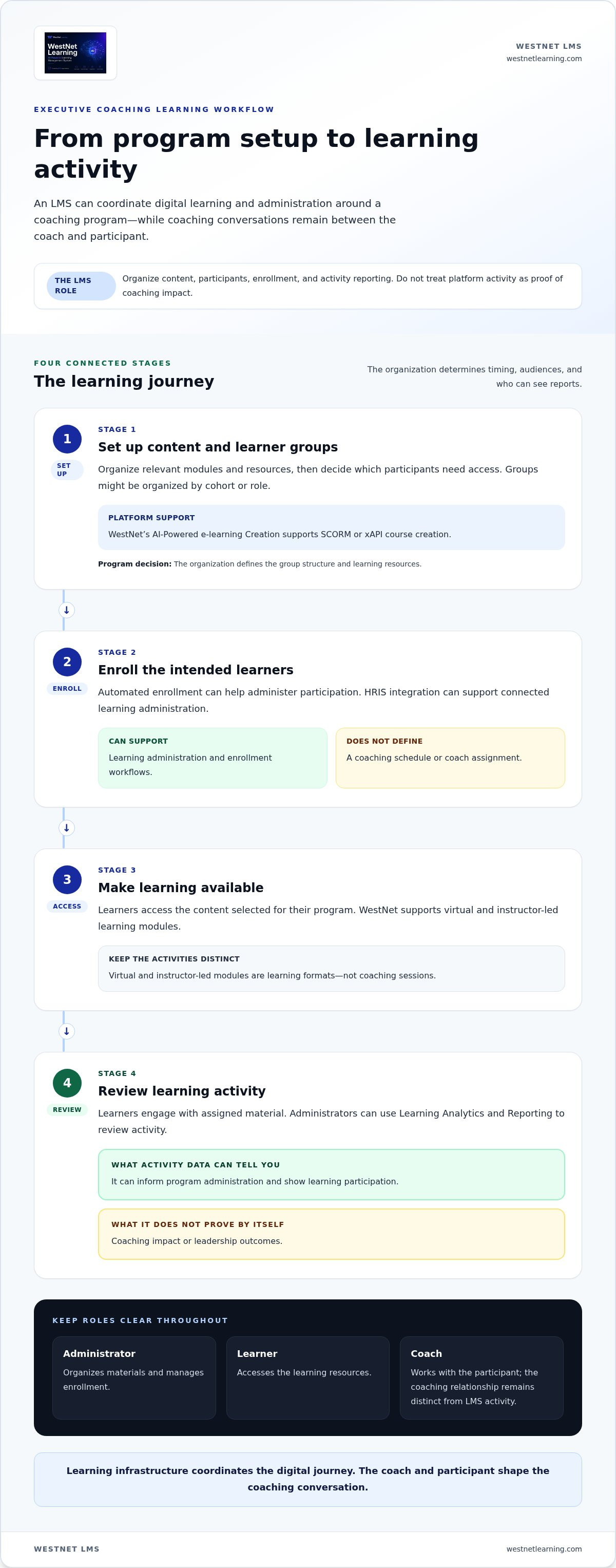
A well-planned learning journey connects program enrollment, relevant content, learner activity, and reporting. The LMS can coordinate those learning steps, while coaching conversations remain a separate part of the program shaped by the coach and participant. Use the workflow below as a planning model. Your organization decides timing, audiences, and who can see reports.
- Set up learning content and groups. Organize relevant modules and resources, then determine which participants need access. You might create groups by cohort or role, but that structure is a program design decision. WestNet’s AI-Powered e-learning Creation supports SCORM or xAPI course creation. Organizations can also explore AI course creation when planning digital learning content.
- Enroll the intended learners. Automated enrollment can help administer participation, while the organization decides who should be enrolled and when. HRIS integration can support connected learning administration. Neither capability defines a coaching schedule or assigns a coach.
- Make learning available. Learners access the content selected for their program. WestNet supports virtual and instructor-led learning modules. These are learning formats, distinct from coaching sessions.
- Review learning activity. Learners engage with assigned material, and administrators can use Learning Analytics and Reporting to review activity. Participation and course activity can inform program administration, but they don’t prove coaching impact or leadership outcomes by themselves.
Set up content and participation with clear roles
Define responsibilities before launch. Administrators can organize materials and manage enrollment. Learners access the resources. Managers may help identify program needs or review appropriate participation information, depending on organizational policy. Coaches may refer to learning resources in their work with participants, while the coaching relationship and conversation remain distinct from LMS activity. Decide in advance what each role needs to do and what information it should receive.
Personalize learning and review activity
Use recommendations to make relevant learning easier to discover. WestNet’s AI-Generated Course Recommendations can guide learners toward course content, while AI-Powered Help supports learners and administrators as they use the system. These features can complement the program’s learning sequence, but the organization still determines its goals, content, and connection to coaching.
For reporting, start with the question the organization needs to answer. Enrollment and completion activity can help administrators understand whether learners are engaging with assigned learning. These measures don’t assess the coaching relationship or establish outcomes they weren’t designed to measure. Keep that distinction clear in internal updates.
As you map the workflow, separate platform capabilities from design choices. The system can support enrollment, content access, recommendations, help, and reporting. Your organization defines cohorts, timing, responsibilities, and how learning relates to coaching. To see how these workflows could fit your program, request a WestNet LMS demo.
Executive Coaching Platform vs. LMS vs. Online Course: What Should You Compare?
These options solve different problems. A coaching service supports coaching delivery or access to coaches. An online course provides a defined learning experience. An LMS organizes learning content and its administration. An executive coaching e-learning platform is useful when an organization needs learning infrastructure around a coaching program, not a substitute for the coach.
| Category | Primary job | Typical user | Buyer questions |
|---|---|---|---|
| Coaching service | Provide coaching delivery or access to coaches | Coaching participants and program sponsors | Does the program need coach access or coaching conversations? |
| Online course | Deliver a defined set of learning content | Learners studying a particular subject | Does the course cover the learning topic and format we need? |
| LMS | Manage learning content, users, enrollment, and reporting | Learners, administrators, and program owners | Can it support our content workflow, integrations, and reporting needs? |
Think of these as complementary categories, not competing labels. A coaching service doesn’t automatically provide LMS administration, and a course alone doesn’t establish a coaching relationship. An LMS can organize digital learning and track participation, but it can’t replace a coach or demonstrate coaching impact through learning activity alone.
When is a coaching service the closer fit?
Choose this category when the central requirement is coaching delivery or coach access. For example, Coaching.com presents a coach-focused combination of education, practice tools, marketplace, and community, while CoachHub positions digital coaching around workforce development. These are examples of how providers describe their services, not independent evidence of effectiveness. Course administration alone doesn’t provide a coach-participant relationship.
When does an LMS become the stronger operational fit?
An LMS is a stronger fit when the operational challenge is coordinating learners, content, enrollment, and activity reporting. Map the process first: identify who maintains learner records, how people gain access, and what administrators need to report. Then assess whether HRIS integration, SSO, and administrator support fit existing processes. Treat each capability as a requirement to evaluate against your workflow.
Separate operational evidence from coaching evidence. An LMS report may show course access or completion, but those measures don’t demonstrate the quality of a coaching conversation or a leadership outcome. Define what each report can support before sharing it with sponsors, managers, or participants. This helps decision-makers use platform data accurately and avoid overstating its meaning.
To compare systems against your organization’s workflow, begin with clear LMS selection requirements. Ask whether the system’s primary job matches the gap you need to close. If the need is learning administration, WestNet’s AI Enhanced LMS can provide infrastructure for the digital learning component while the coaching itself remains human-led.
How to Evaluate an Executive Coaching E-Learning Platform
Start with the program’s operating requirements, not a feature list. An executive coaching e-learning platform should fit how your organization enrolls participants, delivers digital learning, and reviews activity. Separate essential requirements from optional enhancements before a product demonstration, so stakeholders can compare systems against the same criteria.
Build a requirements matrix for your program
Document who will use the platform and what each role needs to do. Include learner groups, administrator responsibilities, content formats, enrollment processes, integrations, and reporting questions. Mark each requirement as essential or optional, then note how you’ll verify it during evaluation. This keeps the discussion focused on actual workflows rather than features that don’t address a program need.
- Learning operations: Record how content is added, organized, and made available, and who manages these tasks.
- Users and enrollment: Identify participant groups, administrator roles, enrollment responsibilities, and any automated enrollment needs.
- Content: List the formats your program uses, including SCORM or xAPI courses where relevant, and note whether virtual or instructor-led modules are part of the learning model.
- Integrations and access: Document required HRIS data flows and whether single sign-on (SSO) is essential for your existing processes.
- Reporting: Specify the learning activity administrators need to review, who should see reports, and what conclusions the data can reasonably support.
- Language needs: Note the languages learners need to access. WestNet supports up to 60 site languages, with users selecting a language at login.
For teams spread across regions, language access is one part of a wider learning-operations plan. Consider how participant groups and administration will work across locations, alongside the points in this guide to AI LMS support for global teams.
Use a demo to test real workflows
Bring representative learners and administrators into the evaluation. Use sample learning content and trace a realistic journey from enrollment through access and reporting. Ask administrators to walk through user and course management, then compare each step with the requirements matrix. A demonstration is most useful when it shows the workflow your team needs, rather than offering only a general feature tour.
Use a consistent scorecard. For each essential requirement, record whether the workflow was demonstrated, who completed it, and what follow-up is needed to assess fit. Keep optional capabilities in a separate section so they don’t outweigh gaps in core administration. If you need broader criteria for comparing systems, apply this learning management system selection guide alongside your program-specific checklist.
Evaluate what the platform can support, while keeping learning activity distinct from coaching outcomes. To see how WestNet’s AI Enhanced LMS aligns with your requirements, request a product demo.
How WestNet’s AI Enhanced LMS Can Support Executive Coaching Learning
WestNet’s AI Enhanced LMS provides learning infrastructure for the digital components around an executive coaching program. It can help organizations create or organize learning content, administer participation, support learners, and review learning activity. It isn’t an executive coaching service: coaches and participants remain responsible for the coaching relationship and conversations.
Match confirmed WestNet features to learning requirements
Start with the tasks your program needs the learning platform to support. WestNet’s AI-Powered e-learning Creation supports SCORM or xAPI course creation, giving organizations a way to prepare digital learning content for the platform. AI-Generated Course Recommendations can help learners discover relevant courses, while AI-Powered Help supports learners and administrators using the system.
For program oversight, Learning Analytics and Reporting gives administrators learning activity to review. Use it to understand participation in learning, not as standalone proof of coaching effectiveness or leadership outcomes. Automated enrollment supports the administration of learner participation, and HRIS Integration can connect relevant HR and learning workflows. Together, these capabilities can help organize administration around the processes your organization uses.
Make technical requirements explicit. WestNet supports Single Sign-On (SSO), so include it in the technical review if it is part of your organization’s access model. If transferable user licenses or a Service Level Agreement matter to procurement, include them in your evaluation criteria and review the applicable terms. Document requirements before comparing options so decisions reflect your actual needs.
Choose a practical next step
Before evaluating WestNet, write down the learning tasks you need to coordinate: who will administer content, how learners will be enrolled, which learning formats are in scope, what HRIS connection is needed, and which activity reports administrators need. Separate essential requirements from useful additions. This gives stakeholders a shared basis for evaluating whether the platform fits the learning layer of the coaching program.
Then assess the executive coaching e-learning platform against a real workflow. In a demo, have stakeholders consider how course creation, learner access, enrollment, learner support, and reporting relate to the program’s requirements. Keep the evaluation focused on practical fit, and distinguish what the LMS supports from the coaching work itself.
Organizations can request a WestNet LMS demo or start a free 30-day trial to evaluate the platform. Use either option to explore the system against your requirements, without assuming that a technology choice alone determines program results.
Make Your Next Step a Clear Fit Decision
The strongest platform choice starts with a shared definition of what your organization needs the learning system to do. Before moving forward, align program sponsors, administrators, and learning stakeholders on the workflows that matter most and the evidence they’ll use to assess platform fit. That clarity grounds the technology decision in how the program will operate while preserving the human coaching relationship at its center.
Use your requirements as a practical lens for evaluating an executive coaching e-learning platform. A focused demonstration helps stakeholders explore how the system fits their learning operations, and organizations can also use WestNet’s free 30-day trial to evaluate the platform.
Request a WestNet LMS demo and take the next step toward a learning workflow built around your organization’s needs. A thoughtful evaluation can give your program a more coordinated foundation for what comes next.
Frequently Asked Questions
Can an e-learning platform replace an executive coach?
No. A platform can make learning resources available, but it can’t provide a coach’s professional judgment or the interaction that shapes a coaching conversation. For example, a digital reflection exercise might help a participant prepare for a discussion, while a coach helps explore the participant’s perspective. Keep coaching notes and conversations within the appropriate coaching relationship, and use the LMS for learning activities.
What is the difference between an executive coaching platform and an LMS?
An executive coaching platform may focus on facilitating coaching delivery or managing coaching-practice activities, while an LMS focuses on administering learning. The distinction matters when a purchase request uses “platform” to describe both needs. Ask stakeholders to identify the task they need to accomplish first: arranging coaching access, providing a defined course, or coordinating learning administration. That answer clarifies which category should lead the evaluation.
Can an LMS support a blended executive development program?
Yes, an LMS can support the learning component of a blended program, including digital materials and virtual or instructor-led learning modules. For example, an organization might use it to make preparatory material available before a group learning event. The program team still determines how that activity relates to individual coaching, peer learning, or other development work. Map each activity to its owner so learners know where to go.
How can an organization measure an executive coaching program through an LMS?
Use the LMS to review learning participation, then keep coaching and business-outcome measures distinct. Course access or completion can indicate whether participants engaged with assigned learning, but it doesn’t establish that coaching caused a change in leadership performance. Before launch, define the measures for each part of the program, identify who collects them, and state what each measure can and can’t demonstrate.
Can an LMS connect executive development learning with HR systems?
Yes, an LMS with HRIS integration can support connected learning workflows. The relevant data and process depend on organizational requirements. WestNet supports HRIS Integration and Single Sign-On (SSO). Before evaluation, decide which approved employee details, such as department or role, are relevant to the learning workflow, who maintains them, and how administrators will handle changes.
What should I include in a demo of an executive coaching e-learning platform?
Bring a short scenario that reflects your actual program, such as enrolling a new participant, making a course available, and reviewing the resulting activity. Ask an administrator and a learner to follow the steps, and note where questions or extra manual work arise. Include relevant content formats, authentication needs, and reporting questions. This makes the demo a practical fit assessment, not just a feature overview.
Can an e-learning platform support learners in multiple languages?
Language support for the platform interface and learning materials are separate considerations. WestNet supports site-language selection at login, but that doesn’t mean every course or coaching resource is automatically translated. List the languages learners need for platform navigation and separately identify the language requirements for course content. This helps teams assess the learner experience without assuming one language capability covers both.