What good is a training report if it can’t answer the question your leaders are asking? Standard reports may show course completions, yet leave department heads, program managers, and executives without the context they need to decide what happens next. Choosing corporate training software with custom reporting starts with a sharper question: which learning decisions must your data support?
Reporting needs vary across roles and programs, and stakeholders may disagree about which metrics matter. The answer isn’t simply to collect more data. Define the decisions that matter, then assess whether a platform can help your team interpret learning activity and act on it. Clear requirements also make it easier to compare LMS capabilities beyond feature lists.
This guide will help you map stakeholder questions to reporting requirements, compare platforms through practical scenarios, and identify capabilities to evaluate, including learning analytics and integration needs. You’ll leave with a focused framework for choosing software that connects training data to useful decisions instead of adding another stream of numbers to interpret.
Key Takeaways
- Start with the decisions stakeholders need to make, then define the learning data that can inform them.
- Separate basic activity measures from indicators that help teams assess training progress and program relevance.
- Compare corporate training software with custom reporting against practical needs, including data scope, users, administration, integrations, and validation.
- Test reporting requirements with real stakeholder scenarios before choosing a platform.
- Explore how WestNet AI Enhanced LMS’s Learning Analytics and Reporting, HRIS Integration, Data Migration, and Administrator Support relate to your reporting needs.
Why Corporate Training Software Needs Reporting Built Around Business Questions
Training data is useful when someone can interpret it and decide what to do next. A completion total may confirm that employees finished a course, but it won’t necessarily tell a manager whether a team is falling behind, where learners need support, or whether a program addresses the right need. Buyers evaluating corporate training software with custom reporting should begin with questions, not a list of charts or metrics.
Custom reporting shapes learning information around an organization’s questions, audiences, and decisions. It doesn’t mean collecting every available data point. It means clarifying what information matters, who needs it, and what action the answer could inform. A Learning Management System (LMS) can record learning activity, but the value of that information depends on how well it supports the decisions people need to make.
Reports without a defined audience or follow-up action can create more noise than insight. Before requesting a metric, identify the decision it could support. If no one can explain what they would do differently based on the result, that information may not belong in a priority report.
What questions should training reports answer?
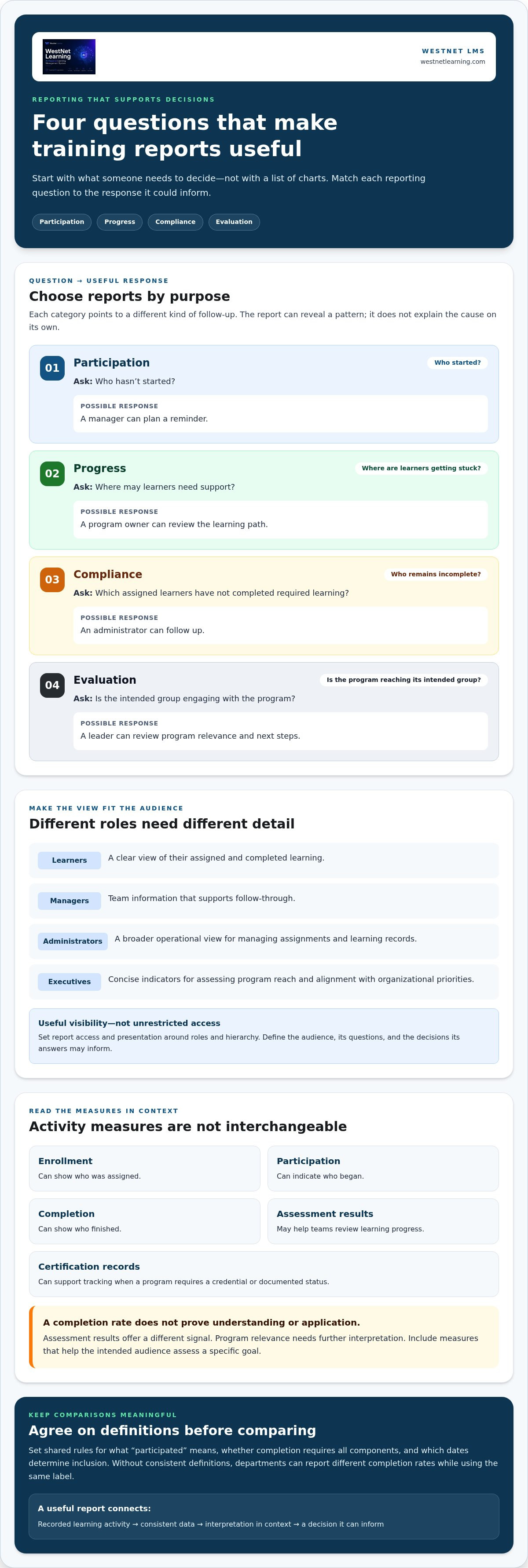
Group questions by purpose, then connect each answer to a practical response. Participation questions show who started or completed learning. Progress questions help identify where learners may need support. Compliance questions track whether required learning has been completed. Program evaluation questions help teams consider whether learning activity aligns with the program’s intended purpose.
- Participation: Who hasn’t started? A manager can plan a reminder.
- Progress: Where are learners getting stuck? A program owner can review the learning path.
- Compliance: Which assigned learners remain incomplete? An administrator can follow up.
- Evaluation: Is the intended group engaging with the program? A leader can review its relevance and next steps.
For example, a manager notices that one team has fewer course completions than expected. That finding can prompt a conversation about scheduling, access, or communication. The report identifies a pattern, but it doesn’t explain the cause on its own.
Who needs corporate training reports?
Different roles need different levels of detail. Learners may need a clear view of their assigned and completed learning. Managers may need information about their teams to support follow-through. Administrators need a broader operational view to manage assignments and learning records. Executives usually need concise indicators to assess program reach and alignment with organizational priorities.
Set access and presentation with roles and hierarchy in mind. A team manager’s view should support their responsibilities, while organization-wide summaries may serve leadership. The goal is useful visibility, not unrestricted access to every learner’s information. For broader context on how analytics can support enterprise learning strategy, explore enterprise learning analytics tools. Define the audience first, then specify the questions each audience needs answered and the decisions those answers can inform.
How Custom LMS Reporting Turns Learning Activity into Useful Insight
A useful report follows a clear path: learning activity is recorded, organized into consistent data, interpreted in context, and used to guide a decision. If any step is missing, a number can be accurate yet misleading. A completion rate may look low because employees haven’t finished a course, or because the report includes people who were never expected to take it.
A report creates value when its audience knows what the information means and which decision it can inform. That principle helps distinguish corporate training software with custom reporting from a system that simply collects activity. Buyers should examine how a platform brings records together and whether the resulting information can be interpreted in light of the program’s purpose.
Which training metrics belong in a report?
Choose measures based on the question a program needs to answer. Enrollment can show who was assigned, participation can indicate who began, and completion can show who finished. Assessment results may help teams review learning progress, while certification records can support tracking for programs that require a credential or documented status.
These measures are not interchangeable. A high completion rate says learners finished, but doesn’t by itself demonstrate that they understood or applied the material. Assessment results offer a different signal, and program relevance requires further interpretation. Include only metrics that help the intended audience assess a specific goal.
Define terms and reporting periods before comparing courses, teams, or groups. Decide what counts as “participated,” whether completion means finishing all required components, and which dates determine inclusion. Without shared definitions, two departments could report different completion rates while using the same label. Consistent rules make comparisons more meaningful.
How do organizational data and integrations affect reporting?
Learning activity gains context from the records attached to it. Department, role, and employment status can help explain which learners belong in a comparison and how their assignments relate to their work. If those details are missing or inconsistent, a report may group people incorrectly, obscure differences between teams, or include former employees in current summaries.
Consider HRIS integration as part of the reporting evaluation. HRIS data can provide a source for employee and organizational records, but buyers should clarify which fields are relevant, how records are maintained, and how changes such as department transfers are handled. These questions matter because the context used to organize learning data affects how stakeholders interpret it. For more on this connection, see HRIS integration for corporate LMS platforms.
During evaluation, use a realistic scenario: compare completion for a defined group during a defined period, then check whether the learner records and metric definitions support a fair reading. WestNet Learning’s AI Enhanced LMS includes Learning Analytics and Reporting, along with HRIS Integration and Data Migration. Explore WestNet’s LMS for corporate training as you consider how reporting and employee data needs fit together.
How to Compare Corporate Training Software with Custom Reporting
Compare platforms against the reporting work your organization needs to do, not the labels in a feature list. “Analytics” or “custom reporting” can describe different capabilities. A disciplined evaluation connects each requirement to a real audience, a learning question, and a way to validate the information before making a decision.
Which reporting capabilities should buyers assess?
Start with the questions and roles you have identified, then assess how each platform handles the information needed to answer them. Determine whether user, department, course, and program records can be organized for your reporting use cases. Consider administrative effort, relevant integrations, and how your team will check whether the information is accurate and useful.
| Comparison area | What to evaluate |
|---|---|
| Data scope | Which learning records and organizational details are available for the questions you need answered? |
| Intended users | Can learners, managers, administrators, and executives access information suited to their responsibilities? |
| Administration | How do administrators manage reporting workflows, maintain consistent definitions, and support routine requests? |
| Integrations | How does the platform relate learning records to relevant employee or organizational information? |
| Validation | Can your team check a result against a known group, course, and reporting period? |
Use the same scenario to compare every platform. For example, ask how you would review course completion across two departments during a defined period. Specify which employees belong in each group, what “completion” means, and which roles need the result. Then assess whether the available information and administrative process support that use case. This makes differences easier to see than a general feature checklist.
Compare confirmed capabilities with your documented requirements. WestNet Learning’s AI Enhanced LMS includes Learning Analytics and Reporting, HRIS Integration, Data Migration, and Administrator Support. These capabilities are relevant to reporting evaluation, but their names alone don’t establish a particular report design, filter, export, or output. Assess the platform against your use cases rather than assuming specific features.
How can you validate reporting before choosing a platform?
Prepare realistic scenarios before a demo. Specify the learner group, course or program, time period, intended viewer, and decision the information should support. During the demonstration, observe how administrators and managers access relevant learning information, then note where the process matches or falls short of your needs. The corporate training LMS demo buyer’s guide offers practical evaluation planning.
Record the result for each scenario as supported, partly supported, or still to assess. Include the evidence behind that rating, such as what the team observed or which question remains open. This keeps stakeholder discussions grounded in shared criteria. To explore how WestNet’s LMS for corporate training fits your learning requirements, review the platform against these same scenarios.
A Practical Plan for Defining and Testing Your Reporting Requirements
Make reporting evaluation a focused exercise, not a full LMS implementation plan. Involve the people who use or maintain learning information, document what they need, and test those needs with realistic scenarios. This gives your team a shared basis for comparing corporate training software with custom reporting and surfaces questions about ownership before platform selection.
- Identify stakeholders. Include learners, managers, administrators, program owners, and executives who rely on training information. Ask what decisions they make and which questions they need reports to answer.
- Turn questions into requirements. For each stakeholder, record the question, information needed, decision it should support, and how often the answer is useful. Separate essential operational needs from preferences.
- Map relevant data. List the course, program, learner, department, and compliance records each requirement depends on. Note where each source is maintained and who is responsible for keeping it accurate.
- Set priorities and ownership. Mark requirements as essential or optional future needs. Assign responsibility for data definitions, access roles, recurring report requests, and resolving discrepancies so administration doesn’t become an unowned task.
- Test with scenarios. Create a realistic example for each essential requirement, including the learner group, course or program, period, intended viewer, and decision. Use these scenarios to assess platform fit.
How should teams document reporting needs?
Keep requirements in a concise working record that stakeholders can review together. A useful entry names the audience, business question, information required, source, decision enabled, and priority. Include access expectations and a named data owner. This format helps identify duplicate requests, missing sources, and conflicting definitions before they become evaluation surprises.
How should teams test reports during evaluation?
Bring sample scenarios to the platform evaluation and have relevant stakeholders interpret the information together. Check whether administrators can manage the user and organizational records the scenarios rely on, and whether intended viewers can access information appropriate to their roles. Record gaps, accountable owners, and next steps. A promising demonstration isn’t proof that every requirement is met, so note what was observed and what still needs resolution.
Before making a selection, review the requirement record with stakeholders. Agree which open items are acceptable, which need follow-up, and who will own them. This keeps the decision anchored to reporting needs instead of broad feature claims.
Evaluate your reporting requirements in a WestNet LMS demo and use your documented scenarios to guide the discussion.
How WestNet AI Enhanced LMS Supports Corporate Training Reporting
Reporting fit depends on more than a feature label. Buyers need to understand which capabilities relate to their requirements, then evaluate the platform using stakeholder questions and documented scenarios. WestNet Learning’s AI Enhanced LMS includes Learning Analytics and Reporting, giving organizations a reporting capability to assess against their corporate training software with custom reporting needs.
Which confirmed WestNet LMS capabilities relate to reporting?
Learning Analytics and Reporting is a feature of the platform. Use your real questions during evaluation to explore how it aligns with the information your stakeholders need. Assess what you observe against your requirements, including the report formats and views your team needs.
Other capabilities relate to the information environment around learning. Automated enrollment supports the administration of learning assignments, while HRIS Integration is relevant when employee records and organizational information matter to reporting setup. Data Migration and Administrator Support also relate to preparing and maintaining learning information. Consider how these capabilities fit your reporting workflow.
AI-Powered Help for learners and admins, along with a dedicated Client Success Manager, are additional platform features. Consider how they fit your team’s responsibilities for data administration and platform use. Evaluate each capability against your requirements and the way your organization manages learning information.
How can buyers evaluate WestNet against their reporting needs?
Bring your requirements record to a product evaluation. Select representative stakeholder questions and specify the learner group, course or program, relevant period, intended user, and decision each scenario should inform. Then assess Learning Analytics and Reporting in relation to those needs. Include administrators so data setup, migration, and ongoing responsibilities are considered alongside the learner-facing experience.
Use this process to distinguish essential needs from preferences. For example, if a manager needs to review learning information for a defined group, evaluate the scenario with the appropriate organizational context and access role. Capture what the team observes, any open questions, and who will own follow-up. This keeps the decision grounded in your use cases rather than broad platform claims.
Review the LMS for corporate training against your documented requirements, then assess product fit through the free 30-day trial or a demo. Bring your questions and scenarios to the evaluation. Start a free 30-day trial or request a WestNet LMS demo to explore the platform against your reporting needs.
Turn Reporting Requirements into Your Next Decision
Your reporting framework should evolve as teams, programs, and priorities change. Set a regular review point to check whether each report still answers a current business question, reaches the right audience, and leads to a clear next step. Retire measures that no longer inform decisions, and document new requirements before they become urgent. This keeps reporting focused instead of allowing outdated requests to accumulate.
As you assess corporate training software with custom reporting, define what a successful fit means for your organization: stakeholders can use the information, administrators understand their responsibilities, and the data supports decisions with appropriate context. A practical evaluation turns those standards into shared expectations across learning, operations, and leadership.
Take the next step with your documented priorities in hand. Explore your reporting needs in a WestNet LMS demo or free 30-day trial, and assess how the platform fits your organization’s decision-making requirements.
Clear criteria make the choice more confident. Start with the questions that matter and choose a reporting approach designed to support better-informed action.
Frequently Asked Questions
What is custom reporting in corporate training software?
Custom reporting organizes training information to address an organization’s specific needs, rather than relying only on a standard summary. For example, a learning team might examine participation in a leadership program separately from onboarding activity. The value comes from making information relevant to its users and purpose, helping teams identify questions that need follow-up and make informed decisions about learning priorities.
Why do companies need custom LMS reports?
Companies need reports that help stakeholders decide what to do, not just review totals. A department leader may want to know whether a required course has reached a particular team, while an L&D leader may assess whether a learning program is reaching its intended audience. Corporate training software with custom reporting can align information with these different needs, helping teams focus follow-up and planning on relevant evidence.
Which metrics should corporate training reports include?
Include metrics that match the program’s purpose. For onboarding, assignment and completion information may help teams check whether new employees have progressed through required learning. For a skills program, assessment information may be more useful for reviewing learner progress. Certification status may matter when a program tracks credentials. Define what each measure means and its reporting period before comparing results, so stakeholders interpret the same metric consistently.
Can an LMS report on employee training by department?
An LMS may support department-level reporting when learner records include reliable department information and the platform can organize learning data against it. Before relying on a comparison, define how departments are named, who maintains those records, and how employee transfers are handled. Also consider access: a manager may need visibility into their own team, while administrators may manage broader organizational records.
How can you evaluate custom reporting in an LMS demo?
Bring a specific use case, such as a manager checking whether a defined group completed an assigned course during a particular period. Ask the demo team to show how the relevant information is accessed, then have a manager and administrator explain what they would do with it. Note unclear terms, missing context, or access questions. This tests whether the information supports a real workflow, not just a polished presentation.
Does WestNet AI Enhanced LMS include learning analytics and reporting?
Yes. WestNet AI Enhanced LMS includes Learning Analytics and Reporting. To assess how it fits, bring the questions your team needs answered and evaluate the capability against those requirements. This keeps the decision grounded in your reporting needs rather than assumptions based on a feature name.
How long can organizations evaluate WestNet AI Enhanced LMS?
Organizations can evaluate WestNet AI Enhanced LMS with a free 30-day trial, and they can also request a product demo. Use the evaluation to explore how the platform fits your learning administration and reporting priorities. Prepare stakeholder questions and representative use cases before beginning, so your team can focus its review and identify what it needs to assess further.