What if the biggest risk in a cloud corporate training subscription isn’t choosing the wrong courses, but paying for a platform that can’t keep pace with your workforce? Course access is only one part of the decision. You also need to understand how licenses adapt as teams change, what support administrators receive, and whether the system connects with your HR and authentication tools.
A subscription should support how your organization manages learning, not create another disconnected system. This guide offers a practical framework for comparing subscription models and assessing what they include, how users and administrators are supported, and whether the platform can scale with changing needs.
You’ll learn how to evaluate integrations, automation, analytics, and course capabilities against real training workflows. We’ll connect those criteria to WestNet AI LMS, including its AI-powered course creation, learner recommendations, HRIS integration, and support for SCORM or xAPI courses. The goal is to choose a cloud training solution that fits your organization’s people, processes, and systems.
Key Takeaways
- Assess a cloud corporate training subscription as an operating model, not simply access to courses.
- Compare subscription, self-managed LMS, and course-by-course approaches to see how maintenance, administration, and updates align with your needs.
- Review licensing, renewal terms, user changes, integrations, and reporting against your organization’s requirements.
- Test enrollment, course discovery, authentication, and reporting with representative learners and administrators before committing.
- Explore how WestNet AI LMS combines AI-powered course creation, learner recommendations, analytics, and administrative workflows.
What Is a Cloud Corporate Training Subscription, and What Does It Cover?
A cloud corporate training subscription provides recurring access to an online learning platform that an organization uses to deliver and manage workforce training. Employees and administrators access its tools online, while the provider hosts the core platform. What’s included depends on the subscription: check whether it covers the software, learning content, integrations, and administrator support your organization needs.
The platform is the foundation. A Learning Management System (LMS) can organize courses, assign training, track learner progress, and produce reports. Course catalogs, content creation, and implementation services are separate considerations. Distinguish what the software can do from the learning materials and services included in your subscription.
What does the subscription pay for beyond course access?
Connect each capability to a recurring training task. Automated enrollment, for example, can help manage assignments, while reporting gives administrators a way to review completion. Integrations can connect training workflows with other organizational systems. Make a short list of the tasks you need to improve, then check whether the platform’s features support those specific workflows.
- Software: Identify the tools learners and administrators can use, such as course assignment, user management, and reporting.
- Content: Separate access to a course catalog from tools for creating or importing courses.
- Services and support: Define the help your team needs for setup, data migration, and ongoing administration.
This separation makes comparisons more useful. A feature matters when it addresses a real obstacle, such as repeated manual enrollment or completion records spread across different processes. WestNet AI LMS includes AI-powered e-learning creation, Learning Analytics and Reporting, automated enrollment, and administrator support. Compare those capabilities with the work your team needs to do rather than assuming every subscription offers the same combination.
How does a cloud LMS subscription differ from course purchasing?
Buying an individual course provides access to that learning content under its purchase terms. An LMS subscription provides an online platform for organizing training across teams and programs. The distinction is practical: a course is a learning resource; an LMS is where you can assign, organize, and monitor learning.
For example, an organization might purchase a course on a specific topic, then use an LMS to assign it to relevant groups, combine it with other learning, and review completion reports. A shared platform can also help keep training administration and tracking organized as needs change. Explore the corporate training LMS overview for more on how an LMS supports workforce programs.
Keep live training distinct, too. An instructor-led session is a different training format from recurring access to hosted learning software. Organizations may use both, but they address different operational needs. Define which part of your training system you’re evaluating before comparing subscription scope.
Which Subscription Criteria Matter Most for Corporate Training?
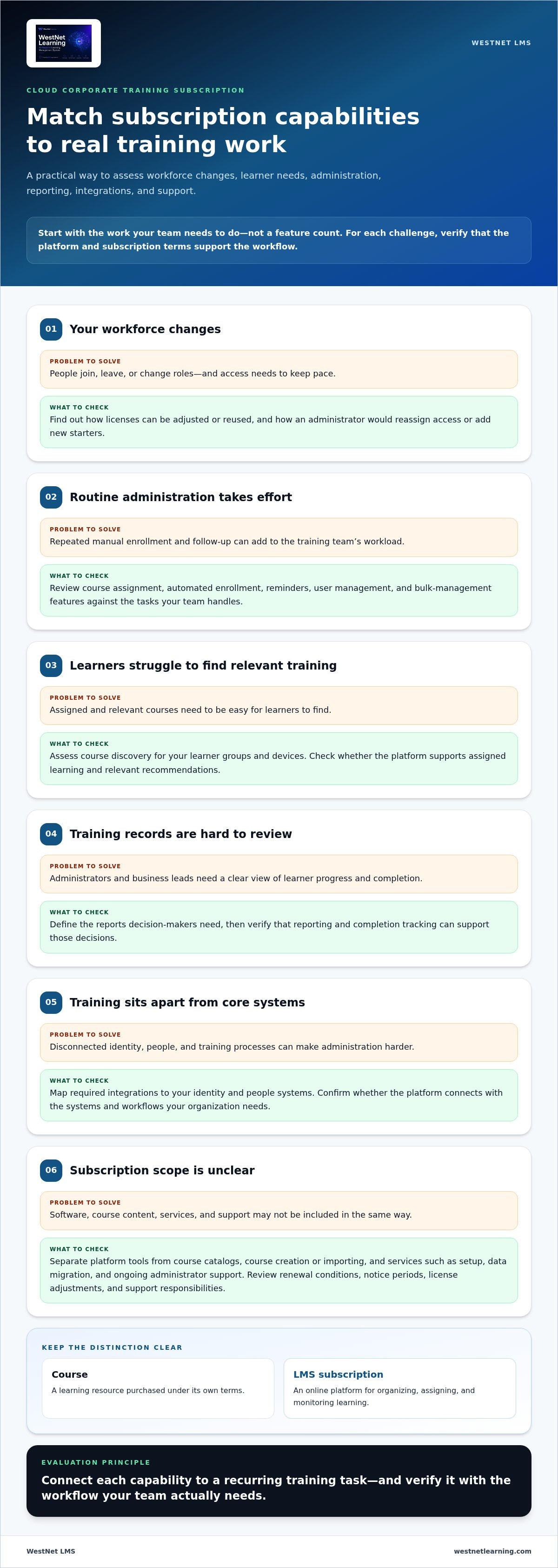
Choose according to your operating needs, not a feature count. A cloud corporate training subscription should fit your workforce today and accommodate changes in roles, locations, and training priorities. Start by documenting learner groups, administrator tasks, required systems, and the reports decision-makers need. Then use that list to compare platforms and test specific workflows.
Decision checklist: assess workforce scale, learner experience, administration, integrations, reporting, licensing flexibility, renewal terms, and support scope.
- Workforce scale: Consider who needs access, how user numbers may change, and whether licenses can be reused as people join, leave, or change roles.
- Learner experience: Check whether learners can find assigned and relevant courses easily, and whether the platform suits the groups and devices in your training model.
- Administration and reporting: List routine tasks such as enrollment, reminders, and completion tracking. Define the reports administrators and business leads need to make decisions.
- Commercial and support terms: Compare renewal conditions, notice periods, license adjustments, and the support responsibilities described in the subscription agreement.
How should buyers assess licenses, administration, and support?
Model a realistic workforce change. Consider how an administrator would reassign access when an employee changes teams or add a group of new starters. Check how the subscription handles each task and whether transferable licenses fit your approach. Compare administrator roles and bulk user-management features with the workload your team expects to handle.
Set clear expectations for ongoing support. Identify what your administrators will manage, what support is available, and how operational questions are handled. Compare the documented service expectations with your internal requirements rather than treating “support” as a standard package. Review renewal terms as well, including how changes in user numbers or organizational needs affect the subscription.
Which technical requirements should the LMS meet?
Map the platform to your identity and people systems. If employees sign in through a central identity provider, include single sign-on (SSO) in your test plan. For HRIS integration, document which employee data needs to flow into the LMS, how updates should be handled, and which system is authoritative for each field. Specific requirements make it easier to identify gaps that could otherwise become manual work.
Check course compatibility using your actual learning assets. If your organization uses SCORM or xAPI content, test representative courses and confirm that completion and other required learning data are captured as expected. WestNet AI LMS supports AI-powered e-learning creation for SCORM or xAPI courses. For a structured approach to system and data requirements, use this corporate LMS and HRIS integration guide.
Keep requirements observable. “Integrates with HR” is too broad to evaluate; a defined data flow is testable. Explore WestNet’s corporate training LMS to see how these operational priorities can fit into a workforce learning platform.
Cloud LMS Subscription vs. Other Corporate Training Approaches
Choose the operating model that matches your training frequency, internal expertise, and need for control. A cloud LMS subscription, a self-managed LMS, and course-by-course purchasing place different responsibilities on your organization. Compare who maintains the platform, organizes learning, manages system connections, and keeps content current. The right fit depends on how your organization works.
| Consideration | Cloud LMS subscription | Self-managed LMS | Course-by-course purchasing |
|---|---|---|---|
| Platform maintenance | Platform hosting and maintenance are generally handled by the provider; specific responsibilities depend on the agreement. | Your organization manages the LMS environment and its maintenance responsibilities. | No organization-wide LMS infrastructure is required to access a standalone course. |
| Administration | Administrators use the hosted platform to organize and manage learning; the division of support tasks varies. | Internal teams oversee platform administration, with control shaped by their systems and processes. | Administration focuses on purchasing, distributing, and tracking each course through available processes. |
| Content organization | Courses and programs can be arranged in a shared learning environment. | Your organization configures how the LMS structures and presents learning. | Content is acquired individually, so organizing it across programs may require separate processes. |
| Integrations and updates | Integration options and platform updates depend on the provider and subscription terms. | Your team has direct responsibility for managing integrations and updates. | Platform-level integrations and ongoing system updates aren’t part of the course purchase itself. |
When is a cloud LMS subscription a practical fit?
A cloud subscription can fit organizations that run recurring training and want centralized access without managing LMS infrastructure themselves. A shared platform helps administrators coordinate learning across teams and review activity in one place. The system still needs to fit your data practices, access controls, and internal governance, so identify those requirements as part of evaluation and implementation.
A subscription can also support programs that evolve, such as onboarding alongside role-based or recurring learning. Its value comes from using the platform as an ongoing operating environment, not simply activating accounts. Define who owns course assignment, learner communication, and reporting so the subscription supports a process your team can sustain.
When might course purchases or self-managed systems suit better?
For occasional, standalone training, buying a course may be a straightforward fit if your organization doesn’t need centralized assignment, program organization, or platform-wide reporting. A self-managed LMS may suit teams that prioritize direct infrastructure control and have the capacity to handle platform administration, integrations, and maintenance. That control also brings responsibilities, so assess the internal skills and time required to operate the system.
Compare the approaches against your actual workload and governance requirements rather than assuming one will cost less or perform better. If a hosted platform fits your operating model, explore WestNet’s corporate training LMS as a subscription option.
How to Test Subscription Fit Before You Commit
Turn your requirements into observable tests. A presentation can show what a platform does, but representative tasks reveal how it fits your workforce and administrative processes. Include learners, managers, and LMS administrators in the evaluation. Agree on success measures in advance, such as successful sign-in, clear visibility into course completion, and the effort required to complete routine administrative tasks.
- Set a baseline. Record how your team currently enrolls learners, answers training questions, prepares reports, and handles access. Note where information is delayed, duplicated, or difficult to find.
- Choose representative users and scenarios. Include people with different roles and levels of platform familiarity. Select real training examples, such as onboarding or a required course, and define what each participant needs to accomplish.
- Test the learner journey. Run a sample enrollment from invitation through course discovery and completion. Check whether learners can sign in, find the right material, understand what to do next, and see their progress.
- Test administration and reporting. Have an administrator assign training and answer practical questions using the available reports. Can they identify who completed a course and who still needs follow-up?
- Validate system workflows. Test authentication and any required HR data exchange using agreed scenarios. Compare the results with your requirements, then gather feedback from each user group.
What should a buyer test during a platform evaluation?
Observe how people complete tasks, not just whether a feature exists. Ask learners to find a course without step-by-step coaching, then ask a manager to locate a learner’s progress. Have administrators repeat an enrollment and produce a report. Record confusion, workarounds, and missing information so stakeholders can compare real usability with the requirements.
How can teams assess value without relying on assumptions?
Compare trial observations with your baseline, agreed success measures, and stakeholder feedback. Did the workflow reduce manual steps? Could decision-makers get the training information they needed? Record evidence and unresolved questions. WestNet Learning offers a free 30-day trial, which organizations can use to evaluate the AI Enhanced LMS through representative training workflows. The 30-day corporate LMS trial guide can help structure those activities.
Keep the evaluation focused. Use the corporate LMS demo buyer’s guide to prepare a demonstration checklist, and have the team assess each workflow against the same criteria. A structured trial lets your team test the platform with its own users and scenarios.
WestNet AI LMS Subscription: From Evaluation to Everyday Training
Once your evaluation criteria are clear, connect them to the work your training program needs to support. WestNet Learning’s AI Enhanced LMS brings course creation, learner recommendations, administration, and reporting into a cloud-based corporate training platform. It supports the ongoing learning operation, not just course hosting.
Each capability addresses a different day-to-day need. AI-Powered e-learning Creation supports course development, while AI-Generated Course Recommendations for learners can help employees discover relevant learning. Administrators can use automation and reporting to manage recurring processes and review participation. HRIS Integration connects LMS workflows with employee information workflows.
Which WestNet LMS capabilities support ongoing training operations?
Assess the platform’s features against the workflows identified during your evaluation. AI-Powered e-learning Creation supports SCORM or xAPI courses. Learning Analytics and Reporting helps administrators review training activity, while automated enrollment and other task automation support repeatable administrative processes. HRIS Integration, Data Migration & Administrator Support are also included capabilities.
- For learning teams: AI-powered course creation and AI-generated course recommendations support content development and course discovery.
- For administrators: Analytics, reporting, automated enrollment, and task automation support ongoing program management.
- For system owners: HRIS integration and data migration support employee information workflows.
- For engagement: Gamification, including leaderboards and badges, adds interactive elements to learning activities.
WestNet AI LMS also supports transferable user licenses and up to 60 site languages, which can matter as workforce composition or language needs change. Users select their site language at login, and deactivated user licenses can be reused for new users. Assess each capability against a defined use case. For example, map an HR data workflow to your integration requirements, then evaluate the learner and administrator experience. A cloud corporate training subscription is a stronger fit when its features align with real work and clear ownership.
What is a practical next step for evaluating WestNet?
Bring together the stakeholders who will use or manage the platform. Map current training workflows to the capabilities that matter: course creation, learner recommendations, enrollment, reporting, authentication, and HR data exchange. Then select a representative training scenario and agree on what success looks like for learners, administrators, and system owners.
Use a demo to explore the platform against those requirements, or use WestNet Learning’s free 30-day trial to test representative tasks directly. Keep notes on task completion, usability, and workflow questions. That evidence helps your team make a decision based on practical fit rather than a feature list alone.
Start evaluating WestNet AI LMS by matching your training priorities to the workflows your organization needs to support.
Turn Your Evaluation Into a Confident Next Step
The right cloud corporate training subscription should fit more than today’s training calendar. It should give your organization a workable foundation for adapting learning as teams, processes, and priorities evolve. Before making a longer-term decision, turn evaluation findings into an implementation plan: identify who will own administration, which workflows to launch first, and how you’ll measure whether the platform serves learners and the business.
Start with a focused use case rather than changing every training process at once. A defined first phase helps stakeholders build familiarity, identify practical adjustments, and plan for broader adoption. Keep the success measures from your evaluation in view as the platform becomes part of everyday training.
Put your criteria into practice with WestNet AI LMS. Evaluate WestNet AI LMS with a free 30-day trial or demo, and take the next step toward a more connected, adaptable training operation.
Frequently Asked Questions
What is a cloud corporate training subscription?
A cloud corporate training subscription gives an organization recurring access to an online learning platform for managing employee development. Compare the platform’s tools, learning content, and support with the needs of your training program. For example, map an onboarding program to user management, course assignment, and progress tracking. This helps distinguish the value of platform access from the content or services the program may also need.
How much does a cloud corporate training subscription cost?
Subscription scope and terms vary by organization. User licensing, integrations, platform capabilities, and support arrangements can all affect a proposal. Compare written offers against the same requirements, and separate recurring subscription charges from services scoped independently. Estimate expected user changes and identify which operational tasks the platform must support. This gives stakeholders context beyond the headline figure and helps them assess whether the proposed scope fits their needs.
Can a corporate LMS subscription support more than one training format?
Some corporate LMS platforms support digital learning as well as virtual or instructor-led training activities. WestNet AI LMS includes Virtual & Instructor-Led modules, including ILT and vILT. For a blended program, map how each format should be scheduled and recorded. For example, decide whether learners need to complete an online module before attending a virtual session, and how administrators will review participation across both activities.
What happens to user licenses when an employee leaves?
License reassignment depends on the platform and subscription terms. WestNet AI LMS has transferable user licenses, so a deactivated user’s license can be reused for a new user. Build the handoff into your offboarding process: identify who deactivates access, who assigns the license to a replacement, and how the new learner receives the right training. Clear ownership helps keep workforce changes aligned with learning access.
Can employees use a corporate LMS in different languages?
Some LMS platforms offer multilingual interfaces, with language coverage and functionality varying by product. WestNet AI LMS supports up to 60 site languages, and users select a language at login. For a multilingual rollout, identify the interface languages employees need and consider how administrators will support learners using different settings. Assess course content separately, because a translated interface doesn’t mean every learning resource is available in each language.
Do employees need to install software to use a cloud LMS?
Cloud LMS access is generally provided online, rather than through software installed and maintained on each employee’s computer. Test sign-in using the devices and authentication processes employees are expected to use, including any single sign-on requirements. Involve IT early to review access and security needs, since hosted delivery still needs to fit organizational policies and systems.