What if the problem isn’t a lack of training content, but the difficulty of finding and managing it? A central learning repository for enterprises should do more than gather files in one place. When courses, learner access, and administration are scattered across teams and systems, employees can struggle to find current training, while leaders lack a consistent view of learning activity.
Centralizing learning makes sense, but a shared folder alone won’t solve the challenge. A useful repository needs to support course organization, enrollment, learner access, and oversight. It serves a different purpose from general document storage: the goal is to make training easier to deliver and manage, not to replace every corporate content system.
This guide will help you evaluate repository approaches, distinguish learning platforms from document stores, and identify practical criteria for organizing content and governing access. You’ll also see how a learning management system can connect courses, users, and administration through features such as AI-assisted course creation, recommendations, and reporting. Build a foundation that works today and can adapt as workforce learning needs evolve.
Key Takeaways
- A central learning repository for enterprises should connect learning content with learner access and administration, not simply store files.
- Trace the learning lifecycle to see how course organization, enrollment, user roles, and reporting work together.
- Compare shared storage, intranets, and LMS-centered approaches by how they support discovery, enrollment, integrations, and oversight.
- Strengthen governance by assigning content owners and setting clear expectations for accuracy, audience, prerequisites, and review.
- An LMS can bring course catalog management, enrollment, learner recommendations, and analytics into a learning-focused platform.
What a Central Learning Repository for Enterprises Should Actually Do
Courses may sit in team folders, an intranet, and separate learning platforms. Employees can encounter different access rules for similar training, while managers may not know who owns the current version. Moving materials into one location helps only if the destination makes learning easier to discover and administer.
A central learning repository for enterprises is a governed system for organizing learning content, managing learner access, and coordinating course administration. This definition focuses on the learner journey, not just the files. The repository should help employees identify relevant training and help administrators manage access, enrollment, and content currency.
That purpose differs from a process repository or corporate records archive. Business process maps explain how work gets done; records and general files serve broader business needs. Learning resources may connect to those materials, but they need a learning-focused structure. The principles of Knowledge Management explain why capturing and organizing knowledge matters. A learning repository applies that aim to courses, learners, and training administration.
Think of centralization as a way to create a coherent learning experience, not as a file-transfer project. Before consolidating content, define what belongs in the learning catalog, who it’s for, and who is accountable for maintaining it. For organizations coordinating learning across locations, a connected approach can also support a consistent experience for global teams.
How a learning repository differs from general document storage
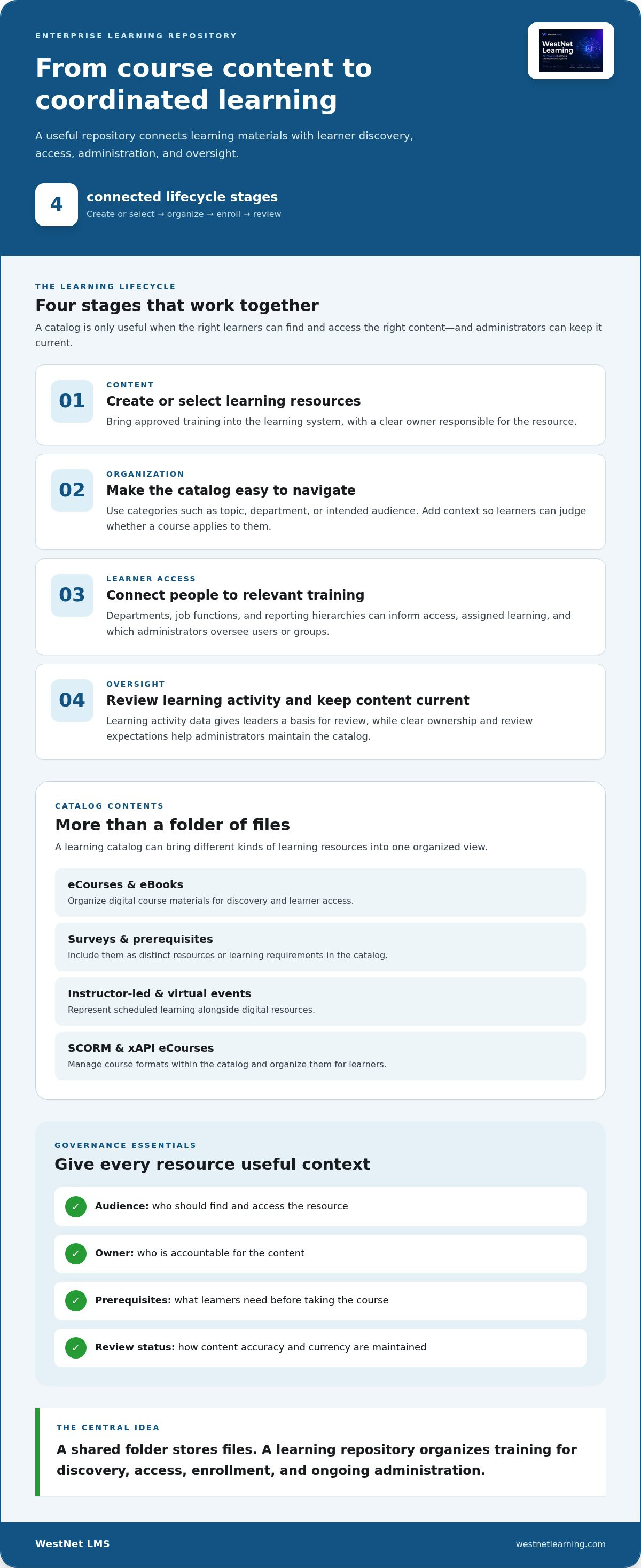
A shared folder stores files; a learning repository organizes training for discovery and use. Learners need to find a course by subject or intended audience, understand whether it applies to them, and follow the right enrollment path. Administrators need to manage the catalog and learner access, not just maintain a directory structure. A repository can work alongside document-management systems instead of replacing every corporate file store.
When enterprise learning becomes difficult to navigate
Look for practical signals: duplicate course versions, no clear content owner, or different access paths for comparable training. Separate catalogs can make onboarding harder to coordinate, especially when new employees need a consistent set of learning resources. Recurring training can also be difficult to administer when teams maintain separate records or processes.
These problems call for governance, not just consolidation. Set expectations for ownership, audience, access, and content review so learners and administrators can rely on the catalog. Start with this checklist:
- Content: Identify the approved learning resource and its owner.
- Audience: Clarify which learners should be able to find and access it.
- Administration: Define how enrollment and updates are handled.
With these foundations, a central repository can connect learning materials to the people who need them while preserving the wider systems that support business processes and records.
How an Enterprise Learning Repository Connects Content, People, and Systems
A learning repository supports a connected lifecycle, not just a static catalog. Learning content is created or selected, organized for discovery, assigned or enrolled according to organizational needs, and reviewed using learning activity data. Each stage depends on the others: a well-organized course still creates friction if the right people can’t access it, and enrollment is difficult to administer when course ownership and audience are unclear.
Map the lifecycle before setting up a central learning repository for enterprises. Identify how content enters the catalog, how learners discover or receive courses, which teams administer access, and what activity leaders need to review. An LMS can bring course creation, catalog management, automated enrollment, user administration, and learning analytics into one learning-focused system. These connections help administrators manage learning as a coordinated operation rather than a collection of disconnected resources.
What belongs in a governed learning catalog
A catalog can organize eCourses, eBooks, surveys, prerequisites, and scheduled instructor-led or virtual events as distinct learning resources. Categories such as topic, department, or intended audience help employees narrow their search. Course restrictions can help keep access relevant. For digital courses, format matters too: SCORM and xAPI eCourses can be managed within the catalog, making it easier to distinguish course materials and organize them for learners.
Give each item useful context, including its audience, owner, prerequisites, and review status. That makes the catalog more than a list of titles. It gives employees a clearer basis for choosing training and gives administrators a framework for maintaining it.
How learner access and administration fit together
Access should reflect the organization’s structure. Departments, job functions, and reporting hierarchies can inform who receives assigned learning and which administrators manage specific users or groups. Automated enrollment can connect learners to assigned training, while role-based administration helps distribute oversight without making every user a platform administrator.
Authentication is part of the same experience. Single sign-on (SSO) can be offered alongside standard username-and-password sign-in, giving organizations options for user access. The configuration should fit the organization’s access approach and user structure.
Employee information can also support connected learning workflows. HRIS integration links an LMS with HR data, providing a foundation for coordinating employee records and learning administration. Define which data and processes should connect, then align that scope with the teams responsible for HR and learning systems. The HRIS-integrated LMS workflow guide explores this connection in more detail.
At the repository level, analytics help administrators review learning activity and understand how the catalog is being used. They provide a more consistent view than separate records maintained by individual teams. For broader reporting considerations, explore the enterprise learning analytics guide.
Plan around the full chain: content, catalog, people, access, and oversight. To see how these elements come together in a learning platform, explore a WestNet LMS demo.
How to Compare Central Learning Repository Approaches
Choose based on the work your learning operation needs to do, not the length of a feature checklist. A shared folder may be enough to distribute a small set of reference files. But if employees need assigned courses, managed enrollment, and consolidated oversight, storage alone leaves important learning workflows outside the repository.
| Approach | Discovery | Enrollment and administration | Integrations and reporting | Best fit |
|---|---|---|---|---|
| Shared storage | Employees browse folders or use available search. | Course assignment and enrollment are handled separately. | Learning-specific connections and reporting aren't inherent to file storage. | Limited document distribution. |
| Intranet or knowledge base | Employees can search learning alongside broader company information. | Training administration may depend on separate processes or systems. | Connections and reporting depend on the platform and configuration. | Wider employee information discovery. |
| LMS-centered repository | Courses are organized in a learning catalog. | Supports course, user, and enrollment administration. | Can connect learning workflows with integrations and learning analytics. | Structured employee training. |
Which approach fits each enterprise learning need?
Match the repository to the job. Use shared storage when the goal is simply to distribute documents. Choose an intranet or knowledge base when employees need to discover policies, updates, and other company information alongside learning resources. Prioritize an LMS-centered approach when training includes managed courses, learner access, enrollment, and oversight. It can work alongside document systems rather than replacing them.
Evaluation criteria that reveal a sustainable fit
Test the workflow from both the administrator’s and learner’s perspectives. Can teams organize catalogs, manage users and roles, and automate enrollment? Can the learning system connect with HRIS and authentication workflows? Consider how reporting supports oversight, and whether administrators can manage content without recreating records across disconnected tools.
Then assess operational fit. If employees work in different languages, consider the platform’s language support: WestNet AI LMS supports up to 60 site languages, with users selecting a language at login. Consider license reuse as well: deactivated user licenses can be reused for new users. For course content, check compatibility with the formats in your catalog. WestNet catalog management supports AI-powered eCourse creation in SCORM or xAPI.
A central learning repository for enterprises should match the complexity of training administration. If the organization needs structured courses and learner workflows, an LMS-centered approach is a strong starting point. Use this enterprise LMS selection framework to assess broader platform requirements, then compare how each option supports your actual learning processes.
To see how a learning platform can bring catalog, user, and enrollment administration together, explore a WestNet AI LMS demo.
How to Organize and Govern a Central Learning Repository
A repository stays useful when its operating rules are clear. Define who maintains each resource, how learners find it, and when it is reviewed. Then migrate intentionally. Transferring every file without checking its owner, audience, or currency can reproduce the same confusion in a new system.
Use this sequence to establish a governed foundation:
- Inventory existing resources. Record each course, its location, format, audience, and current owner. Flag duplicates, outdated materials, and content that needs conversion or review.
- Assign accountable owners. Name a subject owner responsible for accuracy and audience, and an administrator responsible for catalog and access processes.
- Structure the catalog. Apply consistent categories and document prerequisites, restrictions, and enrollment rules so learners and administrators understand how each resource should be used.
- Configure user access. Align departments, roles, and organizational hierarchies with appropriate permissions and training assignments.
- Review and refine. Set a review cadence, check learner and administrator feedback, and update or retire resources when they’re no longer relevant.
Set ownership, catalog rules, and access expectations
Make accountability specific. For each course, identify who validates its accuracy, defines the intended audience, confirms prerequisites, and triggers review. Consistent catalog rules reduce ambiguity: apply categories in the same way, use restrictions deliberately, and document how enrollment is handled. Custom roles and organizational hierarchies can help separate responsibilities, so local administrators manage their assigned groups while broader oversight remains coordinated.
At enterprise scale, user changes also need a defined process. Establish who can add, update, or deactivate accounts, and how bulk or batch updates are reviewed before they affect access or assignments. Clear responsibilities help prevent outdated user records from undermining the structure.
Plan migration and adoption without creating another silo
Before moving content, decide what should remain active and what belongs in another corporate system. Check course formats and dependencies, preserve useful ownership information, and map existing categories to the new catalog structure. Include HRIS and authentication workflows in planning so the repository fits into the systems employees and administrators already use.
Data migration and administrator support are important transition considerations. WestNet AI LMS includes data migration and administrator support. Set a communication plan for launch: explain where employees will find training, how assigned courses appear, and where to report access or content issues. Gather feedback after rollout, then use it to improve catalog labels, guidance, or administration procedures.
Governance is ongoing work, not a one-time setup. A corporate learning systems roadmap can help place repository decisions within wider modernization planning. To put course, user, and administration workflows into practice, explore a WestNet AI LMS demo.
How WestNet AI LMS Supports a Central Learning Repository
A central repository needs more than a place to publish courses. It needs connected tools for organizing learning content, managing users and enrollment, and giving administrators a view of learning activity. WestNet AI LMS brings these functions together in a learning-focused platform, supporting structured training without requiring it to replace every corporate document system.
That combination maps to the evaluation criteria established earlier: catalog organization, learner access, administration, and reporting. For a broader view of how an AI-powered platform can support enterprise learning, explore the AI-powered LMS enterprise growth guide.
Connect course creation, catalog management, and learner support
WestNet AI LMS supports AI-Powered e-learning Creation and catalog management for SCORM or xAPI eCourses. This gives administrators a way to organize digital course content within the learning environment, while AI-Generated Course Recommendations help learners discover relevant courses. Recommendations support discovery and course selection.
AI-Powered Help is another named capability for learners and administrators. Support for both audiences matters in a repository: employees need help engaging with learning resources, and administrators need assistance as they manage the learning environment. Together, creation, catalog organization, recommendations, and help address different points in the course lifecycle.
Access can accommodate varied enterprise needs. The platform supports up to 60 site languages, with users selecting a language at login. Multiple authentication options include SSO. Deactivated user licenses can be reused for new users, supporting license transferability as workforce needs change.
Support enterprise administration and a confident next step
For day-to-day coordination, WestNet AI LMS includes automated enrollment, user and catalog management, HRIS integration, and Learning Analytics and Reporting. These capabilities connect course administration with learner access and provide administrators with information about learning activity. The platform also includes administrator support, a Dedicated Client Success Manager, and a Service Level Agreement.
Consider how these capabilities align with your repository requirements. If your priority is bringing course creation, catalog management, learner access, and administration into one learning platform, WestNet AI LMS offers a connected foundation. It can support learning operations while other systems continue to manage broader business documents and records.
Take the next step by discussing your learning requirements in a tailored WestNet demo, or start a free 30-day trial to explore the platform. Focus the conversation on your catalog, user structure, enrollment workflows, and reporting needs.
Turn Repository Planning Into a Workforce Learning Strategy
Your next step is to turn repository principles into decisions your teams can apply: who owns learning content, how employees find the right training, and how administration will evolve as the organization changes. Start with a focused assessment of current learning workflows, then define what a more connected experience should make easier for learners and administrators.
A central learning repository for enterprises is most valuable when it supports an ongoing strategy, not a one-time consolidation project. Set clear priorities, involve the teams responsible for learning and employee systems, and use those priorities to guide platform decisions. Progress can begin with a practical first move: identify one learning workflow where clearer ownership or access would make a difference.
Ready to explore how a learning platform could support your goals? Request a WestNet AI LMS demo and take the next step toward a more coordinated learning experience. With a clear plan, your organization can build a stronger foundation for workforce development.
Frequently Asked Questions
Is a central learning repository the same as an LMS?
No. A central learning repository for enterprises describes an organized destination for learning resources, while an LMS is a platform that can manage workflows around those resources. For example, a shared folder can hold course files, but it doesn’t inherently manage course enrollment or learner activity. Think of the repository as the learning environment employees use and the LMS as the system that can organize and administer it.
Can a central learning repository include SCORM and xAPI courses?
Yes, an enterprise learning platform can organize SCORM and xAPI courses alongside other learning resources. WestNet AI LMS supports AI-powered eCourse creation in both formats. Before migrating a course, record its format and decide how it should be categorized and assigned. A course package isn’t the same as a PDF or reference file, so plan its learner access and administration as part of the catalog.
How can a central learning repository support employees in different languages?
A repository can make resources easier to locate, while site-language support and course translations are separate considerations. WestNet AI LMS supports site-language selection at login, giving users an interface option. This does not mean every course is translated. Identify priority languages for course materials and distinguish translated content from courses offered in another language.
What happens to a user license when an employee leaves?
In WestNet AI LMS, a deactivated user license can be reused for a new user. Administrators can include deactivation in offboarding and account creation in onboarding, with clear responsibility for updating access. A reusable license does not transfer a former employee’s learning history or personal data; treat account access and record retention as separate administrative decisions.
Can a central learning repository support instructor-led training?
Yes, if the learning platform supports the relevant training workflows. WestNet AI LMS includes Virtual and Instructor-Led modules, including ILT and vILT. These can sit alongside digital resources in a learning program. Administrators should define how event information, learner participation, and related course materials are managed, so employees can understand how scheduled learning fits with other training in the catalog.
Does a central learning repository replace an intranet or HRIS?
Not necessarily. An LMS-centered repository focuses on training, while an intranet can support broader employee information and an HRIS manages workforce data. Integration can connect relevant systems without making them interchangeable. For example, an organization can designate the HRIS as the source for employee information and the LMS as the place to administer learning, then define who manages changes between them.