Automation that saves clicks but obscures accountability isn’t progress. An automated workflow training management platform should connect enrollment, reminders, course administration, and oversight while keeping training relevant to the people assigned. When HR and learning records sit apart, routine tasks can still take staff attention and leave uncertainty about which data is current. Clear, connected records also support employee liability management.
Automate too little, and administration remains manual. Automate without clear governance, and teams may lose confidence in learner assignments, records, or controls. The answer isn’t simply more automation. It’s a coherent workflow with clear rules, reliable integrations, and human oversight where it matters.
This 2026 buyer’s guide offers a practical framework for identifying tasks suited to automation and comparing platforms across operational fit, HRIS and learning-data integration, and governance. You’ll also learn how to test real workflows in a demo or trial, from enrollment through reporting, and assess whether a platform can reduce friction while keeping accountability clear.
Key Takeaways
- Map training from user setup through results review to identify repetitive administration that can be automated while keeping ownership clear.
- Compare an automated workflow training management platform by end-to-end workflow coverage, integrations, usability, oversight, and scalability, not by feature counts alone.
- Start rollout planning with one high-volume workflow, then define its owners, approval points, data requirements, and success measures.
- Use a demo or trial to test how platform capabilities fit your actual workflows and governance needs.
- Assess WestNet’s AI Enhanced LMS against distinct needs, including e-learning creation, learner recommendations, and help for learners and administrators.
What an Automated Workflow Training Management Platform Connects
Recurring training rarely begins and ends with assigning a course. Someone needs to identify the right learners, apply the correct requirements, send instructions, track progress, record completion, and prepare results for review. When those steps rely on separate records, spreadsheets, and follow-up messages, staff spend time reconciling information instead of managing the process.
A Learning Management System (LMS) provides a foundation for delivering and managing online learning. An automated workflow training management platform extends that role by coordinating administrative tasks, learner activity, and oversight across a defined process. It automates how training is administered; it doesn’t automatically determine what every learner should learn or replace human judgment. Rules can trigger assignments and reminders, while people remain responsible for setting requirements and handling exceptions.
Which training workflows are organizations trying to connect?
Start with the full lifecycle. A new or changed user record may prompt an administrator to assign learning based on a role, team, or requirement. Learners receive the assignment, access course materials, and complete activities. The system records activity and completion so administrators can review status and prepare reports.
Recurring, role-based, and compliance-related programs are especially suited to repeatable workflows. A role change, for example, may call for a different course assignment; a scheduled refresher may require a new due date and a way to monitor completion. Each workflow has two sides:
- Learner-facing steps: receiving an assignment, finding the course, completing learning activities, and seeing what remains.
- Administrator tasks and decisions: maintaining user information, defining assignment rules, managing exceptions, reviewing records, and deciding what action to take when progress stalls.
Automation can handle defined, routine actions, such as enrollment or reminders, while accountable staff retain decisions about requirements, exceptions, and follow-up. Training records can also inform broader employee risk management, particularly when organizations need a clear view of assigned learning and recorded completion.
Automation versus a collection of disconnected tools
A course catalog, HR records, email reminders, and a separate tracking sheet may each serve a purpose. Friction appears at the handoffs: a user update may not reach the learning record, an assignment may be tracked elsewhere, or a completion report may need manual reconciliation. Each transfer adds work and makes it harder to see where a learner or task stands.
Look for connected administration, not a longer feature list. A platform should help teams understand who owns each step, what has happened, and where action is needed. HRIS integration can connect workforce information with learning workflows, while reporting gives administrators a structured view of training activity. The exact workflow depends on the organization’s rules and configuration.
Automation supports a process; it doesn’t design sound policy or resolve every unusual case. Define who sets assignments, approves exceptions, and acts on overdue training. Then automate stable, repeatable steps and preserve human review where context matters. That balance can make administration clearer without handing organizational judgment to software.
How Automated Training Workflows Move from Enrollment to Oversight
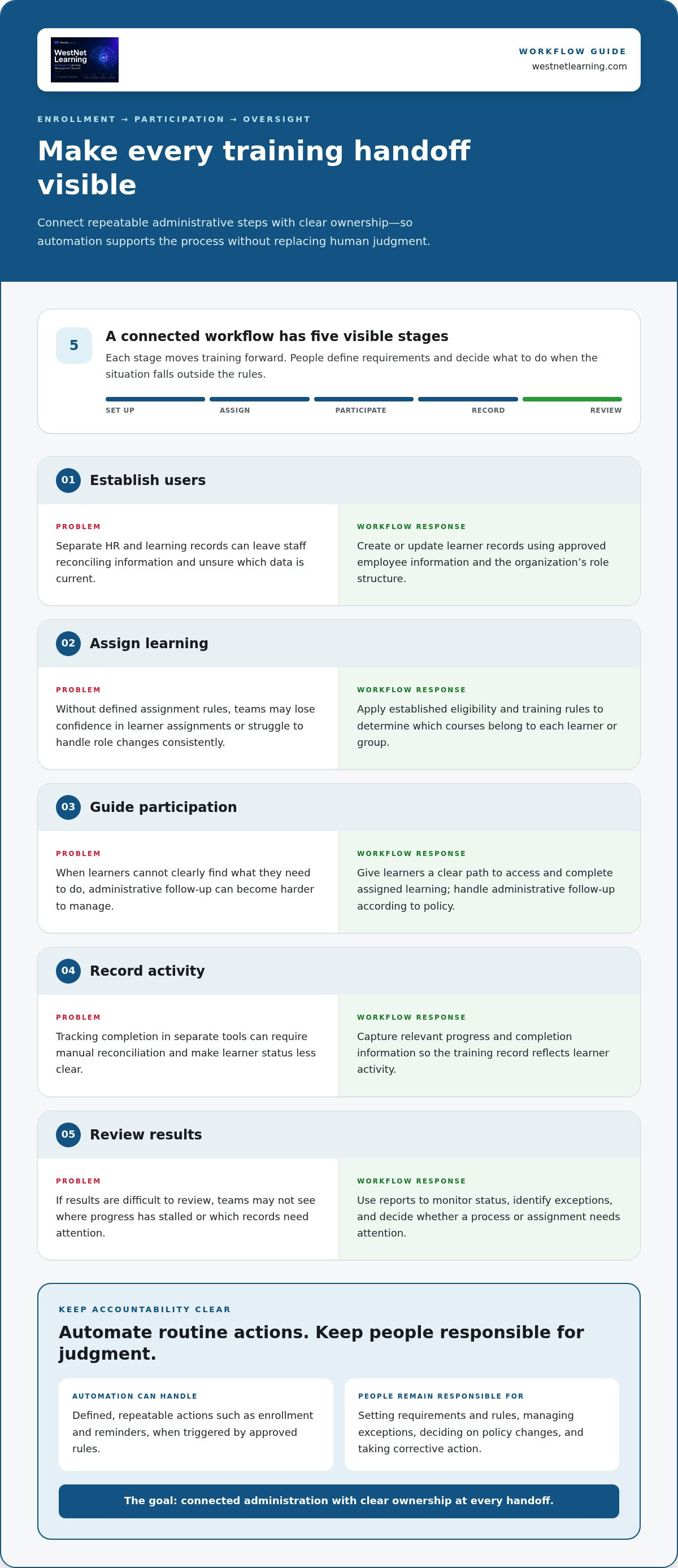
A reliable training workflow makes each handoff visible, from the employee record that establishes who needs training to the report administrators use to review progress. An automated workflow training management platform can carry out repeatable actions based on rules, while designated people remain responsible for setting those rules and handling exceptions.
Enrollment automation starts the process; training oversight keeps its purpose, progress, and accountability in view. This is the practical distinction between triggering tasks and governing a program. The principles of Business Process Automation (BPA) apply: software can coordinate recurring steps, but process owners still define intended outcomes and decision points.
- Establish users. Create or update learner records using the organization’s approved employee information and role structure.
- Assign learning. Apply defined eligibility and training rules to determine which courses belong to each learner or group.
- Guide participation. Give learners a clear path to access and complete assigned learning, with administrative follow-up handled according to policy.
- Record activity. Capture relevant progress and completion information so the training record reflects learner activity.
- Review results. Use reports to monitor status, identify exceptions, and decide whether a process or assignment needs attention.
The sequence is consistent, but not every action should be automatic. A system may perform an approved assignment when a user meets established criteria. An administrator should retain authority over the criteria, unusual eligibility cases, policy changes, and corrective action. That separation makes automation useful without obscuring who is accountable.
Automate learner setup and course assignment
Begin with the organization’s roles, training requirements, prerequisites, and eligibility rules. For example, a policy may associate a learning requirement with a role or business unit. Once the organization approves that relationship, automated enrollment can reduce repeated manual assignment work when users are added or their records change.
Set ownership before activation. Administrators or policy owners define the rules and determine how exceptions are handled; the platform applies the configured process. WestNet’s AI Enhanced LMS includes automated enrollment and other task automation to support repeatable administrative workflows.
Keep progress and administration connected
Completion records and Learning Analytics and Reporting give administrators a basis for reviewing workflow status. They can see whether records are current, which assignments require attention, and where a decision or follow-up may be needed. Reporting is most useful when the underlying user and learning data remain coherent.
HRIS connectivity can help maintain continuity between employee information and learning administration, while data migration can support the transfer of existing records into a new environment. WestNet’s AI Enhanced LMS includes HRIS integration and data migration. Organizations assessing that connection can use the HRIS-integrated LMS guide to explore how employee data and learning workflows fit together.
How to Compare Automated Workflow Training Management Platforms
Feature lists can make different systems look alike. A more useful comparison follows a real training process from a learner’s record to an administrator’s review. Assess how well each platform connects the steps, handles exceptions, and keeps responsibility clear. This shows whether automation fits your policies and daily operations, rather than merely whether a feature appears in a product description.
Use the same scenarios for each option. Trace how a new employee in a particular role receives a required course, how a changed record affects an assignment, and how an administrator reviews completion. Score the experience and note where people must intervene.
| Criterion | What to evaluate |
|---|---|
| Workflow coverage | Can the platform support the full sequence from user setup and assignment through progress tracking and reporting? |
| Integrations | How does it connect with HR data and authentication, and can it work with your existing course formats? |
| Usability | Can administrators complete routine user, course, and reporting tasks without avoidable steps? Can learners understand what to do next? |
| Oversight | Can authorized staff see workflow status, review exceptions, and retain ownership of policy decisions? |
| Scalability | Can the approach support different learner groups, locations, and changing training needs without making administration harder? |
Compare complete workflows, not feature counts. A platform may list enrollment, notifications, and reporting as separate capabilities, but their operational value depends on how they work together. Record handoffs, manual corrections, and points where a person must approve or decide. This makes trade-offs visible and keeps the evaluation grounded in organizational needs.
Assess automation, integration, and administrative control
Ask which tasks follow defined rules and which decisions remain with administrators. Test a routine assignment and an exception, such as a learner whose role or eligibility needs review. Examine how employee data and authentication fit into the process, and whether existing SCORM or xAPI course materials suit the intended workflow. The corporate LMS automated notifications guide offers related criteria for assessing communication steps.
Test usability, scale, and learner experience
Have administrators perform representative tasks, such as updating a user, adjusting a course assignment, and producing a progress report. Observe handoffs and whether status is easy to interpret. Include different learner groups, especially if teams have distinct roles or access needs. For broader planning, consider how an AI-powered LMS can support enterprise growth.
Use a demo to walk through your own scenarios rather than relying on a feature presentation. WestNet’s AI Enhanced LMS includes automated enrollment, HRIS integration, Learning Analytics and Reporting, and AI-Powered e-learning Creation. Explore how these capabilities map to your evaluation criteria through a WestNet LMS demo.
Plan a Practical Rollout for Training Workflow Automation
Resist the urge to automate every training process at once. Start with one high-volume workflow, such as onboarding or a recurring course cycle, and document how it works today. Record who initiates each step, which systems hold the necessary information, where approvals happen, and what causes delays or corrections. This gives the implementation team a practical baseline instead of asking software to reproduce an unclear process.
Reliable automation starts with a process people understand, then applies that process consistently through technology. Before configuring an automated workflow training management platform, agree on who owns decisions, what data the workflow depends on, which actions require approval, and how the organization will judge whether the pilot is working.
Prepare people, processes, and learning data
Inventory the materials and rules the pilot depends on: existing courses, user records, assignment criteria, and reporting requirements. Identify information that needs cleanup, such as duplicate or outdated learner records, and determine which processes should remain manual or require administrator approval. Assign an owner for each policy decision and an administrator for routine workflow oversight. For an onboarding use case, an employee onboarding training LMS checklist can help frame requirements before rollout.
Plan migration around the condition and structure of existing data, not just the volume of records. Decide which information must carry forward, who will review its accuracy, and how administrators will be supported as they learn the new process. WestNet’s AI Enhanced LMS includes data migration and administrator support; the organization defines its data requirements and validates records for its own use.
- Ownership: Name the process owner, system administrator, and approver for exceptions.
- Data: Specify required user fields, course details, assignment rules, and records to migrate.
- Approval: Mark actions that automation can perform and decisions that need human review.
- Measures: Choose practical indicators, such as assignment accuracy, completion-record accuracy, or administrator effort for routine tasks.
Validate the workflow before expanding
Run a pilot with representative administrators and learners, including people who use different access methods or belong to distinct training groups. Test the full journey: user setup, assignment, course access, activity recording, and reporting. Include ordinary cases and exceptions, such as a record that needs correction or an assignment requiring approval. Capture where users hesitate, administrators intervene, or information fails to match the intended process.
Review the pilot against the measures defined in advance. Check whether records are accurate, ownership remains clear, learners can follow the process, and administrators can interpret the resulting status. Document each issue, decide whether it reflects configuration, data quality, policy, or usability, then refine the workflow before adding more users or training programs. A measured expansion gives teams room to resolve friction before early assumptions become organization-wide procedures.
Use a WestNet LMS demo to explore how the platform’s workflow capabilities fit your rollout requirements.
Evaluate WestNet’s AI Enhanced LMS Against Your Workflow
Use your evaluation criteria to connect specific platform capabilities with real operational needs. WestNet’s AI Enhanced LMS brings together automated enrollment and other task automation, HRIS integration, Learning Analytics and Reporting, and AI-supported learning features. The fit depends on how these capabilities align with your organization’s processes, decision rules, and learner requirements. An automated workflow training management platform should support the work your team needs to do while keeping administration and oversight understandable.
Separate administrative automation from AI-supported learning functions. Automated enrollment can support repeatable assignment processes based on organizational rules. AI-Generated Course Recommendations for learners can surface learning options, while AI-Powered Help supports learners and administrators as they use the platform. AI-Powered e-learning Creation addresses a different need: creating e-learning content, including SCORM or xAPI courses. Evaluate each capability against a defined use case rather than treating AI as a single outcome.
Match confirmed WestNet capabilities to your requirements
For course creation, assess how AI-Powered e-learning Creation fits your content workflow and SCORM or xAPI requirements. For administrator review, Learning Analytics and Reporting can help teams examine training activity and records. HRIS integration and data migration are relevant where employee information and existing learning records need to connect with administration. WestNet also supports Virtual & Instructor-Led modules (ILT, vILT), which may suit programs that combine online learning with instructor-led formats.
Include service and governance considerations in your comparison. WestNet’s AI Enhanced LMS includes administrator support, a Dedicated Client Success Manager, and a Service Level Agreement. Map these support features to your ownership model and operational needs, alongside automated enrollment, multiple authentication options, and help for learners and administrators. The goal is a clear fit assessment, not an assumption that any one feature guarantees a particular result.
Use a demo or trial to test real workflows
Prepare a representative scenario before your evaluation. Outline a learner’s enrollment, course access, participation, and completion, then identify the report an administrator needs to review. Include an exception, such as a record that requires administrator attention. During the demo or trial, compare both learner and administrator journeys with your documented requirements. Note where the workflow follows your policies and where staff need to make a decision.
Bring your evaluation criteria and sample use cases to the discussion. The corporate training LMS demo buyer’s guide can help structure preparation, from choosing scenarios to reviewing platform fit. WestNet offers a demo and a free 30-day trial, giving your team a way to explore relevant workflows against its own requirements.
Start a free 30-day trial or request a demo to evaluate WestNet’s AI Enhanced LMS against your training workflows.
Turn Your Workflow Requirements into a Confident Next Step
The right automated workflow training management platform should fit the way your organization works, not force teams into unclear processes. Treat your evaluation as the beginning of a deliberate change: choose a priority workflow, define what good administration looks like, and give the people who manage and complete training a voice in shaping the rollout.
As you plan for a more connected operation, consider how your requirements may evolve across teams and languages. WestNet’s AI Enhanced LMS supports up to 60 site languages, alongside capabilities for enrollment, HRIS integration, data migration, and administrator support. A Dedicated Client Success Manager and Service Level Agreement add defined support structures as your organization evaluates platform fit.
Move from criteria to evidence. Use a demo or free 30-day trial to examine how the platform aligns with your actual workflows and priorities. Start a free 30-day trial or request a demo, and take the next step toward training operations your people can manage with clarity and confidence.
Frequently Asked Questions
Can a training management platform support multiple site languages?
Yes. An automated workflow training management platform such as WestNet’s AI Enhanced LMS supports multiple site languages, and users select their language at login. This can help organizations plan a shared platform experience for teams with different language needs. During rollout, identify which learner groups need which language options and test the experience with representative users.
Does WestNet’s LMS support single sign-on?
Yes. Single Sign-On (SSO) is one of the authentication options in WestNet’s AI Enhanced LMS. It can be relevant when an organization wants learners to access training through an established sign-in approach. Include identity and access stakeholders in your evaluation, and test the learner sign-in journey so administrators understand how authentication choices fit the organization’s setup.
What happens to a user license when an employee leaves?
When a user is deactivated, their license can be transferred and reused for a new user. For example, after an employee leaves, an administrator can deactivate that account and assign the available license to a replacement employee. Include this lifecycle in user-management planning, and define who is responsible for deactivation and reassignment so account changes are handled consistently.
Can an LMS combine online courses with instructor-led training?
Yes. WestNet supports Virtual & Instructor-Led modules (ILT, vILT), allowing a program to include online courses alongside instructor-led learning formats. For example, learners might complete online preparation before a scheduled virtual session. Organizations can map each format to its intended learning activity.
Can existing SCORM or xAPI courses be used in WestNet’s LMS?
Yes. WestNet supports SCORM or xAPI course creation and course management, so existing learning content in these formats can be part of an LMS evaluation. As a practical check, select a representative course and assess its launch, learner experience, and completion information against your intended workflow. This helps distinguish format support from assumptions about how every course is configured.
What support is available when an organization adopts WestNet’s LMS?
WestNet provides administrator support, a Dedicated Client Success Manager, and a Service Level Agreement (SLA). Data migration can also support the transition of existing user or learning records into the LMS. Before adoption, define the questions administrators need help with and identify migration priorities so project planning and support align with your rollout needs.