What if annual training assignments, completion records, and renewals worked as one connected process instead of a yearly scramble? Choosing annual mandatory compliance LMS software is about more than sending courses to employees. It’s about reducing repetitive follow-ups and making useful training records easier to access when learners, roles, and requirements change.
That’s the challenge many learning and compliance teams recognize: assignments need to be repeatable, progress needs to be visible, and the process must fit existing systems and administrative capacity. The right platform can bring these workflows together, but software alone doesn’t ensure compliance. Your organization still needs to determine which training applies and maintain appropriate oversight.
This guide will help you evaluate the workflows, evidence, and platform capabilities needed to manage annual mandatory training with confidence. We’ll cover assignment automation, learner progress and completion reporting, recordkeeping, integrations, and the practical questions to consider when selecting an LMS. You’ll also see how capabilities such as automated enrollment, Learning Analytics and Reporting, and a competency/certification tracker can support a more coordinated training cycle.
Key Takeaways
- Build annual training as a repeatable cycle: identify audiences, assign relevant learning, monitor progress, record completion, and plan the next review.
- Use automation to reduce recurring administrative steps while keeping learner records current as roles and workforce needs change.
- Compare annual mandatory compliance LMS software against your actual workflows, including reporting, user administration, integrations, and support.
- Test the platform with representative learner groups and course records before configuration and rollout.
- See how WestNet LMS capabilities can support a connected process, from enrollment and reporting to course creation with organizational review.
Why annual mandatory compliance training needs a repeatable LMS workflow
Annual mandatory training is best treated as a recurring learning cycle managed by the organization, not as a universal checklist that applies identically to every employer. The courses and audiences depend on the organization’s policies, roles, and applicable requirements. A repeatable workflow gives teams a reliable way to manage those decisions and carry them through the year.
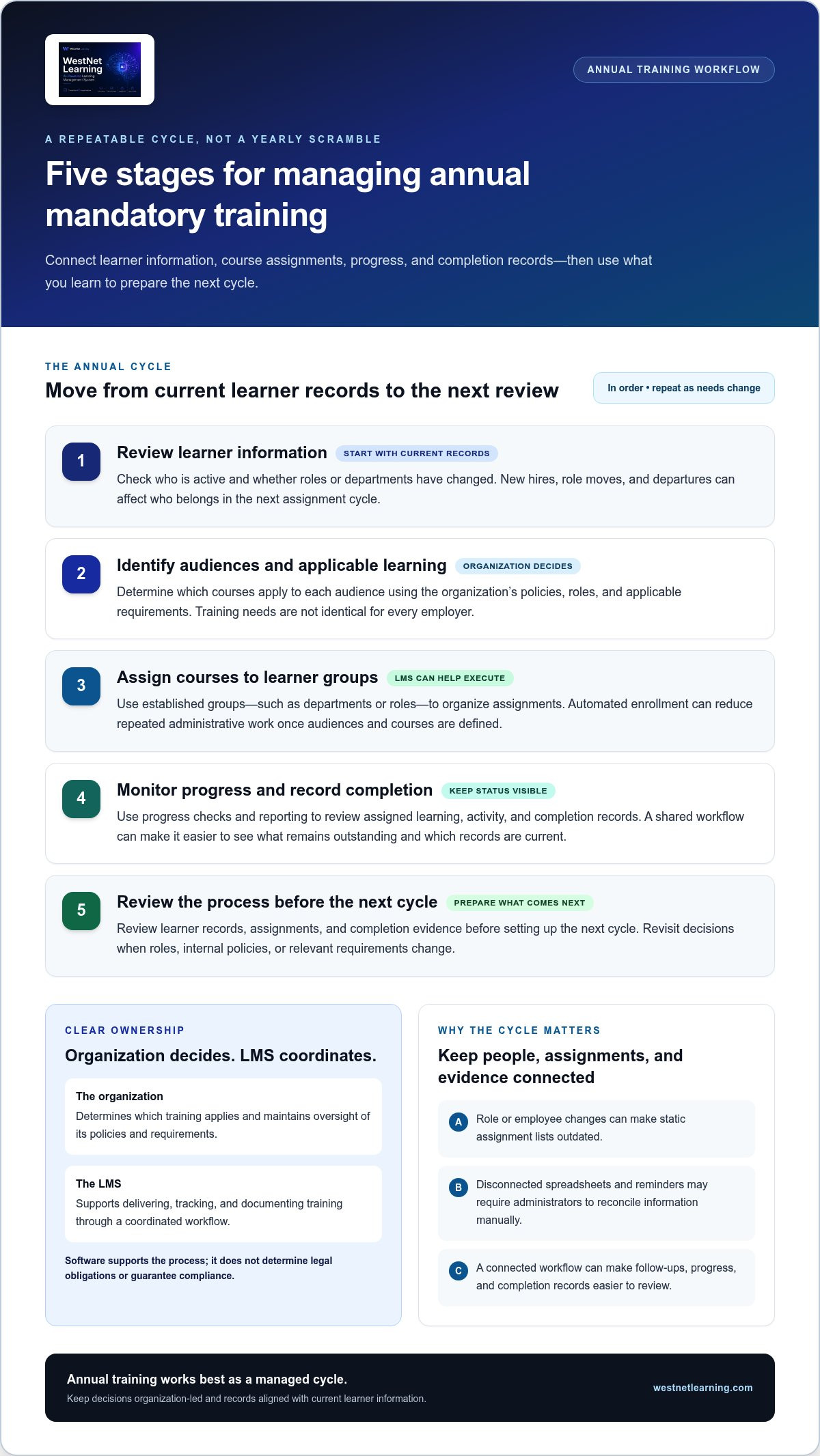
The cycle starts by identifying who needs which learning. From there, administrators assign courses, monitor progress, record completions, and review the process before the next cycle. That sequence matters because workforce information changes: employees join, move into different roles, or leave. If assignments and records don’t keep pace, teams can lose visibility into who still needs training and which records are current.
A learning management system can provide a central place to organize these activities. For a foundational overview of the platform category, see What is a Learning Management System (LMS)? For annual training operations, the practical question is how well a platform connects learner information, course assignments, progress, and completion records into a manageable workflow.
What annual mandatory compliance LMS software should coordinate
Annual mandatory compliance LMS software should help coordinate learners, courses, assignments, and records, while leaving training decisions with the organization. Administrators define which learning applies to particular roles and policies; the platform helps execute and track those assignments. An LMS supports the workflow for delivering and documenting training; it doesn’t determine an organization’s legal obligations or guarantee compliance.
That division of responsibility is essential. A platform may make assignment and recordkeeping more consistent, but the organization must decide which courses belong in its program and keep those decisions aligned with its policies and applicable requirements. Once those choices are made, a centralized workflow can make them easier to administer and review.
Where manual annual training processes create friction
Spreadsheets and disconnected reminders can work at first, but they often separate the information administrators need. One file may contain employee roles, another course assignments, and a third completion dates. When someone changes roles or employee details are updated, teams may need to reconcile several lists before they can tell what’s outstanding.
Follow-ups become harder to coordinate, too. If reminders are tracked in email while completion evidence sits elsewhere, an administrator may need to compare records manually before deciding whom to contact. A connected workflow can reduce those repeated steps; guidance on automated LMS notifications can help frame how reminders fit into the process.
Make the workflow repeatable, not rigid. Review learner and role information, apply the organization’s training decisions, then use progress and completion records to prepare the next cycle. That structure helps teams see ownership and status without assuming every organization has the same annual training obligations.
How an LMS manages annual assignments, completion, and renewal
A dependable annual cycle links learner information to assignments, progress checks, and completion records. Start by reviewing who is active and how their roles or departments have changed. Next, match learner groups to the courses the organization has determined apply, then monitor activity and review records before setting up the next cycle. Each step should have a clear owner, so an overdue assignment or outdated learner record has a practical path to resolution.
Annual mandatory compliance LMS software can support this sequence by bringing enrollment, course activity, and reporting into a shared workflow. It doesn’t make policy decisions: the organization determines course applicability and renewal timing based on its policies and verified requirements. Those decisions should be reviewed when roles, internal policies, or relevant requirements change, rather than treating last year’s assignment list as automatically current.
Set up learner groups and annual course assignments
Use reliable learner information to organize assignments. Departments, roles, or other established organizational structures can help administrators create groups that reflect how training is managed. For example, a role change may mean a learner belongs in a different audience for the next assignment cycle. Keeping group membership aligned with current records helps administrators avoid relying on a static list.
Once the organization has defined the audiences and applicable courses, automated enrollment can reduce the repeated work of assigning learning. Task automation can also reduce manual steps in recurring administration. These capabilities execute the workflow; they don’t decide which course an employee needs or whether a particular renewal interval applies. For programs that also track credentials, automated certification tracking offers a related way to consider record management.
Track progress and maintain completion records
Make reporting useful for decisions, not just data collection. Learning analytics and reporting can help administrators review assigned, in-progress, and completed training, then identify records that may need attention. A focused status review can answer practical questions: Which learners have not completed an assignment? Are any records missing or associated with outdated learner details? Who owns the follow-up?
A competency/certification tracker can support management of relevant records alongside course completion information. Before relying on a report, define what status means in your workflow and how administrators will resolve exceptions, such as a role change during an active cycle. Keep the organization’s record-handling policies in view; reporting features don’t establish retention periods or guarantee that records will meet an external reviewer’s expectations.
Close each cycle with a review. Compare the intended audience and assigned courses with current learner information, document unresolved items according to organizational practice, and use the findings to prepare the next cycle. That review turns reporting into a repeatable administrative process, while leaving decisions about course applicability and renewal with the organization. To explore how a connected platform can support learning workflows, visit WestNet Learning’s LMS resources.
How to compare annual mandatory compliance LMS software
Compare platforms against the work your team needs to complete, not the length of a feature list. Begin with a real annual training scenario: current learner records, a defined audience, assigned courses, progress to review, and completion information administrators need to retrieve. Then evaluate how each system supports those steps and where staff still need manual work.
Use a simple scorecard to keep the comparison consistent. For each capability, record the workflow tested, the evidence or result you need, and any remaining administrative steps.
| Capability | What to evaluate |
|---|---|
| Assignment automation | Can administrators organize learner groups and automate enrollment for the audiences they define? |
| Reporting | Can staff review progress, completion, and records in a format useful for status checks? |
| User administration | Can the system accommodate the user loading, organizational hierarchy, and administrative roles your process requires? |
| Integrations | How will learner data, authentication, and existing systems connect, and what migration work is involved? |
| Support | What administrator support is available during implementation and routine platform use? |
Give each item a practical test rather than a vague rating. For reporting, for example, check whether an administrator can distinguish incomplete assignments from completed ones and produce a review-ready view. This keeps the evaluation anchored in operational fit.
Evaluate administration, reporting, and system fit
Map your current user-management process before reviewing a demonstration. Note whether you rely on batch user loading, organizational hierarchies, or custom administrative roles, then test how the platform handles those needs. Review HRIS integration, data migration, standard sign-in or Single Sign-On, and administrator support as connected parts of implementation. A compliance LMS architecture review can help frame those dependencies.
Prioritize needs that affect recurring administration. A capability that looks advanced may add little value if your team can’t use it in its annual workflow.
Check course workflows and learner access
Inventory existing course files and identify whether your library uses SCORM, xAPI, or other formats. Test representative content in the LMS and check that the learner activity and completion information your program relies on can be reviewed. Treat compatibility as a practical test, not an assumption based on a format name alone.
AI-powered course creation can help produce a draft, but organizational review should remain part of the workflow before content is assigned. If learners need language selection at login, include that scenario in evaluation and assess it against your audience’s needs.
Choose annual mandatory compliance LMS software that fits both the workflow and the systems surrounding it. WestNet Learning’s LMS capabilities include automated enrollment, Learning Analytics and Reporting, HRIS integration, data migration, and administrator support, capabilities buyers can assess against their own requirements.
A practical evaluation and rollout plan for annual compliance training
Choose a platform with a clear view of what happens before, during, and after an annual training cycle. A staged evaluation helps your team uncover workflow gaps before they become rollout issues. It also turns broad requirements into practical tests that administrators can run using realistic learner groups and course records.
Use this sequence to structure the work:
- Document: Capture how learner information, course assignments, reminders, and completion records are managed today.
- Define: List the workflows, integrations, reporting, and administrative responsibilities the future process must support.
- Test: Run representative assignments, completion reviews, and learner-record updates in a demo or evaluation environment.
- Configure: Set up user groups, administrative roles, authentication, and system connections to match approved requirements.
- Review: Check access and reporting, resolve issues, and refine the process before expanding its use.
Keep the current and desired workflows side by side. The aim isn’t to preserve every manual step; it’s to identify what the organization needs to control and where the LMS can make execution more consistent. Annual mandatory compliance LMS software should fit that defined process rather than dictate which policies or courses apply.
Prepare requirements and test realistic scenarios
Build a short requirements set covering learner groups, assignment rules, course formats, reporting needs, and the administrators responsible for each task. Then test one complete scenario: select a representative group, assign a course, review the resulting progress or completion information, and update a learner record. Compare the steps with your current process, noting gaps without assuming every department or policy follows the same rules.
Use real workflow variations, such as a learner moving between groups or a course record needing correction. These tests reveal whether administrators can understand the system’s status and act on exceptions, not just complete a smooth demonstration path.
Plan migration, configuration, and adoption
Before rollout, inventory the learner records and existing courses that may need to move. Identify data owners and determine how HRIS connectivity, authentication, and administrator roles fit the organization’s operating model. Assign responsibility for configuration decisions, learner questions, and routine record review so the platform has clear operational ownership from the start.
Plan a review after initial use. Check whether learner access works as intended, migrated records are usable, and reports reflect the statuses administrators need. Capture issues and adjust the process before broadening rollout. If credentials are part of the program, automated compliance certification tracking can inform how to evaluate related tracking workflows.
Ready to align platform capabilities with your annual training process? Explore WestNet Learning’s LMS solutions as you plan your evaluation and rollout.
How WestNet LMS supports a connected annual compliance workflow
WestNet LMS brings several parts of an annual training workflow into one platform: enrollment, learner progress reporting, relevant record tracking, system connections, and administrator support. These capabilities can help reduce fragmented administration, while your organization retains responsibility for deciding which courses apply, setting renewal timing, and reviewing training policies.
Evaluate the platform against a representative cycle rather than relying on a feature list. For example, consider how an administrator would use current learner information to enroll a defined group, review course progress, and locate relevant completion or certification records. This makes it easier to assess whether the workflow fits your existing systems and administrative capacity.
Connect annual assignments with administration and reporting
Automated enrollment and other task automation can support recurring assignment workflows, reducing repeated administrator steps after audiences and course requirements are defined. Learning Analytics and Reporting can help administrators view learner progress and completion data for status reviews. These capabilities support oversight; they don’t determine which training applies or establish that an organization meets a legal requirement.
Implementation needs matter, too. HRIS Integration, Data Migration & Administrator Support are relevant capabilities to assess when planning how learner information and existing records will connect with the platform. Standard sign-in and Single Sign-On options can also be considered against your organization’s authentication approach. A Dedicated Client Success Manager and administrator support provide points of coordination for implementation and ongoing administration.
For course development, AI-powered course creation can help generate drafts for organizational review. Keep subject-matter and policy review within your workflow before any course is assigned. That distinction lets teams use AI as a creation aid without treating generated content as approved training by default.
Assess WestNet against your organization’s requirements
Use a product demo to walk through one representative annual training scenario. Review how an administrator would handle enrollment, learner progress, and reporting, then consider whether the competency/certification tracker supports the records your organization manages. Evaluate each capability against established policies and processes, not assumptions about what every organization needs.
If your program includes credentials, test how the relevant records fit into your routine review process. Also consider how HRIS integration and data migration relate to learner data you currently maintain. WestNet’s LMS for compliance training can be evaluated as part of the broader platform fit, with your organization continuing to determine applicable requirements.
For a practical next step, schedule a product demo and bring a sample learner group, course, and reporting need. That focused review can help you assess whether annual mandatory compliance LMS software supports the workflow you intend to manage.
Make your next training cycle easier to manage
The next step is to turn your evaluation into a practical decision. Bring together the people who own learner data, training assignments, and completion review, then agree on what a successful annual workflow should look like. That shared definition can guide your platform choice and help keep implementation grounded in the way your organization actually operates.
As you assess annual mandatory compliance LMS software, use your own learner groups and processes to examine where administration can become more connected. Consider Automated enrollment and other task automation, Learning Analytics and Reporting, HRIS Integration, Data Migration & Administrator Support, and the Dedicated Client Success Manager in relation to the responsibilities your team needs to manage. The goal is a platform fit that supports your process while leaving training decisions and oversight with your organization.
Move from requirements to a hands-on evaluation. Book a WestNet LMS demo to explore how the workflow aligns with your organization’s needs. A clearer process can make the next cycle more manageable, and give your team a confident foundation for continuous improvement.
Frequently Asked Questions
What is annual mandatory compliance LMS software?
Annual mandatory compliance LMS software is a learning management platform that helps an organization administer recurring required training and manage related learner records. It can support course assignment, learner access, progress monitoring, and completion reporting within one system. The organization still decides which training applies to its workforce and how its policies should be implemented. Think of the LMS as operational infrastructure for the training process, not a substitute for compliance oversight.
Can an LMS automatically assign annual compliance training?
Yes. An LMS can use administrator-defined groups or assignment rules to enroll learners in selected courses, reducing repeated manual setup. For example, an administrator might group learners by department and assign a course to the relevant group. The organization must define the audience and course first; automation carries out those decisions. WestNet LMS includes automated enrollment and course auto-enroll capabilities that teams can evaluate against their own assignment process.
How does an LMS track annual compliance training completion?
An LMS records learner activity and makes course status available for review through reporting tools. Administrators can use those records to see which learners have completed assigned learning and which assignments may still need attention. Before rollout, decide which completion details your team needs to review, such as learner identity, course, and status. WestNet’s Learning Analytics and Reporting can support these reviews, while your organization remains responsible for its record-handling practices.
Does using an LMS make a company legally compliant?
No. An LMS can help administer training and organize learning records, but using one does not by itself make a company legally compliant. The organization remains responsible for determining which laws, regulations, contracts, and internal policies apply, and for taking appropriate action. For example, assigning a course doesn’t establish that its content is suitable for a particular workforce or that all relevant obligations have been met. Treat the platform as workflow support, not legal advice.
Can an LMS manage different annual training requirements by role?
Yes. An LMS can organize learners using information such as job roles, departments, or organizational hierarchies, then support different course assignments for those groups. For instance, a company may need separate learning paths for employees with different responsibilities. Administrators define the groups and decide which courses apply based on organizational policies and verified requirements. Review group membership when someone changes roles so assignments reflect current information rather than an outdated roster.
What should I prepare before a compliance LMS demo?
Bring a concise example of your current workflow, a representative learner group, a course, and the report or record administrators need to review. Note how user data is maintained, who will administer assignments, and whether HRIS integration or Single Sign-On matters to your setup. Prepare a few realistic scenarios, such as a role change or an incomplete course. A demo or trial is more useful when you can test those specific tasks.
Can existing compliance courses be used in a new LMS?
Often, existing courses can be moved into a new LMS, but compatibility depends on their file format and the platform’s support. Inventory your course library and identify formats such as SCORM or xAPI, then test representative content before planning a full migration. Check that learners can launch the material and that the completion information your team relies on can be reviewed. WestNet LMS supports AI-Powered e-learning Creation for course drafts as well as SCORM or xAPI eCourse creation.