What should you look for in an AI employee training course generator? It’s tempting to focus on how polished a video looks, but a finished clip alone won’t organize a complete course, deliver it through your LMS, or show who completed it. When content creation and learning administration happen in separate tools, manual work and fragmented tracking can erode the efficiency AI is meant to deliver.
A practical solution should fit your full employee learning workflow, from developing course content and reviewing it for accuracy to publishing, engaging learners, and tracking completion. Video can be a useful asset within that structured experience, but it isn’t the whole course.
This guide explains how to evaluate AI course generators, compare video-focused tools with end-to-end learning workflows, and assess SCORM or xAPI compatibility. You’ll also see where human review belongs and how AI authoring can work alongside LMS delivery and administration. WestNet LMS supports AI-powered e-learning creation for SCORM or xAPI courses, connecting course creation with learning management.
Key Takeaways
- Distinguish tools that create training videos from an AI employee training course generator designed to build structured learning materials.
- Map the workflow from identifying a learning need through drafting, expert review, publishing, and measuring completion to see where AI can reduce manual effort.
- Compare video, design, standalone authoring, and LMS-based tools by course structure, delivery options, and reporting.
- Pilot one real course and review its accuracy, relevance, accessibility, and alignment with internal policy before rollout.
- Consider how WestNet Learning’s AI Enhanced LMS connects AI-powered e-learning creation with course management for SCORM or xAPI courses.
AI employee training course generator: what does it need to create?
A polished training video can capture attention, but it doesn’t automatically give employees a learning path or give L&D a way to manage progress. Video tools and course generators support related work, but they solve different problems. Before choosing a tool, define the output your organization needs: a media asset, a structured course, or a connected process for creating and managing learning.
An AI employee training course generator is software that helps turn source information or instructions into organized learning materials. Depending on the tool, those materials may include lesson content, knowledge checks, or other course components. AI can speed up drafting and assembly, but subject-matter experts still need to confirm accuracy, relevance, and fit with internal practices. This distinction reflects wider applications and considerations discussed in Artificial intelligence in education.
Separate a course’s learning structure from its individual assets. A video, diagram, or presentation can explain part of a topic. The course gives those assets a purpose and sequence through learning objectives, lessons, assessments, and guidance on what learners should do next. Learner administration is another layer: enrollment, access, progress records, and completion reporting belong to the delivery workflow, not to the video file itself.
How is a video course generator different from an employee course generator?
A video generator primarily creates or edits video content. It can help produce an explanation or demonstration, but the result is a media asset. A course generator focuses on organizing learning content into a structured experience, while an LMS can support delivery and administration. Organizations can combine specialist video tools with an LMS, using video within a course rather than treating it as the entire training program. A training course may also be adapted to a particular audience or objective, as illustrated by WestNet Learning’s guidance on customizing a training course.
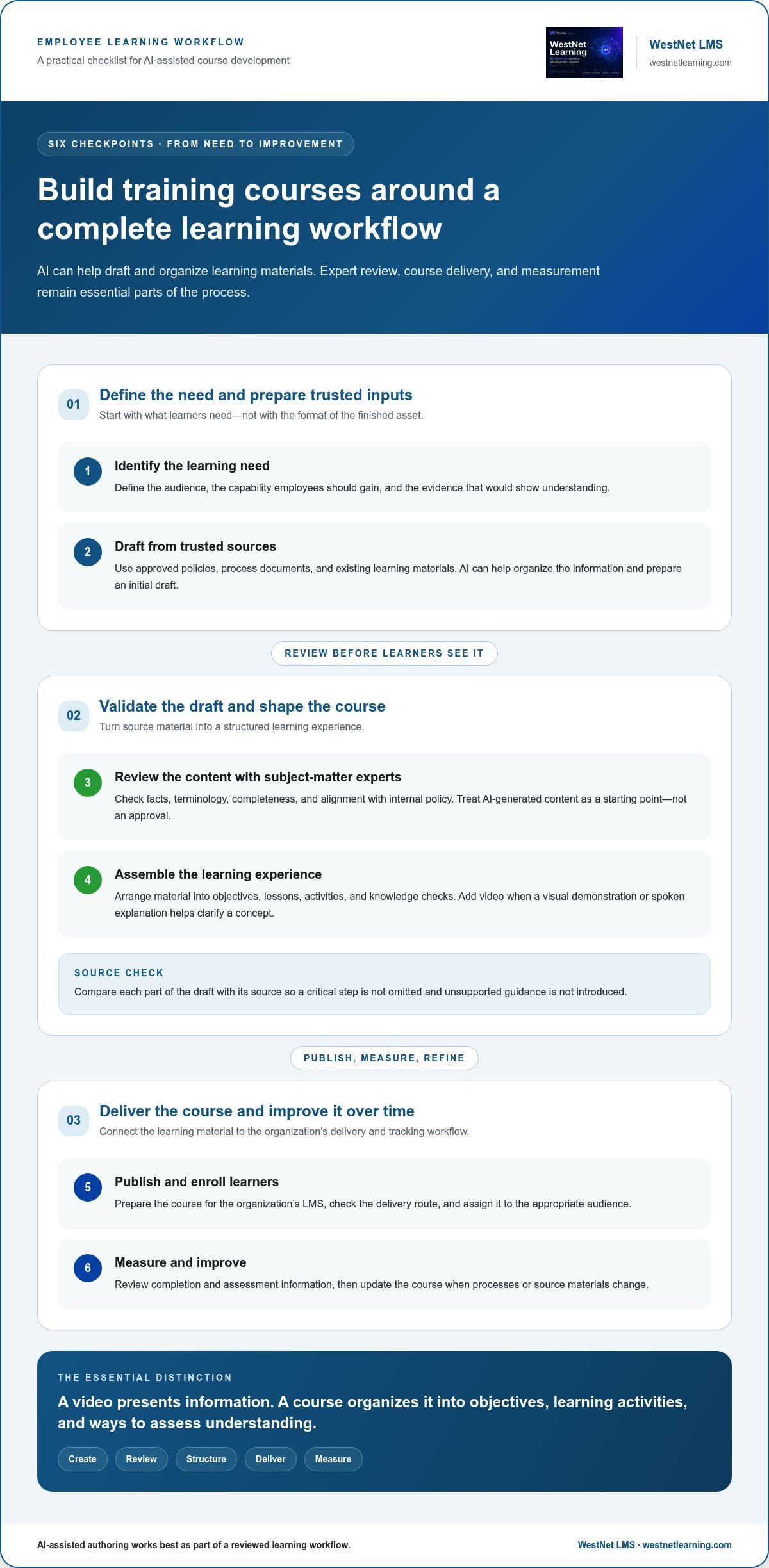
A video asset presents information; a course organizes it into objectives, learning activities, and ways to assess understanding.
Which employee training needs are you trying to solve?
Start with the recurring learning need, then identify the output that will address it. Onboarding may require a sequence of role-specific lessons; compliance training may need clear explanations and an assessment; process training may call for a step-by-step demonstration. A video could support any of these, but producing the video and managing the learning are separate requirements.
- Onboarding: Organize essential information into lessons employees can follow as they join.
- Compliance: Structure key concepts and checks so learners can demonstrate understanding.
- Role-based learning: Group material around the knowledge or tasks relevant to a job.
- Process training: Pair demonstrations with clear steps and opportunities to check comprehension.
Write down whether your priority is creating media, structuring instruction, delivering courses, or tracking participation. This distinction clarifies what the generator must create and what the wider learning workflow must handle.
How AI course generation fits into the employee learning workflow
AI can speed up drafting, but it creates the most value when course development connects to review, delivery, and measurement. Treat it as one part of an operating workflow, not a shortcut around learning decisions. Start by defining what employees need to learn and how you’ll recognize successful learning. Then use AI to shape source material into a draft that experts can refine before it reaches learners.
- Identify the learning need. Define the audience, desired capability, and evidence that would show understanding.
- Draft from trusted sources. Use approved policies, process documents, and existing learning materials as inputs. An AI employee training course generator can help organize information and prepare an initial draft.
- Review the content. Subject-matter experts check facts, terminology, completeness, and alignment with internal policy. AI-generated content is a starting point, not an approval.
- Assemble the learning experience. Arrange material into objectives, lessons, activities, and knowledge checks. Add video when a visual demonstration or spoken explanation helps clarify a concept.
- Publish and enroll learners. Prepare the course for the organization’s LMS, check the delivery route, and assign it to the appropriate audience.
- Measure and improve. Review completion and assessment information, then update the course when processes or source materials change.
From source material to structured employee course
Begin with material employees are expected to follow, such as an approved procedure or an existing training module. Ask AI to help extract key concepts and arrange them around specific learning objectives. A process document, for example, might become a sequence of short lessons with a knowledge check at a decision point. Compare each part of the draft with the source so it doesn’t omit a critical step or introduce unsupported guidance.
Different roles may need different examples, terminology, or emphasis while sharing the same core policy. Adapt the course structure to the audience rather than duplicating an entire course unnecessarily. Teams considering that approach can explore customizing a training course for different learning needs.
From course draft to LMS delivery and measurement
Keep approval, publishing, enrollment, and reporting distinct. Approval confirms the content is ready; publishing makes the course available; enrollment assigns it; and reporting gives administrators a view of learner progress. Before rollout, check how the course package communicates with the LMS. SCORM is commonly used to record course completion and scores, while xAPI can capture a broader range of learning experiences. The appropriate standard depends on the course and tracking needs.
Video-view data shows interaction with a clip; course completion data indicates progress through a structured learning experience. Neither measure alone proves mastery, so pair completion records with relevant knowledge checks and review the results against learning objectives. For a deeper look at enterprise authoring workflows, explore AI course creation software.
Compare AI video tools, course generators, and LMS-based authoring
Compare tools by the job they perform, not by a single headline feature. A specialist video tool may excel at producing demonstrations, while a course authoring platform focuses on structured lessons. An LMS-based authoring workflow can bring creation closer to enrollment and reporting. The right fit depends on your existing content, learning systems, and the steps your team needs to manage from draft to learner record.
Use a comparison matrix to make the differences visible. Check each tool’s product documentation for specific features rather than assuming they’re standard.
| Tool category | Primary job and course structure | Video role | LMS delivery and reporting |
|---|---|---|---|
| Specialist video tool | Produce or edit video; course structure may be limited or depend on other tools. | Central output, such as a narrated demonstration. | Check supported publishing formats and what learner data is passed to the LMS. |
| General design tool | Create visual materials and presentations; structured course functions vary. | One content format among design assets. | Confirm how materials are packaged, delivered, and tracked. |
| Standalone course authoring | Build organized lessons and assessments outside the LMS. | Embedded or supporting course media. | Check export options and compatibility with the organization’s LMS. |
| LMS-based authoring | Create courses within a learning management environment. | One possible asset within a course. | May connect authoring with enrollment, administration, and reporting. |
When does a specialist AI video tool make sense?
Choose this category when employees need repeatable visual explanations, such as a software walkthrough or equipment procedure, and producing that media is the main bottleneck. Evaluate editing controls, brand consistency, accessibility options, and publishing formats against real course requirements. Features such as avatars, dubbing, or translation vary by tool, so review product documentation and test a representative asset before building a workflow around them.
When should course creation and LMS capabilities be considered together?
Consider an integrated workflow when teams must coordinate authoring with enrollment, course administration, and learner reporting. Assess each capability separately: SCORM or xAPI support for course packaging, learner recommendations, analytics, and automation address different needs. WestNet Learning’s AI Enhanced LMS supports AI-powered e-learning creation for SCORM or xAPI courses, alongside learning management capabilities. For assessment planning, explore automated quiz generation for corporate training.
Test the intended publishing route using content your team already maintains. Check whether existing materials can be incorporated, how the course reaches the LMS, and whether completion and assessment information can be reviewed where administrators work. An AI Enhanced LMS can connect course creation with delivery and administration without treating video as the course itself. Match the tool category to the workflow your organization needs, rather than expecting one feature to solve every learning challenge.
How to evaluate an AI employee training course generator before rollout
Move beyond a feature demonstration. Evaluate the AI employee training course generator with a real course, real learners, and the delivery path your organization intends to use. A focused pilot can reveal whether the tool fits your authoring standards and learning operations, where human review is needed, and what work remains outside the platform. Define success before testing so the team can make a grounded rollout decision.
What should a small course pilot test?
Choose a bounded training need, such as one process update or a short role-specific module. Set clear learning objectives, select approved source materials, and include representative users and an administrator in the test. Compare the generated draft with existing course requirements and review standards. Then gather feedback on clarity, navigation, and usefulness before expanding the workflow to more topics or teams.
Use the pilot to test more than the first draft. Follow each stage from source content to learner experience, noting where AI saves effort and where revisions or manual steps are still required.
- Content quality: Check factual accuracy against approved sources, relevance to the intended audience, and alignment with internal policies.
- Accessibility: Review readability, navigation, captions or transcripts where relevant, and whether learners can access the material in the expected way.
- Learning flow: Test course navigation, assessment instructions, feedback, and whether activities support the stated objectives.
- Delivery route: Confirm learner access, enrollment, and the intended LMS publishing process, including any required course-package compatibility.
- Measurement: Inspect the reports available to administrators and verify that completion or assessment information is useful for the training purpose.
Which operational and governance checks belong in the evaluation?
Include the people and systems that will keep the course running after the pilot. Map authentication, user management, enrollment, reporting, and relevant integrations to your current processes. Assign clear ownership: subject-matter experts review generated materials, while designated course owners maintain published content as policies and procedures change. Treat AI output as a draft until qualified reviewers validate it.
Capture findings in a simple decision log: what worked, what needed correction, which steps required manual effort, and who will own each task at scale. Ask pilot learners where instructions felt unclear, and administrators whether the reporting supports their routine oversight. If a course includes sensitive or frequently updated information, document its source and review responsibility so future revisions don’t rely on an unverified draft.
Use the results to refine the workflow before expanding it. WestNet Learning’s AI course creation capabilities can be part of a broader course-creation and LMS delivery approach. Explore AI course creation capabilities to see how course authoring can fit into your organization’s learning process.
Use WestNet’s AI Enhanced LMS to connect course creation and delivery
Choosing an AI employee training course generator is only part of the decision. L&D teams also need a clear route from course creation to learner access, administration, and reporting. WestNet Learning’s AI Enhanced LMS brings AI-powered e-learning creation and course management into one learning environment, so organizations can evaluate authoring alongside the operational workflow that supports it.
Course creation supports SCORM or xAPI courses. Consider which standard aligns with your organization’s LMS and the learning activity it needs to track. Video can still be included as a training asset within a structured course, with its role determined by the learning objective.
Which confirmed capabilities support the course workflow?
Assess the platform against each stage of your learning process. AI-Powered e-learning Creation supports course development; automated enrollment and LMS administration support delivery; Learning Analytics and Reporting help administrators review learner activity. AI-Generated Course Recommendations can connect learners with relevant courses, while AI-Powered Help supports learners and administrators as they use the platform. Gamification includes leaderboards and badges.
Consider the surrounding operational requirements too. HRIS Integration, Data Migration, and Administrator Support may be relevant when planning how the LMS fits with existing employee data and administration processes. Keep these checks distinct: authoring, compatibility, enrollment, learner support, and reporting each address a different part of the workflow.
What are the next steps for evaluating WestNet?
Start with one employee training need and map the full path it requires. Identify the source materials and course objectives, then note how learners should access the course, how administrators will manage enrollment, and what information the team needs to measure. Use that scenario to assess the platform rather than relying on a feature list alone.
During an evaluation, consider whether the course format aligns with your SCORM or xAPI requirements, how learner recommendations fit your training approach, and which analytics can inform course follow-up. Include administrators in the review so they can assess enrollment, reporting, and day-to-day course management. If existing employee systems are part of the planned workflow, include relevant integration and data migration needs in the discussion.
A demo or free 30-day trial provides an opportunity to examine the platform workflow against that defined use case. Keep human review in the process: AI can support course creation, while your subject-matter experts remain responsible for validating content before it is assigned to employees. This gives your team a practical basis for judging how course creation and learning management fit together.
Request a demo or start your free 30-day trial to evaluate WestNet Learning’s AI Enhanced LMS for your employee training workflow.
Turn your evaluation into a focused next step
A strong AI employee training course generator strategy starts with a clear operational priority, then builds a repeatable path from learning need to learner progress. Choose one training area to advance, define what employees should be able to do, and decide how your team will maintain the course as processes evolve. This gives L&D a practical foundation for scaling thoughtfully instead of adding another disconnected tool.
As you plan, consider the support required to carry the approach into your organization. WestNet Learning’s AI Enhanced LMS brings course creation and learning administration into a shared workflow, with HRIS integration, data migration, and administrator support relevant to rollout planning. Keep your team’s review and ownership processes in view as you shape the next phase.
Move forward with a concrete use case. Evaluate how the AI Enhanced LMS workflow fits your organization’s goals through a demo or free 30-day trial. With a defined starting point and the right operational framework, your next training initiative can become a stronger foundation for learning at scale.
Frequently Asked Questions
Can AI create a complete employee training course?
AI can help draft and organize course materials, but whether it creates a complete course depends on the tool and the learning requirements. A safety procedure course, for example, may also need a decision-based scenario, clear feedback, and an assessment that checks understanding. An AI employee training course generator can support production, but a course owner should verify that each element serves the learning objective and reflects approved guidance.
What is the difference between an AI video generator and an AI course generator?
An AI video generator produces or edits video, while a course generator helps arrange learning content into a course experience. A video could demonstrate how to complete a software task; a course might pair that clip with context, practice questions, and guidance for applying the process. Choose based on the deliverable you need. If the requirement is an organized learning experience, video output alone won’t cover every course need.
Can AI-generated training courses be published in an LMS?
Yes, if the authoring tool creates a package or format that the LMS can accept. Before publishing, check supported standards and test a representative course in the intended environment. Confirm that navigation works, assessments behave as expected, and completion information is recorded in the right place. WestNet Learning’s AI Enhanced LMS supports AI-powered e-learning creation for SCORM or xAPI courses, which can be evaluated against an organization’s publishing requirements.
Is AI-generated employee training accurate enough to use without review?
No. Treat generated material as a draft, especially if it explains internal procedures, product details, or safety practices. Compare statements with current source documents, check examples for relevance, and have a qualified subject-matter expert approve the final version. For instance, if a policy changes, an AI draft based on an older file could preserve outdated instructions. Record who approved the course and which source version informed it.
Can an AI course generator create training in multiple languages?
Some tools include language-generation or translation features, but capabilities vary. Review product documentation and test the specific languages and content types you need. Check machine-generated wording for meaning, terminology, and cultural clarity before learners rely on it. WestNet Learning supports up to 60 site languages selected by users at login; that site-language capability does not automatically translate course content.
How do you measure whether AI-generated employee training is working?
Set a measure tied to the learning goal, not just the act of publishing. For a process course, compare assessment responses with the skill or decision the course teaches; for onboarding, check whether new employees can locate and apply required resources. Review completion alongside quiz results and learner feedback, then look for recurring errors or questions. Use those signals to decide whether the course needs clearer explanations, better practice, or updated content.
Does an employee training course generator replace an LMS?
Not necessarily. A course generator focuses on creating learning materials, while an LMS typically supports access, enrollment, administration, and learning records. Some platforms combine authoring and LMS capabilities, so the distinction depends on the system. WestNet Learning’s AI Enhanced LMS brings AI-powered course creation together with learning management. If your organization already has an LMS, determine whether a separate authoring tool fits its publishing and tracking workflow.