The most powerful LMS can be the wrong choice for a midsize company. The right corporate e-learning software for midsize companies should support the training you need today without adding enterprise-level complexity or creating more administration than it removes.
If you’re weighing simple small-business tools against feature-heavy enterprise platforms, the differences can be hard to pin down. Integrations, user management, reporting, and room to grow all matter, but only when they fit your workflows and your team’s capacity.
This guide offers a practical framework for comparing platforms against your requirements. You’ll learn how to prioritize capabilities, assess operational fit, and plan for growth without getting distracted by features you may not use. We’ll also cover how WestNet’s AI Enhanced LMS brings learning administration, learner support, and analytics together through features such as HRIS integration, AI-powered help, and learning analytics and reporting. Use the framework to narrow your options, then evaluate the fit with a demo or free 30-day trial.
Key Takeaways
- Define mid-market fit by your workflows, operational complexity, and growth plans, not by a fixed employee-count cutoff.
- Compare corporate e-learning software for midsize companies against practical requirements such as enrollment, tracking, reporting, and administrator workload.
- Balance platform capability with usability by assessing administration, learner experience, integrations, reporting, and adaptability.
- Run a focused evaluation with clear decision criteria and a representative course workflow before making a commitment.
- See how the WestNet AI Enhanced LMS’s listed capabilities map to common mid-market learning needs.
Why Corporate E-Learning Software Needs a Different Fit for Midsize Companies
A midsize organization doesn’t necessarily need a platform built for a particular employee-count bracket. Its learning requirements depend on how work is organized: how many learner groups need different training, which departments manage assignments, who owns course records, and how much time administrators can devote to the system. Several locations or distinct operational teams can create coordination challenges that headcount alone won’t reveal.
Those challenges often emerge gradually. Enrollment tracked in spreadsheets, course materials stored in separate tools, and completion records maintained across systems may work at first. As departments, roles, or training programs are added, staff spend more time reconciling information and less time understanding learning progress. A suitable platform should connect the workflows that matter, rather than simply add another place to manage them.
Mid-market LMS fit is the alignment between how your organization operates today and the changes it expects to manage tomorrow. Evaluate practical fit before counting features. A capability is valuable when it supports a real workflow or a credible growth need. Without a clear use case, it can add configuration and administration without solving a current problem.
What makes an LMS suitable for a midsize organization?
Start by mapping people and processes. List learner groups, departments, training owners, and the administrators responsible for course assignments and completion reviews. Then separate essential workflows from appealing extras. Recurring onboarding may be critical, for example, while a specialized feature may be unnecessary if no team has a use case for it. Consider likely organizational changes, such as new teams or distributed learners. For context on learning across locations, see connected learning for global teams.
Use Corporate education as a broad reference for how structured employee learning supports development and organizational goals. The practical test is whether the LMS can support your training responsibilities as they evolve without making routine administration harder.
Where small-business and enterprise assumptions can miss the mark
A minimal tool may be easy to start with but leave coordination needs unresolved when departments require different assignments, records, or reports. At the other extreme, a system configured around extensive enterprise processes can put a heavy implementation and administration burden on a lean L&D team. Look for sufficient control and capability, with complexity proportionate to the work your organization needs to manage.
- Check coordination: Can the system support your current learner groups and training responsibilities?
- Check administration: Will routine assignments and completion reviews fit the time and capacity available?
- Check adaptability: Can the platform accommodate plausible changes in teams, programs, or learner populations?
Use this lens when comparing corporate e-learning software for midsize companies: prioritize operational fit, then assess how each platform supports growth. Feature volume alone isn’t a reliable measure of value. A strong fit connects necessary workflows and lets your team manage learning as the organization changes.
How to Evaluate Corporate E-Learning Software Against Your Requirements
Compare platforms against the work your teams need to complete, not a feature checklist in isolation. A disciplined evaluation shows where a system reduces friction, where it adds administration, and which gaps matter before you commit. Use the same requirements and test scenarios for every option.
Turn training needs into a prioritized requirements list
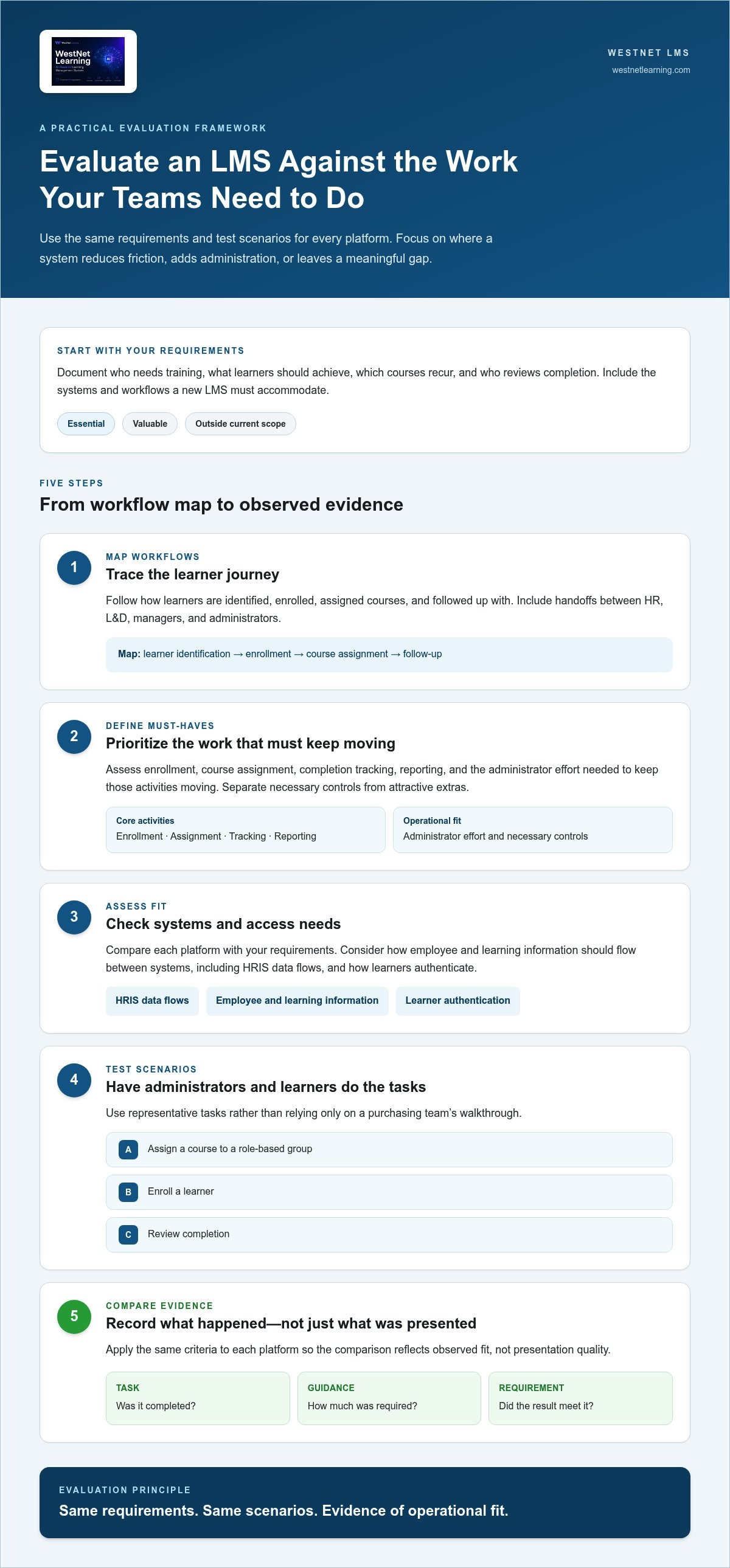
Document who needs training, what learners should achieve, which courses recur, and who reviews completion. Classify each requirement as essential, valuable, or outside the current scope. Record the systems and workflows a new LMS must accommodate, including HRIS data flows and authentication requirements, so you assess integration needs as part of the operating model.
- Map workflows. Trace how learners are identified, enrolled, assigned courses, and followed up with. Include handoffs between HR, L&D, managers, and administrators.
- Define must-haves. Prioritize enrollment, course assignment, completion tracking, reporting, and the administrator effort needed to keep those activities moving. Separate necessary controls from features that are simply attractive.
- Assess fit. Compare each platform with your requirements. Consider how employee and learning information should flow between systems and how learners authenticate. A corporate LMS and HRIS integration guide can help frame connected employee and learning workflows.
- Test scenarios. Use representative tasks, such as assigning a course to a role-based group, enrolling a learner, and reviewing completion. Have administrators and learners carry out the tasks themselves instead of relying only on a purchasing team’s walkthrough.
- Compare evidence. Record whether each task was completed, how much guidance it required, and whether the result met the original requirement. Apply the same criteria to each platform so the comparison reflects observed fit, not presentation quality.
Test real workflows, not just feature descriptions
Give evaluators clear scenarios and ask them to complete tasks without relying on a vendor’s feature summary. For example, an administrator can assign a recurring course and check learner progress, while a learner finds the course and gets help with a question. Record task completion, clarity, and any manual workarounds. A platform that looks capable but makes routine actions difficult may create avoidable operational work.
Evaluate the learner and administrator experiences separately. Learners need to know where to find assigned training and what to do next. Administrators need clear ways to manage assignments and interpret completion information. Also record integration dependencies, authentication expectations, and reporting outputs. These details help distinguish a genuine workflow fit from a capability that only works after significant process changes.
Use this evidence-based process to assess corporate e-learning software for midsize companies against both immediate priorities and expected change. A focused LMS demonstration can help your team walk through its highest-priority scenarios and compare what you observe with your requirements.
Balancing LMS Capability, Complexity, and Growth
Enterprise-style capability doesn’t have to mean enterprise-level operational burden. The key question is whether a platform supports the workflows you need without forcing your team to manage controls, configuration, or processes that serve no clear purpose. Compare what each system helps people accomplish, then weigh that against the effort required to run it.
Software fit depends on how well a platform covers essential workflows while keeping administration manageable. Use the dimensions below to compare that balance across options.
| Dimension | Compare | Watch for |
|---|---|---|
| Administration | How recurring assignments, updates, and completion reviews fit into routine work. | Processes that require repeated manual steps or specialist attention. |
| Learner experience | How clearly learners find assigned courses, understand next steps, and access support. | A smooth administrator view paired with a confusing learner journey. |
| Integrations | Whether relevant HR and business tools can connect to learning workflows. | Data handoffs that remain manual or duplicate existing work. |
| Reporting | Whether reports help managers make decisions, such as identifying incomplete assignments. | Large volumes of data that don’t answer practical questions. |
| Adaptability | How the platform can accommodate plausible changes in teams, programs, or learner groups. | Buying for hypothetical needs with no clear operational case. |
Compare platforms by the work they help teams complete
Use examples from your operating calendar. If courses recur, compare the effort involved in maintaining assignments and reviewing completions. If managers need to follow up with teams, assess whether reports make the relevant status easy to understand. To evaluate learner support, observe how someone finds help when they’re unsure what to do next. The goal isn’t to select the platform with the longest capability list. It’s to find one that makes meaningful work clearer and more cohesive.
Assess integrations in the same practical way. Identify which existing tools need to exchange information with learning workflows and what work a connection would replace. A scalable platform can accommodate relevant changes as they arise. It doesn’t require adopting every available capability from the outset.
Avoid both underbuying and overcomplicating the decision
A basic tool may be undersized if teams already struggle to coordinate learner groups, assignments, or records. A more advanced system may be oversized if its additional controls and features have no owner or defined use. Consider expected changes, such as a new department or a broader learner population, but distinguish a plausible requirement from a distant possibility. This keeps growth planning grounded instead of turning it into a reason to acquire unused functionality.
For a deeper look at the trade-offs behind moving beyond enterprise systems, explore why mid-market companies leave enterprise platforms. Then use a WestNet LMS demo to assess how the AI Enhanced LMS’s capabilities align with your team’s workflows and administrative capacity.
How to Run a Focused LMS Evaluation Before You Choose
A useful LMS evaluation has a defined endpoint, named owners, and a decision method agreed on in advance. Without those guardrails, teams can spend time exploring features without learning whether the platform fits their work. Set a time-boxed pilot, choose a representative audience, and test realistic learning workflows from assignment through completion review.
Build a practical pilot plan
Choose an audience whose training needs reflect everyday operations, such as a department with a recurring course and a manager who reviews completion. Name an administrator to coordinate setup, learner and manager participants to provide feedback, and a decision owner to review the evidence. Agree on success criteria before testing begins so the team evaluates the platform against requirements, not first impressions.
Use a consistent checklist for each platform under consideration:
- Set the scope: Define the pilot audience, learning activity, and evaluation window.
- Assign responsibilities: Identify who handles configuration, gathers learner and manager feedback, and compiles results.
- Run the workflow: Assign a representative course, have learners access and complete it, then ask an administrator or manager to review progress.
- Capture experience: Ask learners, managers, and administrators separately where the process was clear, where they needed help, and what required extra effort.
- Apply decision criteria: Compare observed results with your prioritized requirements and document any gaps or unanswered questions.
Request a WestNet LMS demo to explore how the platform can be assessed against your team’s evaluation scenarios.
Keep the exercise focused. A pilot doesn’t need to recreate every department or course catalogue, but it should include enough of the real process to expose friction: an assignment, a learner’s route to the course, completion, and a review of the resulting information. Ask participants to perform tasks themselves rather than relying solely on a guided presentation.
Turn pilot evidence into a decision
After each test, record what happened while details are fresh. Separate learner confusion from administrator workload, and distinguish a missing capability from a question about setup. This helps you judge whether an issue signals a genuine mismatch, a training need, or an implementation matter to resolve before making a final decision.
Compare findings against your requirements list. Note which essential workflows worked, which required workarounds, and which needs remain unanswered. Give each open question an owner and a next step, then document who has decision authority and what evidence will inform the choice. If the LMS is part of a broader shift in processes or systems, connect the pilot to a strategic roadmap for modernizing corporate learning systems. That context helps ensure the selected corporate e-learning software for midsize companies supports the organization’s direction as well as the immediate test.
Where the WestNet AI Enhanced LMS Fits in a Mid-Market Evaluation
Use the same requirements and test scenarios to assess the WestNet AI Enhanced LMS as you would any platform. Its capabilities bring learning administration, learner support, and analytics together, giving your team a practical basis for evaluating how the system fits current workflows and future plans. The platform can scale from small teams to tens of thousands of users, so consider fit in terms of your processes and capacity, not headcount alone.
Connect WestNet capabilities to your requirements
Start with the tasks your evaluation has identified. AI-powered e-learning creation can be assessed against course development needs, while AI-generated course recommendations and AI-powered help can be assessed against learner guidance and support requirements. For more context on automated course creation, explore this AI course creation software guide.
Then connect other listed capabilities to specific operational questions:
- Task automation: Consider whether automated enrollment and other task automation align with recurring administrative work your team wants to simplify. Evaluate the actual workflow rather than assuming a task is automated.
- HRIS integration: Assess how it fits your employee and learning data workflows, including the information your organization needs to connect.
- Learning analytics and reporting: Compare the available analytics with the questions managers need answered about learning activity and progress.
- Gamification: Evaluate whether leaderboard and badge features support your learner engagement goals and suit the types of training you deliver.
- Dedicated Client Success Manager: Factor this listed platform feature into how your organization considers support for its LMS relationship.
This requirements-led view keeps the evaluation grounded. AI features are most relevant when they address a defined need, such as creating learning materials or helping learners find guidance. Gamification should be considered in relation to your learning objectives, not treated as a substitute for them. When comparing corporate e-learning software for midsize companies, ask how each capability maps to a real workflow and who will use it.
Choose a low-friction next step
Bring your prioritized requirements and representative scenarios into a demo or trial. For example, use a course workflow to examine how an administrator handles a recurring task, how a learner encounters recommendations or AI-powered help, and how a manager reviews learning information. Record what the team observes, what remains unclear, and how each result compares with your criteria. A free 30-day trial is available, as are demos, so your team can evaluate practical fit before deciding.
Start a free 30-day trial or request a demo and assess how the AI Enhanced LMS fits your learning workflows and plans for growth.
Move from Requirements to a Confident Decision
Turn your evaluation criteria into a real-world test. Choose a workflow that reflects how your team learns and works, then observe where the platform supports that process and where questions remain. This gives stakeholders a shared basis for deciding whether a solution fits, rather than relying on assumptions or a feature list.
Use your findings to make a decision that serves current operations and the changes your organization expects. The right corporate e-learning software for midsize companies should help your team move forward with clarity, without adding complexity that doesn’t support its goals.
Put your requirements into practice with the AI Enhanced LMS. Start a free 30-day trial or request a demo to evaluate your workflows and take the next step with confidence.
Frequently Asked Questions
How many employees does a midsize company need before it should use an LMS?
There’s no universal employee-count threshold for adopting an LMS. The need depends on training volume, administrative workload, reporting or compliance requirements, and how many learner groups must be coordinated. For example, even a smaller organization may benefit if staff manually track recurring training across departments. Before comparing corporate e-learning software for midsize companies, map the work involved and identify where coordination is becoming difficult.
Can a midsize company use an LMS designed to scale to larger organizations?
Yes. A platform’s potential scale alone doesn’t determine whether it suits a midsize company. Assess how its workflows, administrative demands, and learner experience match your current needs, then consider plausible growth. During an evaluation, ask an administrator to manage a real assignment and a learner to access the course. The system should solve actual operational problems, not simply offer capabilities your teams have no clear reason to use.
What should we test during a 30-day LMS trial?
Test the tasks your organization needs to perform, including enrollment, course access, learner support, reporting, and routine administrator work. Before the trial, write down what a successful result looks like for each task. Invite learners and administrators to complete the steps, then record confusion, delays, or manual workarounds. WestNet offers a free 30-day trial. Use your findings to discuss fit with decision-makers rather than relying on initial impressions.
Can WestNet create courses in SCORM or xAPI formats?
Yes. WestNet’s AI-powered eCourse creation supports SCORM or xAPI formats. These standards are used for digital learning content, so include your organization’s actual course workflow in the evaluation. For instance, note what format your team uses to create or manage learning materials and test a representative content task. This helps clarify how course creation fits your process without assuming compatibility with every external course, tool, or implementation.
Can employees reuse a WestNet user license after another user leaves?
Yes. WestNet offers transferable user licenses: when a user is deactivated, that license can be reused for a new user. This may be relevant for organizations where employee membership changes over time. Include a user change in your evaluation scenario, such as deactivating an account and preparing for a replacement learner. Assess how license administration fits your broader account-management process without assuming particular billing rules or timing.
Does WestNet support single sign-on for corporate learners?
Yes. The AI Enhanced LMS offers multiple authentication options, including standard username-and-password sign-in and Single Sign-On (SSO). Evaluate these options alongside the access workflows your organization already uses. For example, identify how learners currently sign in to workplace systems and which authentication approach your team needs to account for. This keeps access requirements in view without assuming a particular identity provider, configuration, or setup process.
Can learners use WestNet in different site languages?
Yes. The platform supports up to 60 site languages, and users select a language at login. This can be useful when assessing access for a multilingual workforce whose learners may prefer different interface languages. Include language selection in your evaluation by asking representative users to review the site experience. Site-language support doesn’t mean every course is automatically translated or that all content is available in every language.